
Pinterest Affiliate Marketing: How It Works, Step by Step
27 October 2026
You've found an affiliate program, saved some attractive product photos, and opened Pinterest. Then the questions start: Can you link straight to the merchant? Where does the disclosure go? And how many Pins should you publish before you know whether anything's working?
Pinterest affiliate marketing means using Pins to recommend products and earning a commission when someone makes a qualifying purchase through your affiliate link. The practical challenge isn't producing the biggest batch. It's creating useful recommendations, matching them to the right destinations, and tracking what happens after the click.
Table of Contents
- How a Pinterest Affiliate Pin Turns Into Commission
- Pinterest Rules and Account Setup
- Disclosures That Satisfy the FTC and Pinners
- Choosing Offers Pinners Will Actually Click
- How to Create Searchable Pins Step by Step
- Measuring Pin Results and Testing One Variable at a Time
- Fixing Weak Pins by Symptom
- Launch One Offer With Ten Compliant Pins
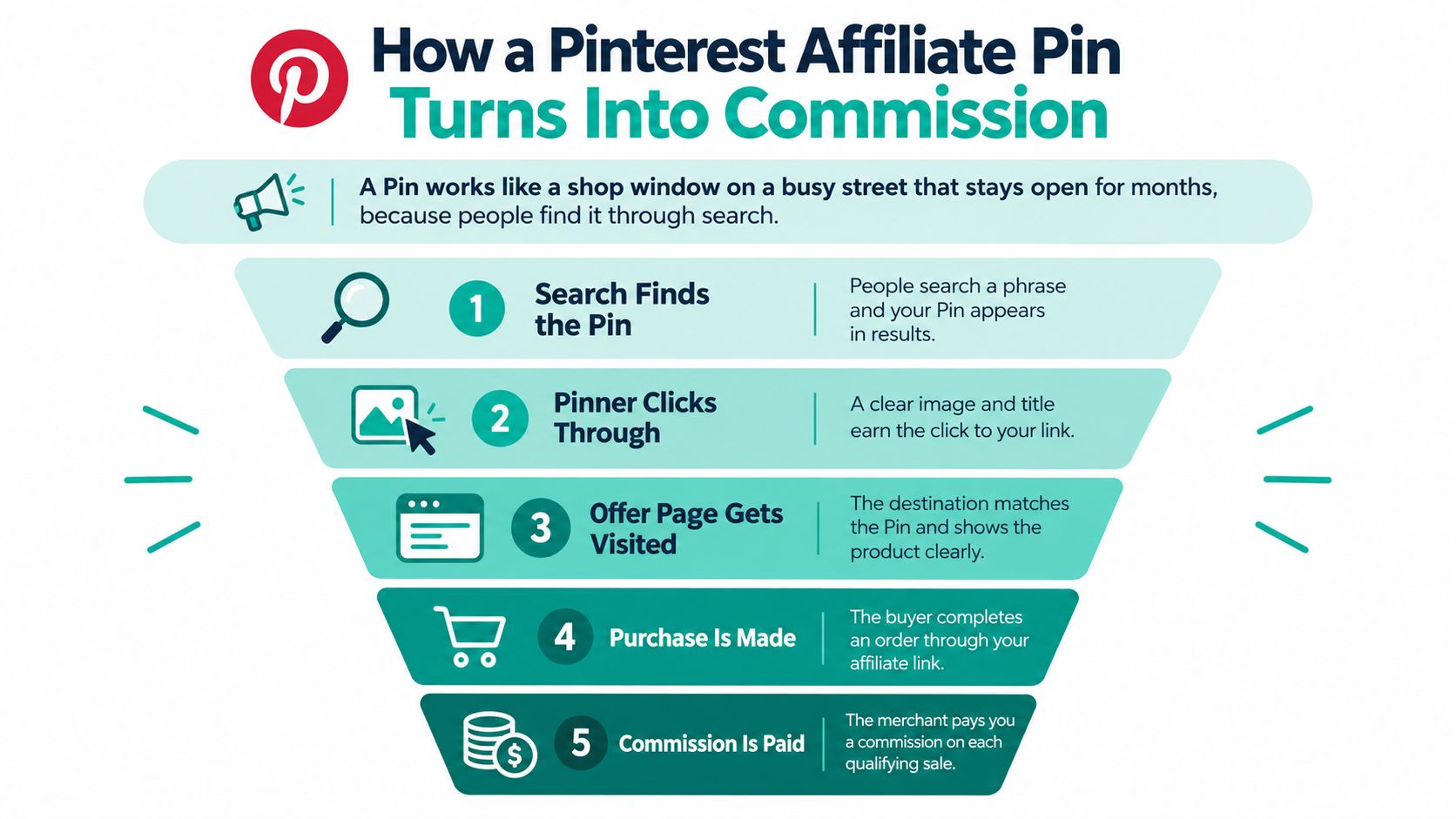
How a Pinterest Affiliate Pin Turns Into Commission
A Pin works like a shop window on a searchable street. People can discover it while looking for a solution, rather than only catching it as a timeline moves past. Your job is to make the display relevant enough that someone wants to step inside.
That journey has distinct stages. A person sees your Pin, perhaps saves it, and may click through to the destination. A save isn't a required step toward buying, and clicking the image isn't necessarily an outbound click.
The Pinterest affiliate funnel, stage by stage
| Stage | What Happens | Where You See It | Your Control |
|---|---|---|---|
| Impression | Pin appears in the home feed or search results | Pinterest Analytics | Medium: keyword, image and board choices |
| Save | A Pinner saves the Pin to a board | Pinterest Analytics | Medium: image and title appeal |
| Outbound click | Pinner leaves Pinterest for the linked page | Pinterest Analytics and network tracking | High: destination relevance |
| Merchant session | Visitor lands on the product or review page | Merchant analytics, or your analytics for your review page | Medium: landing page quality |
| Sale | Visitor buys the product | Merchant or network report | Low: price and checkout belong to the merchant |
| Commission | Network credits a payout for the sale | Affiliate network dashboard | None: set by the program terms |
The outbound click is the moment someone leaves Pinterest. If you send them to your own comparison article, they still need to follow its affiliate link to the merchant. Commission is credited only when the merchant records a qualifying transaction and the program attributes it to your referral.
The visual below shows the buying journey without treating saves as a compulsory step.
Reach isn't the same as revenue
Pinterest's full-year results reported 553 million global monthly active users in the fourth quarter of 2024. That establishes the platform's scale, not the number of buyers your Pins will attract.
Think beyond your own location when choosing merchants and destinations. A useful recommendation still fails commercially if the visitor can't order the product.
Working rule: A Pin earns commission through a qualifying purchase, not through attention alone.
Pinterest Rules and Account Setup
A permitted affiliate link isn't enough. You also need a useful reason for someone to encounter it.
Pinterest's affiliate-link announcement explained that it restored affiliate links after removing them because of spam, with stronger spam-detection systems supporting their return. Permission to use affiliate links shouldn't be mistaken for permission to publish interchangeable advertisements.
Say you're promoting an air fryer. A plain product photograph with a buy-now message gives the reader little help choosing. A comparison explaining basket shape, storage space, and cleaning access answers real buying questions. If you claim you tested products, you must actually have tested them.
Set up an account people can trust
Start with an authentic business account and a clear editorial focus. Use a recognizable name, an accurate profile description, and boards organized around what your audience wants to accomplish.
Keep account management simple. Don't create extra accounts to amplify the same offers, and don't treat every new niche as a reason to manufacture another identity. Separate legitimate brands need honest ownership and distinct purposes, not coordinated engagement.
Avoid practices that replace genuine interest with manipulation:
- Fake identities: Don't invent accounts to promote or save your own content.
- Save exchanges: Don't trade saves or follows to manufacture popularity.
- Artificial traffic: Don't buy or automate visits to make recommendations appear successful.
Review the recommendation, not just the URL
Before approving a Pin, use this editorial checklist:
- Destination match: The page delivers what the image and title promise.
- Added information: The recommendation explains a use, comparison, limitation, or buying consideration.
- Authentic activity: No engagement exchange supports the post.
- Account ownership: The profile represents the actual person or business publishing.
- Commercial clarity: The disclosure is visible beside the recommendation.
A reusable template can support consistent branding. It shouldn't replace editorial judgment. When changing a product name leaves the entire recommendation otherwise identical, reconsider whether you've added anything useful.
Disclosures That Satisfy the FTC and Pinners
Put the disclosure next to the recommendation. Readers shouldn't need to investigate your profile to discover that you may earn money.
The FTC's social media disclosure guidance treats commissions, free products, payments, and other benefits as material connections that can require disclosure. A Pin can function as an endorsement, so don't assume disclosure becomes necessary only after someone reaches your website.
Use plain wording such as: I earn a commission from qualifying purchases. Place it where people can see it without expanding the description or navigating elsewhere.
Where each disclosure goes
| Placement | What to Write | Rule |
|---|---|---|
| Pin description | Opening line: I earn a commission from qualifying purchases | Place with the recommendation, visible without expansion |
| Destination page | An explanatory disclosure directly above or beside the product link | Readers should encounter it before acting on the recommendation |
| Board description | A sentence explaining that the board contains affiliate Pins | Helpful additional context for mostly affiliate boards, not a substitute for individual disclosures |
| Image overlay | An optional short label identifying advertising | Supports clear written disclosure, never a reason to omit it |
A board-level notice isn't a universal FTC requirement for boards containing mostly affiliate content. Likewise, a short overlay such as Affiliate may not explain the relationship clearly enough by itself.
A useful review pairs the image with the actual disclosure text.

Make disclosure a publishing requirement
For a niche-publication example to inspect, review the legal information for this diving publication from Diving Escapades. A general legal page can provide context, but it doesn't replace disclosure beside an endorsement.
International campaigns need local legal checks. Build disclosure into your publishing records alongside the title and destination, and block publication when it's missing, vague, or detached from the recommendation.
Choosing Offers Pinners Will Actually Click
Choose products around a buying task, not just an attractive commission. Someone planning a small kitchen needs help judging dimensions and storage, while someone choosing a gift needs help matching the item to its recipient.
According to Pinterest data reported by Contentmation, 85% of weekly Pinterest users in 2025 had purchased a product after seeing a brand's Pin. That describes past purchasing behavior, not the conversion rate you should expect from an affiliate campaign.
Screen the offer before designing
- Visual accuracy: Use photography that matches the exact product being sold. Don't show accessories that aren't included.
- Search relevance: Look for Pinterest search suggestions describing the problem the product solves.
- Understandable terms: Read the commission rules, qualifying-sale conditions, and attribution window.
- Audience price fit: Consider whether the cost makes sense for the buyer you're addressing.
- Delivery coverage: Confirm that the merchant serves your intended countries and regions.
- Promotion permission: Check whether the program allows Pinterest traffic, direct affiliate linking, and your intended creative assets.
For a concrete program page to evaluate, open the Menorah affiliate program details and apply those questions. Don't assume that joining any program automatically grants permission for every promotional method.
Watch for practical deal-breakers
A large advertised commission won't help if the product is difficult to distinguish, the merchant's terms are unclear, or social promotion is restricted. Unexplained changes to prices or commissions also make your recommendations harder to maintain accurately.
Build a small shortlist rather than joining every available program. Before publishing, record each offer's terms and attribution window, then generate its approved tracking link.
Use the network's supported tracking identifiers to distinguish Pins. Keep an offer identifier stable, and add a separate Pin identifier where the program supports it. Arbitrarily changing an affiliate URL can break attribution.
How to Create Searchable Pins Step by Step
Start with the question someone is trying to answer. A Pin about apartment kitchen storage should lead to content that helps with apartment kitchen storage, not a broad shop homepage.
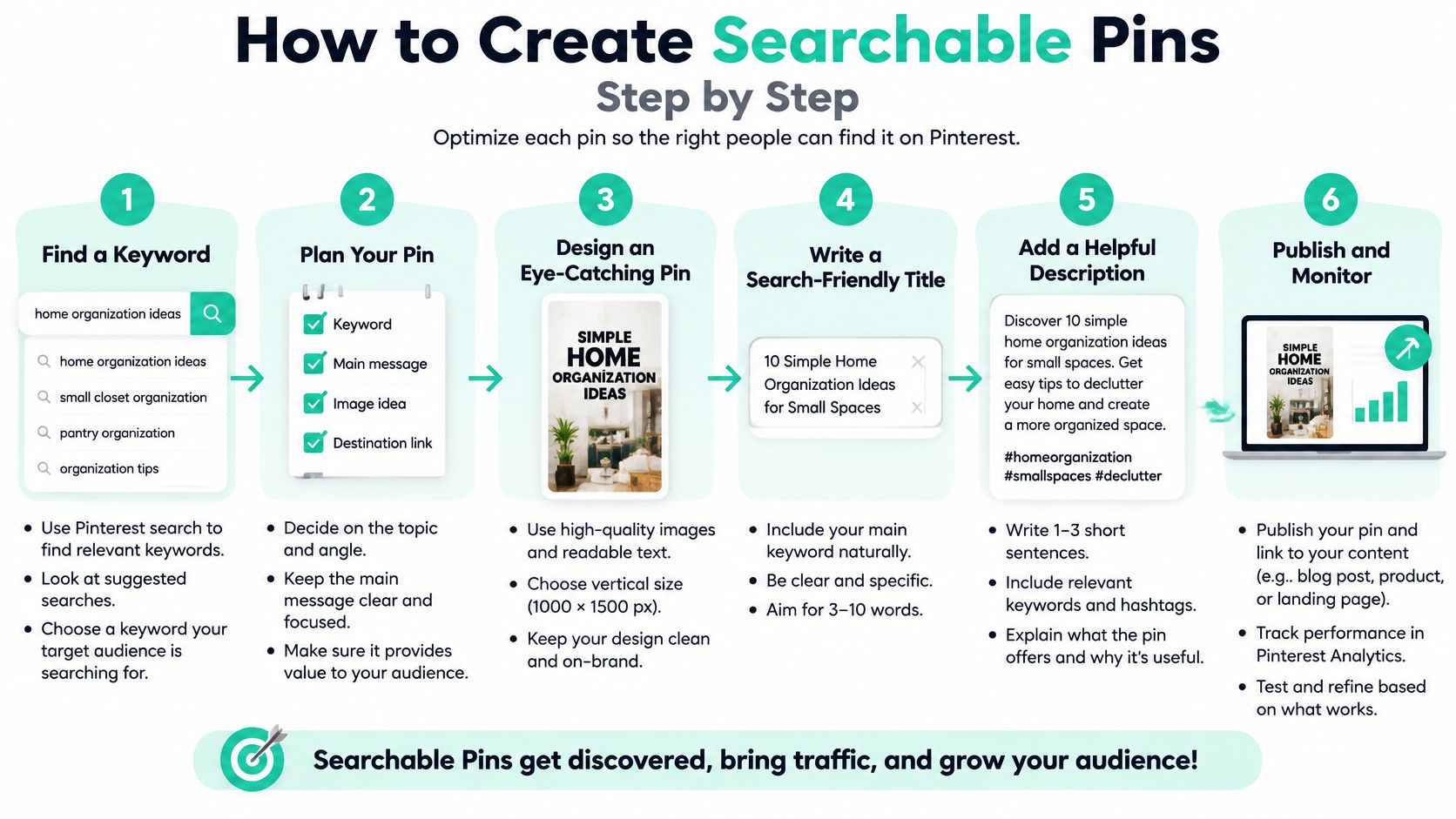
The workflow below keeps the search phrase, image, and destination connected.
Plan the search and destination
Choose a focused search phrase. Start typing the problem into Pinterest and inspect the suggestions, then use Pinterest Trends or a keyword tool to refine your choice. The Pinterest keyword research guide explains that workflow; suggestions indicate relevant wording, but they don't guarantee traffic.
Select the page that answers it. A comparison query needs a comparison, while a product-specific query may suit the exact merchant listing. Don't force every Pin onto the same generic destination just because it already exists.
Choose an uncluttered vertical design. Show the product clearly, preferably in a context that explains its use. Avoid a collage so crowded that a mobile reader can't tell what you're recommending.
Write for someone making a decision
Front-load the title with the topic. A title such as Small Kitchen Storage Ideas for Narrow Cabinets tells readers both the subject and the intended benefit. A string of loosely related keywords doesn't.
Make the description useful. Begin with the disclosure, then explain who the recommendation helps and what the destination contains. Work the search phrase in naturally rather than repeating it throughout the copy.
Describe the image in alt text. Name what's visible, including the product and meaningful setting. Alt text serves accessibility; don't turn it into another promotional paragraph or a list of keywords.
Connect, check, and publish
Choose the closest relevant board. A cabinet organizer belongs on a kitchen-storage board, not automatically on your broadest lifestyle board. A precise board theme also makes your profile easier for visitors to browse.
Test the complete outbound journey. Open the published destination in a private browser and follow any redirects through to the merchant. Confirm that the correct item appears, the page works on mobile, and the affiliate tracking remains intact.
Record the Pin before scheduling. Save its search phrase, creative concept, board, destination, and tracking identifier in a spreadsheet. Without that record, you'll struggle to identify which recommendation generated a sale.
Build a different reason to click, not merely a different background color.
For a storage product, meaningful concepts might include a cabinet-fit checklist, a rental-friendly installation guide, and a comparison of organizer styles. Each concept should earn its place by answering a distinct question, not by restating the same advertisement.
Measuring Pin Results and Testing One Variable at a Time
A Pin can collect saves without producing revenue. Impressions tell you that Pinterest displayed it, but they don't tell you whether the visitor wanted the offer.
Shopify's Pinterest affiliate marketing guide supports measuring beyond exposure by connecting outbound clicks with affiliate tracking. Use Pinterest Analytics for on-platform behavior and your merchant or network reports for transactions.
Pinterest affiliate metrics and the decision each one drives
| Metric | Formula | Decision It Drives |
|---|---|---|
| Save rate | Saves divided by impressions | When low, review image usefulness and title appeal |
| Outbound click rate | Outbound clicks divided by impressions | When low, examine the Pin promise and destination relevance |
| Earnings per 1,000 impressions | Commission divided by impressions, times 1,000 | Compare revenue efficiency before keeping, revising, or replacing a Pin |
| Conversion rate | Sales divided by merchant sessions | When low, review landing-page quality and offer fit |
| Average commission per sale | Total commission divided by number of sales | Rank offers by earnings, not clicks alone |
| Impressions | Count from Pinterest Analytics | Context only: exposure isn't revenue |
Run a controlled comparison
- Hold the offer and landing page constant.
- Change a single element, such as image composition or the keyword-led title.
- Wait for useful evidence, rather than declaring a winner from a handful of impressions.
- Compare click efficiency and earnings, using equivalent reporting periods.
The Pinterest Analytics walkthrough can help you locate and interpret the platform's reporting. Match its date range to the network export, and remember that commissions may remain pending before approval.
Earnings per comparable reach is useful for prioritizing assets, but sparse sales can make rankings unstable. Changing the image and title together also prevents you from isolating which edit helped. Organic comparisons offer directional evidence, not the certainty of a randomized experiment.
Fixing Weak Pins by Symptom
| Symptom | Likely Cause | Fix |
|---|---|---|
| Strong impressions, few outbound clicks | Unclear benefit or mismatch between promise and destination | Align the page with the promise, then sharpen the search-led title |
| Clicks but no sales | Weak offer fit or an unhelpful landing page | Try a relevant comparison or guide, or replace the offer |
| Sudden drop in reach after a large batch | Possible repetitive-content issue | Pause near-duplicates and review the account before publishing more |
| Saves but no clicks | Inspiration without a clear buying reason | Show the item clearly and make the destination specific |
| Link errors or low clicks from a shortener | Broken redirect or expired tracking URL | Test the journey and repair redirects |
| Good earnings on one board only | Better topic-to-offer fit | Test the pattern on genuinely matching boards and retire weak placements |
Start with the destination before redesigning everything. If a Pin promises a price comparison but opens a generic product listing, replace the destination with a real comparison page before rewriting its title.
When clicks arrive without sales, inspect availability, shipping, mobile usability, and audience fit. A prettier image won't repair a checkout that excludes your visitors.
Treat publishing limits as quality control
Pinterest's community guidelines require affiliate content to be original, add unique value, and explain its commercial nature transparently. They also prohibit fake accounts, artificial traffic manipulation, and quid-pro-quo saving schemes, and warn against repetitive or high-volume affiliate activity.
A reach decline alone doesn't prove Pinterest flagged your account. Check account notices, broken destinations, seasonality, and the batch itself before assigning a cause.
Use this maintenance routine:
- Pause duplication: Stop templates that produce substantially interchangeable recommendations.
- Review links regularly: Include redirects, tracking parameters, unavailable products, and mobile destinations.
- Inspect disclosures: Make sure edits haven't separated them from the recommendation.
- Retain useful patterns: Expand relevant topics, not every placement indiscriminately.
Safe automation: Reduce weak output before increasing production.
There's no universal daily Pin count that guarantees safety or earnings. A smaller, varied set gives you clearer tests and fewer low-value posts to maintain, without pretending that low volume alone guarantees better performance.
Launch One Offer With Ten Compliant Pins
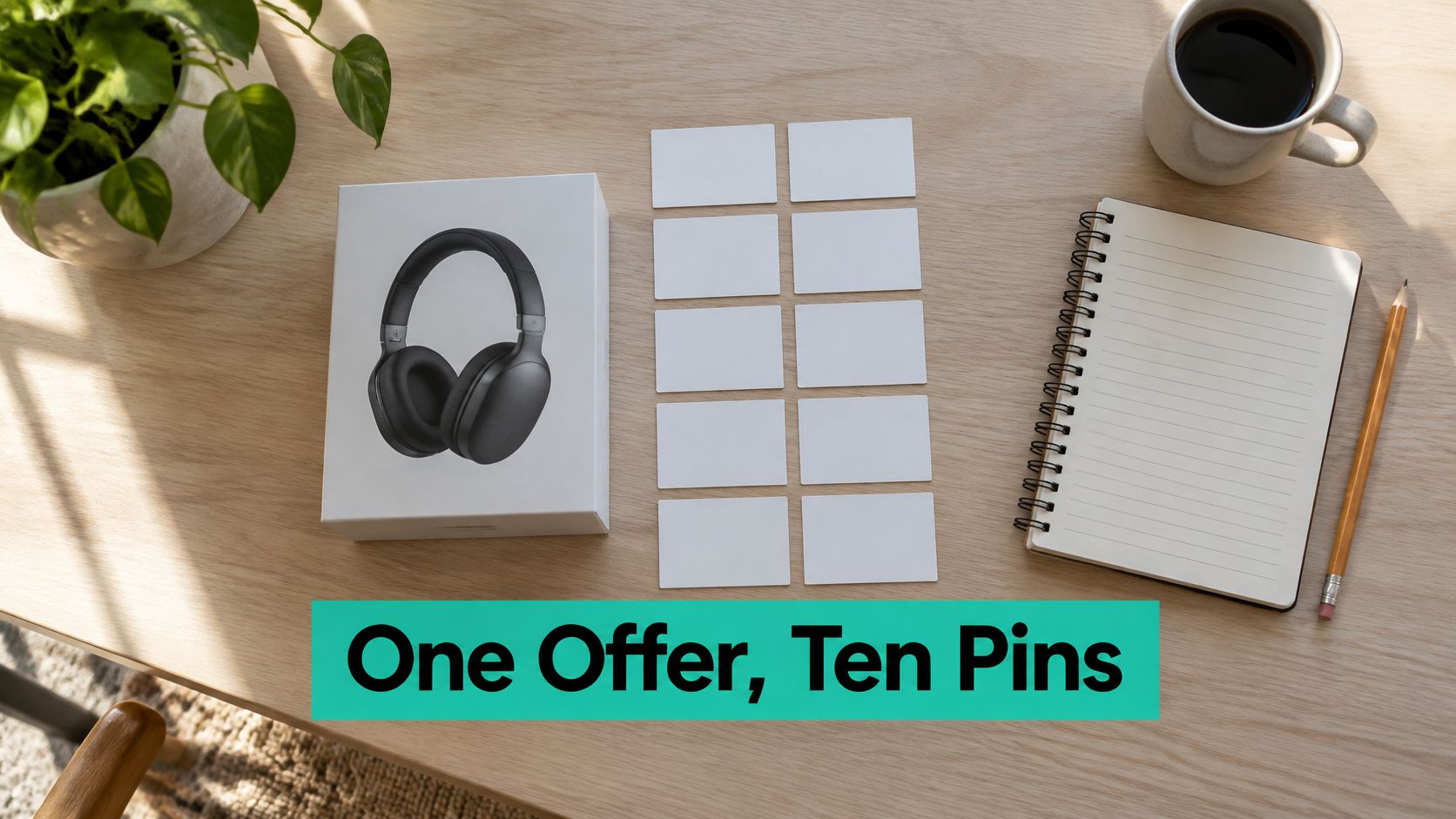
For a manageable practice launch, choose an offer that passes your screening checklist and draft ten distinct Pins. Treat that as a workload you can review carefully, not a platform-approved posting allowance.
Lay out your concepts before scheduling them.
Give each concept a clear purpose
Use different buying questions or creative approaches, with an informative destination and a matching board. Record the phrase, offer, destination, disclosure, and tracking identifier for every draft.
As a starter exercise, set a two-week review window. Check midway for broken links and missing disclosures, then compare earnings and outbound clicks at the end. If traffic is still sparse, extend observation rather than treating the deadline as proof that the offer failed.
Rank the assets, keep promising concepts, and rewrite the weakest drafts before adding another offer. This is a learning cycle, not an income forecast.
For the link-maintenance part of that workflow, watch the demonstration.
Our Affiliate Links bulk update lets you update affiliate links in Pins' outbound URLs. Our Automatic SEO researches Pinterest keywords for each batch, and AI picks the phrase it predicts is most likely to bring traffic for each post, then writes titles and descriptions around it.
Those tools handle repetitive work. You still decide whether the recommendation is accurate, useful, disclosed, and ready to publish.
Pin Generator brings Pin design, metadata writing, board selection, and scheduling into one workflow for your affiliate campaigns. Visit Pin Generator to build your first reviewed batch, then use click and commission results to decide what deserves another test.