
Master Pinterest AI Pins to Boost Your Engagement
18 October 2025
Picture this: your Pinterest feed, but instead of just a collection of pretty images, it's a smart, intuitive guide that knows what you're looking for even before you type it in the search bar. That’s the magic of Pinterest AI Pins. This isn't just a minor update; it's a complete shift in how visual discovery works on the platform, turning it into a personalized, real-time experience powered by artificial intelligence.
Unlocking a New Era of Visual Discovery
Pinterest has grown up. It's no longer just a digital mood board; at its heart, it's a powerful visual search engine, and AI is the engine running the whole show. It’s the difference between a simple point-and-shoot camera and a new smartphone that automatically adjusts the lighting and focus to give you the perfect shot every time. That's what AI is doing behind the scenes on Pinterest—constantly refining your feed.
This evolution is a big deal for everyone on the platform. For creators, bloggers, and brands, figuring out how this AI works isn't just a "nice-to-have" anymore. It's absolutely essential if you want to see any real growth. If you learn to work with Pinterest's AI, you can see your reach and engagement climb to levels you didn't think were possible.
What This Means for You
This guide is going to pull back the curtain and show you exactly how this system works and, more importantly, how you can make it work for you. We'll dig into how AI is shaping what users see and how you can create content that the algorithm absolutely loves to push out to more people.
You will learn to:
- Understand the AI Engine: Get a clear picture of how the algorithm "reads" images and tracks what users are doing.
- Optimize Your Content: Discover the simple, practical steps to create Pins that get seen and shared with a much wider audience.
- Leverage AI Tools: See how tools like Pin Generator can put your workflow on autopilot, helping you create and schedule perfectly optimized content in a fraction of the time.
So, whether you're a seasoned marketer trying to drive more traffic or a passionate Pinner looking to grow your influence, getting a handle on Pinterest AI Pins is your next big step. By tweaking your strategy to fit this new reality, you can make sure your content doesn't just get seen—it connects with exactly the right people.
How Pinterest's AI Engine Understands You
Ever wonder how Pinterest seems to read your mind? It’s not magic—it's a seriously smart AI engine that acts like a personal shopper for your ideas. It doesn't just grab what you search for; it’s constantly learning your unique taste with every single thing you do.
Each search, every click, and all the Pins you save are like breadcrumbs. The AI follows this trail to build an incredibly detailed profile of your personal style and interests, getting smarter and more attuned to you over time.
This goes way beyond simple keyword matching. The real secret sauce is Pinterest's visual search technology. It meticulously analyzes the content of images, picking out objects, colors, styles, and even the overall mood of a Pin. This is exactly how it can spot a specific armchair in a living room photo and then show you a dozen others just like it.
This powerful visual analysis is also what makes features like "Shop the Look" possible, which can identify multiple shoppable products within a single picture. By understanding what’s in an image, the AI bridges the gap between inspiration and action, turning a casual scroll into a potential sale.
Deconstructing the AI's Learning Process
Pinterest’s AI is always working in the background, running on a few core principles to build that hyper-personalized feed you can’t get enough of. It’s a constant cycle of learning and tweaking based entirely on your behavior.
Here’s a simplified look at how it works:
- Data Collection: First, the AI gathers information from your activity—what you search for, the Pins you pause on, the boards you create, and the content you decide to save.
- Object & Style Recognition: Using computer vision, it literally "sees" what's inside each image. It tags everything from a "bohemian-style rug" to "minimalist kitchen decor," creating a massive, rich dataset.
- Pattern Identification: Then, the AI starts connecting the dots between what you do and what it sees. It notices you consistently save Pins with a modern farmhouse vibe, which helps it predict what you'll want to see next.
The platform’s integration of AI is massive, powering 100% of its search and recommendation engines. Features like automated Pin grouping and smart auto-tagging have cut down Pin publishing times by 42%. Meanwhile, AI-driven product recognition in "Shop the Look" has boosted click-through rates by an impressive 17%.
From Pictures to Full Context
It’s not just about the images, though. The AI also pays close attention to the text that goes along with your Pins. The titles, descriptions, and even the comments all provide crucial context that helps it understand the bigger picture.
This is why solid keyword research best practices, similar to what you'd do for Google, are so important for your Pins to get found. Well-crafted pinterest ai pins with descriptive, relevant text just perform better. Period.
By combining visual analysis with these textual clues, the AI gets a complete understanding of every piece of content. This dual approach is what allows it to categorize and surface your Pins with such incredible accuracy, making sure they land in front of the exact people who are most likely to love them. Getting a grip on this process is the first step to creating content the algorithm can't ignore.
The Real Payoff: What AI Actually Does for Your Pinterest Strategy
Jumping into an AI-first approach for your Pinterest marketing isn't just about saving a few minutes here and there. The results are much bigger than that. When you boil it all down, the advantages land in three key buckets: a massive boost in reach, way better user engagement, and a workflow that's just plain smarter.
When you create pinterest ai pins, you're basically giving the algorithm a clear roadmap to your content. The AI gets the context, understands the visuals, and knows exactly who to show it to. It stops being a guessing game and starts being a targeted strategy.
Getting More Eyes on Your Pins (and More Clicks)
Better engagement naturally follows when you're creating Pins that people actually want to see. AI is brilliant at spotting the visual styles and formats that are currently trending and resonating with users. This means more saves, more close-ups, and more clicks. It’s the difference between just making content and making content that feels like it was handpicked for someone's feed.
This is a huge deal when you consider the sheer scale of Pinterest. The platform is home to 570 million monthly active users, and Gen Z now represents a whopping 42% of that audience. Even more importantly, 85% of weekly Pinners say they’ve made a purchase based on Pins from brands. Tapping into that is a no-brainer.
The infographic below really drives home the tangible results you can expect.
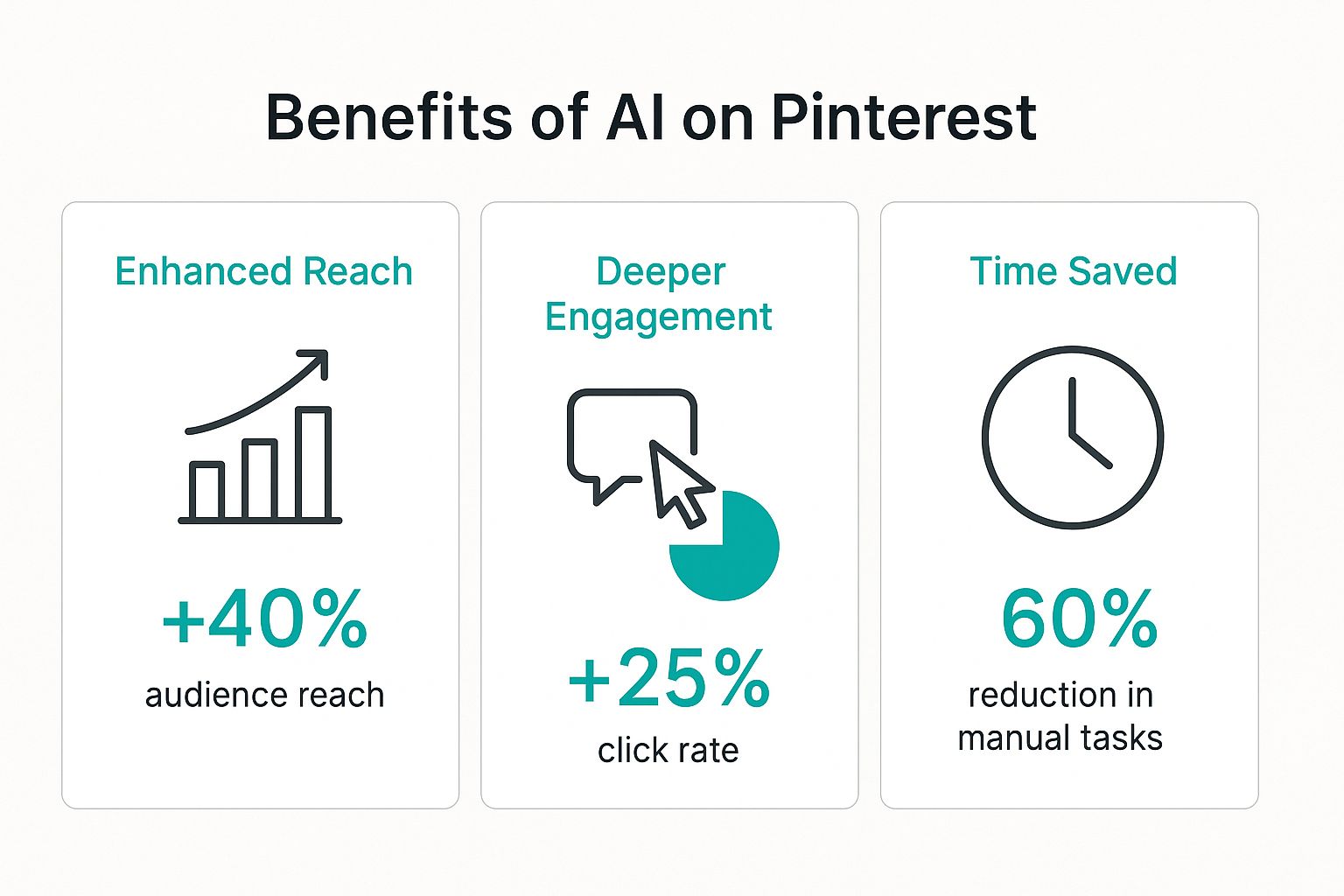
As you can see, the numbers speak for themselves. The impact is real and measurable, from audience growth all the way to how you manage your time.
Making Your Content Workflow Smarter, Not Harder
Maybe the most immediate win is how much smoother your whole content process becomes. AI tools like Pin Generator can take the entire design and scheduling workflow off your plate. What used to take hours of painstaking manual work can now be done in minutes. This frees you up to think about the big picture—your overall strategy and creative direction.
When you automate the repetitive stuff, your job changes. You stop being just a content creator and become a content strategist. The AI handles the heavy lifting, while you steer the ship, analyze what’s working, and double down on your wins.
This is just scratching the surface. A closer look at the benefits of AI in e-commerce shows how this kind of efficiency can directly lead to more sales and a better shopping experience for customers. It’s not just about saving time; it's about creating new opportunities to grow.
Creating Pins the Pinterest AI Will Love
If you want to get ahead on Pinterest, you’ve got to start thinking like the algorithm. It’s all about creating content that the AI can easily understand and see value in. That’s your ticket to better distribution.
This means making your Pinterest AI Pins not just beautiful for people, but also crystal clear for the machine. Think of it like giving the AI a simple, direct set of instructions it can't possibly misinterpret.
The absolute foundation of an AI-friendly Pin is text. Your titles and descriptions are the clearest signals you can possibly send. They tell the algorithm exactly what your content is about, who it’s for, and why it’s worth sharing.
Crafting the Perfect Text Signals
Think of your Pin's title and description as its digital handshake. A weak, vague title like "Cute Outfit" is completely forgettable and gives the AI almost nothing to work with.
But a strong, keyword-focused title like "Cozy Fall Outfit Idea with Chunky Knit Sweater"? Now you're talking. That gives the AI specific details, helping it categorize and recommend your content to the right people.
Here are the text elements you need to nail every single time:
- Keyword-Rich Titles: Aim for 60-100 characters. This keeps your full title visible on all devices. Always include your main keyword and a hook that grabs attention.
- Detailed Descriptions: You get up to 500 characters, but the real sweet spot is between 150-250 characters. This is your chance to naturally weave in related keywords and add crucial context.
- Well-Organized Boards: Make sure you’re pinning your content to boards with clear, descriptive names. A board called "Healthy Dinner Recipes" is way more effective for the AI than a generic one simply named "Food."
This obsession with clear text helps the algorithm build confidence in what your content is all about. You can get a much deeper dive into this in our guide to creating Pinterest Pins with AI, where we break down the more technical side of optimization.
Training the Algorithm with Visual Consistency
It's not just about words. The Pinterest AI also learns from your visual style. Every single time you post a Pin, you're basically "training" the algorithm on your brand's unique look.
By keeping a consistent look and feel across all your Pins, you help the AI recognize your content at a glance and associate it with a specific niche or style.
This doesn't mean every Pin needs to be a carbon copy. Instead, focus on building a cohesive visual identity. Use the same color palettes, fonts, and photography styles. This visual consistency helps the AI get a better handle on who your target audience is, which leads to more targeted and effective distribution over time.
By consistently creating Pins that are both visually appealing and textually optimized, you're not just hoping for visibility—you are actively teaching the Pinterest AI who to show your content to.
At the end of the day, creating Pins the algorithm loves is a two-part strategy. You need high-quality, visually distinct images to stop the scroll, paired with descriptive text that provides clear, unambiguous context. When you master both, you create a powerful feedback loop that screams to the Pinterest AI: "This content is valuable, relevant, and ready for a bigger audience."
Finding the Right Balance with AI Content
With Pinterest AI Pins getting smarter and easier to use, it's tempting to just hit "go" and let the robots do all the work. But let's be real—the secret sauce to actually winning on Pinterest is finding that sweet spot between AI's incredible speed and your own human creativity.
Think of AI as your co-pilot, not the one flying the plane. It's fantastic for crunching the numbers, suggesting routes, and handling the technical stuff. That frees you up to focus on the big picture: where you're going and what the journey feels like for your audience. The best creators aren't letting AI replace their vision; they're using it to bring that vision to life on a bigger scale.
This mindset is more important than ever. The internet is flooded with AI content, and it's only going to get more crowded. By 2025, some estimates say generative AI will be behind a whopping 57% of everything we see online. Pinterest knows this, and they've already seen that users can feel a bit overwhelmed. That’s why they rolled out controls letting people dial down how much AI-generated content they see. It’s a clear signal that the platform wants a healthy mix. You can read more about Pinterest’s new AI content controls on socialmediatoday.com.
Blending AI Efficiency with Human Authenticity
If you want to stand out, you have to inject your own personality into the process. Your personal stories, your unique eye for design, your brand's specific vibe—AI can't fake that. That's the stuff that builds a real connection and gets people to stick around.
So, how do you strike that perfect balance?
- Use AI for a First Draft, Not the Final Word: Let AI spit out a bunch of Pin titles, descriptions, and keyword ideas. Then, you jump in. Tweak the language, inject your brand's voice, and make it sound like you.
- Be the Art Director: Sure, AI can create gorgeous images, but it needs your creative brief. Give it super-detailed prompts that scream your brand's style. Don't settle for generic; guide it until the final image feels authentic.
- Always Do a Final Human Check: Before a single Pin goes live, look it over. Ask yourself, "Does this feel like my brand? Is it actually helpful?" This last step is non-negotiable.
Why Your Originality Is Your Greatest Asset
The most successful Pinterest strategies will always be a team effort between machine efficiency and human creativity. Anybody can use an AI pin image generator, but your unique style and authentic voice are what nobody else has. That’s your unfair advantage.
The goal isn’t to create perfect, sterile content. It’s to create content that makes people feel something. AI helps you do more, but your creativity is what makes people stop scrolling, hit save, and actually click through.
When you treat AI as your super-powered assistant, you can ramp up your content production without losing the very thing that made your audience follow you in the first place. This blend makes sure your Pins don't just add to the noise, but actually provide real value and get noticed.
The Future of AI and Pinterest
Pinterest's journey with AI is really just getting started, and what’s on the horizon looks like it will completely reshape how we find things online. We're about to see AI applications that are way more sophisticated than the simple recommendations we're used to.
Think about a feed that feels like it’s reading your mind. Instead of just showing you a generic dump of "living room ideas," the AI could pick up that you're planning a "small apartment living room refresh on a budget." Just like that, it would pull together the right decor, clever DIY hacks, and shoppable products, all in real time. It might even sense you’ve had a stressful week based on your recent pinning and suggest calming color palettes. This deeper understanding will make discovery feel incredibly natural and intuitive.
The Evolution of Smart Features
The next generation of Pinterest AI Pins will feel much more interactive, almost like a creative partner. Features like virtual try-ons for furniture and fashion will become ridiculously seamless and realistic, letting you see how a couch looks in your living room with startling accuracy.
We're also stepping into a reality where AI can build out entire mood boards or project plans from a simple text prompt.
For example, you could type "plan a rustic-themed wedding for 75 guests in the fall," and the AI could instantly whip up boards for invitations, decor, outfits, and venues, all loaded with shoppable links and vendor ideas.
Getting a handle on Pinterest's AI right now is about more than just getting clicks today. When you understand how these systems think, you're building a solid foundation for what's coming next. You'll be in the perfect spot to adapt as Pinterest becomes an even bigger engine for social commerce and visual search, making sure your content stays front and center for years to come.
Common Questions About Pinterest AI Pins
Diving into the world of AI on Pinterest can feel a bit like stepping into new territory. It's totally normal to have questions about the rules, what works best, and whether it's all safe for your account.
Getting straight answers is the best way to move forward and start creating with confidence. Let's tackle some of the most common things people ask about Pinterest AI pins.
Does Pinterest Penalize AI Generated Images
This is a big one, and thankfully, the answer is no. Pinterest's main job is to show people content that's high-quality, relevant, and inspiring. Their system is smart enough to figure out what an image is about, not just how it was made.
So long as your AI images look great and are a good fit for your audience, you're in the clear. In fact, AI-generated images can do incredibly well because you can design them to perfectly match specific trends and what your followers love to see. It’s all about the quality of the Pin, not where it came from.
How Can I Find Keywords with AI
Using AI for keyword research is a game-changer. It can seriously speed things up. Tools like ChatGPT are fantastic for brainstorming a ton of keyword ideas, especially those longer, more specific phrases you might not think of on your own.
The trick is to be specific with your request. Give the AI a detailed description of your Pin and who you're trying to reach.
For instance, asking something like, "Generate 20 long-tail Pinterest keywords for a Pin about vegan one-pot pasta recipes targeted at busy moms," is going to give you way better results than just asking for "pasta keywords."
On top of that, many dedicated Pinterest marketing tools now have AI baked right in. They'll often suggest optimized keywords as you're creating a Pin, making the whole process much smoother.
Is It Safe to Use AI Tools for My Account
Yes, it's completely safe—as long as you stick to reputable, officially approved tools. Pinterest has a list of official partners that use its API, which is a fancy way of saying they play by the rules. These tools, from schedulers to content creators, are built to work within Pinterest’s guidelines.
The key is to use established, verified services. Steer clear of any shady bots or spammy tools promising things like instant followers or automated comments. Those are the kinds of things that can get your account flagged. Official partner tools are designed for safety, so you can be sure your account stays in good standing.
Ready to create stunning, optimized Pinterest AI Pins in seconds? Pin Generator automates your entire workflow, from design to scheduling, so you can focus on growing your brand. Start creating with Pin Generator today!