
Pinterest Marketing Strategist: Role, Skills, and Pricing
5 October 2026
A small business owner opens Pinterest after several quiet weeks and sees a dashboard full of activity but little business impact. The pins are attractive, yet the account isn't reaching enough of the right people, and nobody can explain whether the problem is the keywords, the boards, the creative, or the publishing rhythm.
That's where a Pinterest marketing strategist earns their fee. The role isn't just designing graphics or uploading content. It combines visual search analysis, creative direction, conversion planning, account management, and operational discipline to turn Pinterest from an occasional posting channel into a repeatable source of discovery and website visits.
Table of Contents
- The Day in the Life of a Pinterest Marketing Strategist
- Why Pinterest Behaves Like a Visual Search Engine
- Core Skills, KPIs, and Service Packages
- Hiring vs DIY and What Each Path Really Costs
- The Strategist Workflow from Keyword Research to Scheduled Pins
- Tools and Automations That Power the Pipeline
- Short Case Examples and Measurable Outcomes
- Decision Framework, Common Mistakes, and Next Steps
The Day in the Life of a Pinterest Marketing Strategist
The strategist starts by looking for evidence, not inspiration. They review the account structure, inspect which pins attract impressions and outbound clicks, check whether descriptions match the linked pages, and look for boards that are too broad, duplicated, or disconnected from the business's actual offers.
A home decor shop, for example, might have boards called “Beautiful Homes” and “My Products.” Those names sound harmless, but they don't give Pinterest much context about the searches the business wants to match. A strategist may reorganize the account around clearer themes such as small-space storage, neutral living rooms, renter-friendly decorating, or seasonal table settings, provided those themes reflect the shop's inventory and audience.
A working day built around decisions
After the audit, the strategist maps search phrases to content. They identify which products, articles, landing pages, and seasonal offers deserve pins, then write creative briefs that specify the visual angle, title, description, call to action, destination URL, and target board.
The production stage involves more than handing a designer a vague request. A useful brief might ask for one pin focused on “entryway organization ideas,” another focused on a specific storage product, and a third aimed at a seasonal decorating query. Each version should offer a reason to click while remaining faithful to the page it leads to.
The strategist also reviews the publishing queue, checks that links work, confirms that designs remain on brand, and watches for gaps in upcoming seasonal content. A weekly or monthly report then connects activity to business goals. It might separate reach, saves, pin clicks, outbound clicks, assisted conversions, and revenue rather than presenting one inflated visibility number.
Practical rule: A strategist should be able to explain what each publishing decision is intended to change.
Pinterest's scale makes that operating discipline more valuable. An independent Pinterest statistics roundup from Hootsuite reported 631 million monthly active users, 11% year-over-year growth, and marketing adoption among 22% of companies. It also reported that the platform had reached its tenth consecutive quarter of double-digit user growth. Those figures support an ongoing program, but they don't remove the need for careful targeting.
Ad hoc posting asks, “What can we publish today?” Strategy asks, “Which search demand, offer, and landing page should this pin serve?” That change in question is the difference between a content helper and a hired acquisition operator.
Why Pinterest Behaves Like a Visual Search Engine
The most useful mental model is simple. Pinterest behaves less like a chronological social feed and more like a visual search engine where images help people evaluate possible answers.
A user enters a query, scans visual results, opens a promising pin, and decides whether to save it, explore related ideas, or visit a website. That behavior means a business can reach someone who has never heard of its brand, provided the pin matches the person's intent.
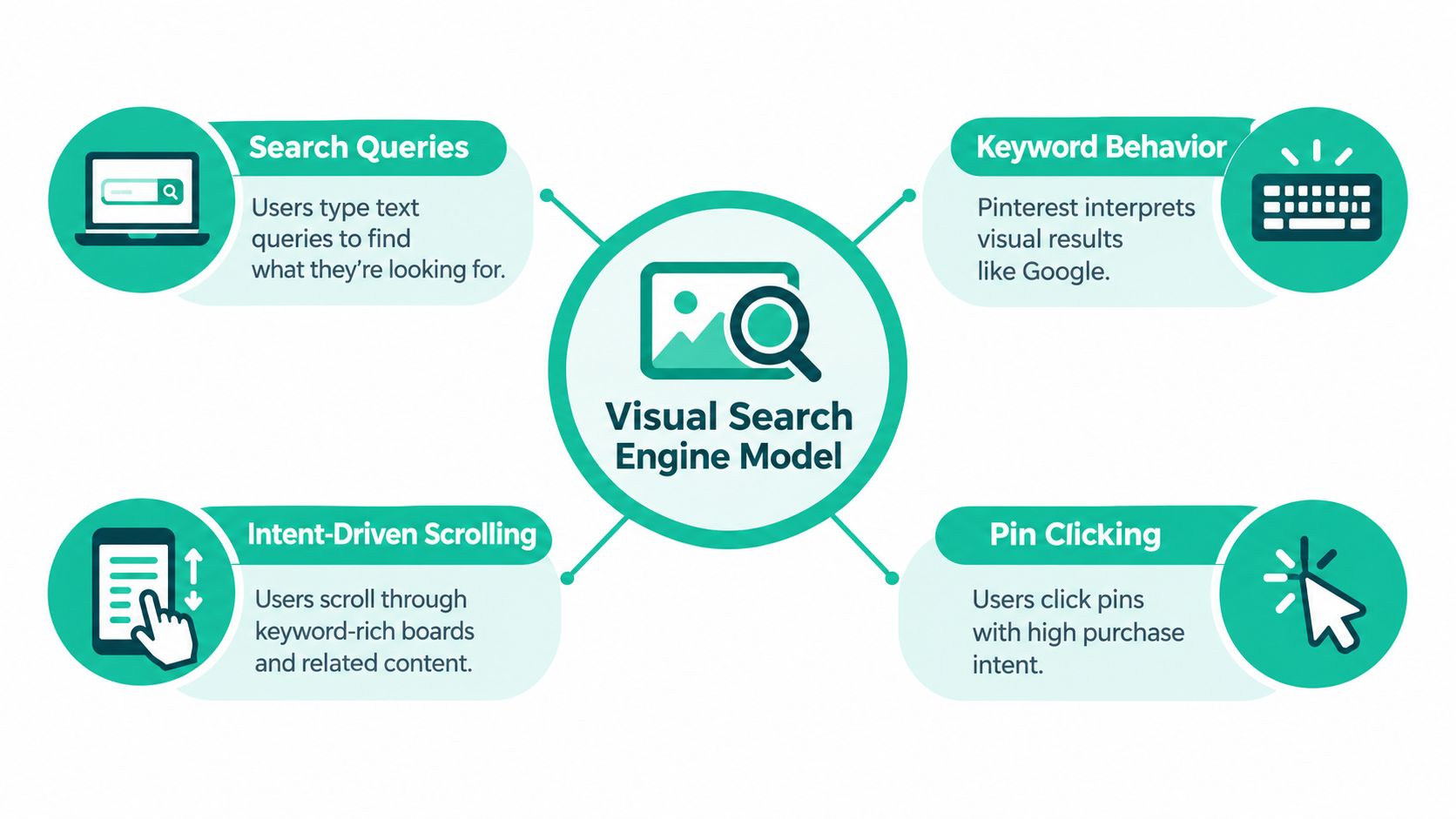
Four questions shape the strategy
What is the user searching for? The strategist begins with category language, problems, occasions, and product attributes. A skincare brand shouldn't rely only on its name. It may need content around morning skincare routines, sensitive skin routines, or gift ideas, depending on its products and audience.
Does the pin communicate the answer quickly? A search result has to earn attention visually. The image, overlay text, title, and destination should work together. A beautiful image with a vague title can attract attention without attracting the right visitor.
Does the account reinforce the topic? Board names, board descriptions, pin copy, and linked pages provide surrounding context. A clear board structure helps the strategist group related content without turning every board into a miscellaneous collection.
What happens after the click? The landing page must fulfill the promise in the pin. If a pin suggests a downloadable guide but leads to a generic homepage, the campaign may receive attention without producing meaningful action.
Pinterest's search behavior makes this especially important. ContentStudio's overview of marketing on Pinterest reports that users conduct more than 80 billion searches per month, while 96% of top searches are unbranded. The strategic implication is direct: optimize for the problem or category people search for, not only for branded discovery.
Pinterest also reflects cultural and seasonal interest. The platform's own marketing leadership, discussed by Say More Online, describes a system that turns cultural signals and user behavior into actionable inspiration. A strategist therefore plans ahead for recurring demand, watches shifts in language, and prepares creative before an occasion becomes crowded.
Followers can be useful, but they aren't the foundation of this model. Search alignment, relevant creative, useful destinations, and consistent coverage matter more because they help a business appear when a person is already exploring an idea.
Core Skills, KPIs, and Service Packages
A Pinterest marketing strategist needs a mixed skill set. Keyword research without strong creative produces pins people overlook. Strong design without search alignment produces attractive work that may never reach the intended audience.
The strategist's responsibilities usually fall into seven connected areas:
- Search research: Find category terms, long-tail phrases, seasonal language, and gaps competitors haven't covered well.
- Visual direction: Set rules for layout, typography, product prominence, photography, motion, and brand consistency.
- Persuasive copy: Write titles and descriptions that clarify the promise without stuffing unrelated keywords into one pin.
- Board architecture: Organize content around useful topics and search themes rather than internal company departments.
- Publishing operations: Maintain a reliable queue, coordinate approvals, and prevent links or metadata from being overlooked.
- Measurement: Interpret reach, saves, clicks, outbound visits, assisted conversions, and revenue signals in context.
- Commerce integration: Connect product feeds, catalogs, landing pages, analytics tags, and promotional campaigns where appropriate.
Matching packages to the real workload
A package should describe the work required to create and improve the system, not just the number of meetings included.
| Package | Typical Scope | Pricing Model | Best For |
|---|---|---|---|
| Audit and strategy plan | Account review, keyword map, board recommendations, creative direction, measurement plan | Fixed project fee | Businesses that need clarity before publishing regularly |
| Monthly management | Research, briefs, creative coordination, scheduling, optimization, and reporting | Monthly retainer tied to scope and production volume | Owners who want an ongoing operator |
| Creative production | Pin concepts, branded templates, copy, metadata, and delivery-ready assets | Per-project or per-asset pricing | Teams with strategy and scheduling already handled |
| Full-funnel management | Organic content, paid campaigns, catalogs, landing-page coordination, and conversion reporting | Custom retainer based on complexity | Merchants and publishers with several acquisition paths |
Pricing should reflect pin volume, account complexity, approval time, creative variation, product count, catalog condition, and reporting depth. A single-content blog has a different workload from a store with frequent product changes and multiple collections.
Pinterest's commercial maturity also supports evaluating both organic and paid work. Printful's Pinterest statistics summary reported $4.222 billion in full-year revenue for 2025, a 16% increase from 2024, and 619 million monthly active users in Q4 2025. The same summary reported Pinterest's tenth consecutive quarter of record-high monthly active users. These are platform-level signals, not a promise of results for an individual account.
The right KPI depends on the job. Awareness work may prioritize qualified impressions and saves. Acquisition work should give more weight to outbound clicks and assisted conversions. Product campaigns need destination performance and revenue context. A strategist who reports only impressions may be hiding the most important part of the funnel.
Hiring vs DIY and What Each Path Really Costs
DIY Pinterest management can work when the business has a focused offer, a manageable content library, and an owner who enjoys creating visual content. It becomes harder when the same person must research search terms, write copy, design variations, schedule posts, maintain product links, and interpret performance while also running the business.
The cost isn't only a contractor's fee. It includes the owner's attention, the opportunity cost of delayed work, and the skill ceiling created when Pinterest receives attention only between urgent tasks.
The trade-off in plain language
A founder can often handle the early learning phase personally. They'll gain useful knowledge about customer language and discover which offers deserve better presentation. The risk appears when every new pin requires starting from a blank page, because production slows down and publishing becomes inconsistent.
Hiring changes the equation. A strategist brings a process for research, creative testing, queue management, and reporting. That doesn't guarantee revenue, but it gives the account a better chance to produce interpretable results because someone owns the system.
| Factor | DIY | Hiring a Pinterest Marketing Strategist |
|---|---|---|
| Time | Uses internal attention for research, design, scheduling, and review | Transfers recurring operational work to a specialist |
| Skill ceiling | Grows gradually through practice and experimentation | Starts with established search, creative, and reporting skills |
| Brand control | Direct owner involvement in every decision | Requires a brief, approval process, and shared standards |
| Production capacity | Usually limited by the owner's available time | Can expand through templates, batching, and automation |
| Strategic consistency | Vulnerable to busy periods and interruptions | Supported by a documented workflow and recurring reviews |
| Best starting point | Focused catalog or one main content stream | Multiple offers, product feeds, campaigns, or growth priorities |
Businesses with simple catalogs may stay DIY for longer. A business with several content streams, a changing inventory, or a need to coordinate organic and paid activity may benefit from outsourcing the most repetitive tasks first. A guide to Pinterest virtual assistant responsibilities can help clarify whether the business needs execution support, strategic ownership, or both.
Use this quick assessment:
- Available attention: Can someone protect recurring time for research, production, scheduling, and analysis?
- Creative capacity: Are usable templates and product assets already available?
- Search confidence: Can the team explain which queries each pin is designed to match?
- Measurement discipline: Can the business connect outbound visits to meaningful actions?
- Growth pressure: Would missed publishing or slow creative production delay an important business goal?
If most answers are uncertain, begin with an audit or a limited strategy project. If the answers are clear but production is the bottleneck, outsource creative operations while keeping strategic decisions in house.
The Strategist Workflow from Keyword Research to Scheduled Pins
A dependable workflow turns a large content library into a set of deliberate search opportunities. The strategist doesn't begin by designing random graphics. They begin with the audience's language and the business's destinations.
1. Discover the seed terms
Start with broad topics from the catalog, editorial calendar, customer questions, and existing analytics. Use Pinterest suggestions, trend observations, and competitor gap analysis to expand those topics into specific queries. The aim isn't to collect every possible phrase. It's to identify terms that connect a real need with a useful page or product.
2. Map demand to content
Group related phrases into pillars and assign them to boards. One article or product may support several angles, but each pin should have a clear primary promise. This prevents keyword stuffing and makes later performance analysis more useful.
3. Produce creative variations
Batching helps the team create several visual treatments while the topic is still fresh. Static pins may suit evergreen articles, video may demonstrate a product, and Idea Pins may support inspiration-led browsing. Templates should preserve brand recognition without making every asset look identical.
4. Complete the metadata and QA
Before scheduling, inspect the title, description, alt text, destination URL, board fit, image legibility, and mobile presentation. A strategist should also check that the pin promise matches the page. Relevance matters more than clever wording.
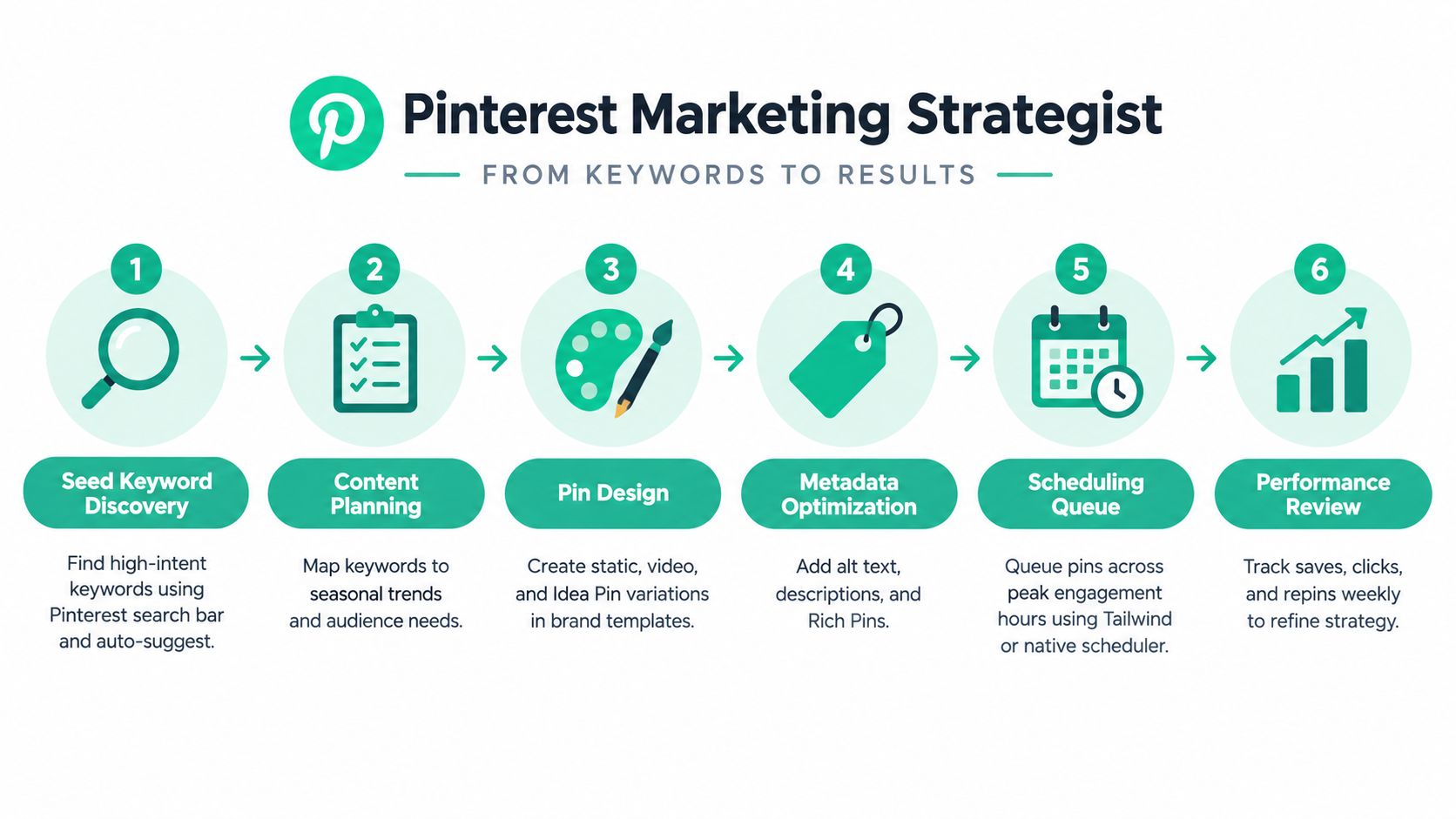
5. Build the queue
Schedule content around the account's publishing plan, seasonal priorities, and available creative. A queue should include enough variety to avoid repeating one message while still giving important topics sustained coverage. Strong performers can inspire new creative angles, but duplication without improvement adds little value.
6. Review and refine
The strategist compares performance by topic, creative angle, destination, and board. They keep the elements that attract qualified visits, revise weak promises, and retire assets that no longer reflect the offer. Automation can remove manual uploading and repetitive copy preparation, but the strategist still decides what deserves attention and approval.
A production pipeline such as the one described in this Pinterest automation workflow guide can support feed, article, and product-based publishing. The important boundary is clear: automate repeated execution, not the judgment about audience, offer, positioning, and destination quality.
Tools and Automations That Power the Pipeline
A modern Pinterest operation usually needs one tool category for each recurring job. The goal isn't to build a complicated stack. It's to remove the tasks that consume attention without improving the strategic decision.
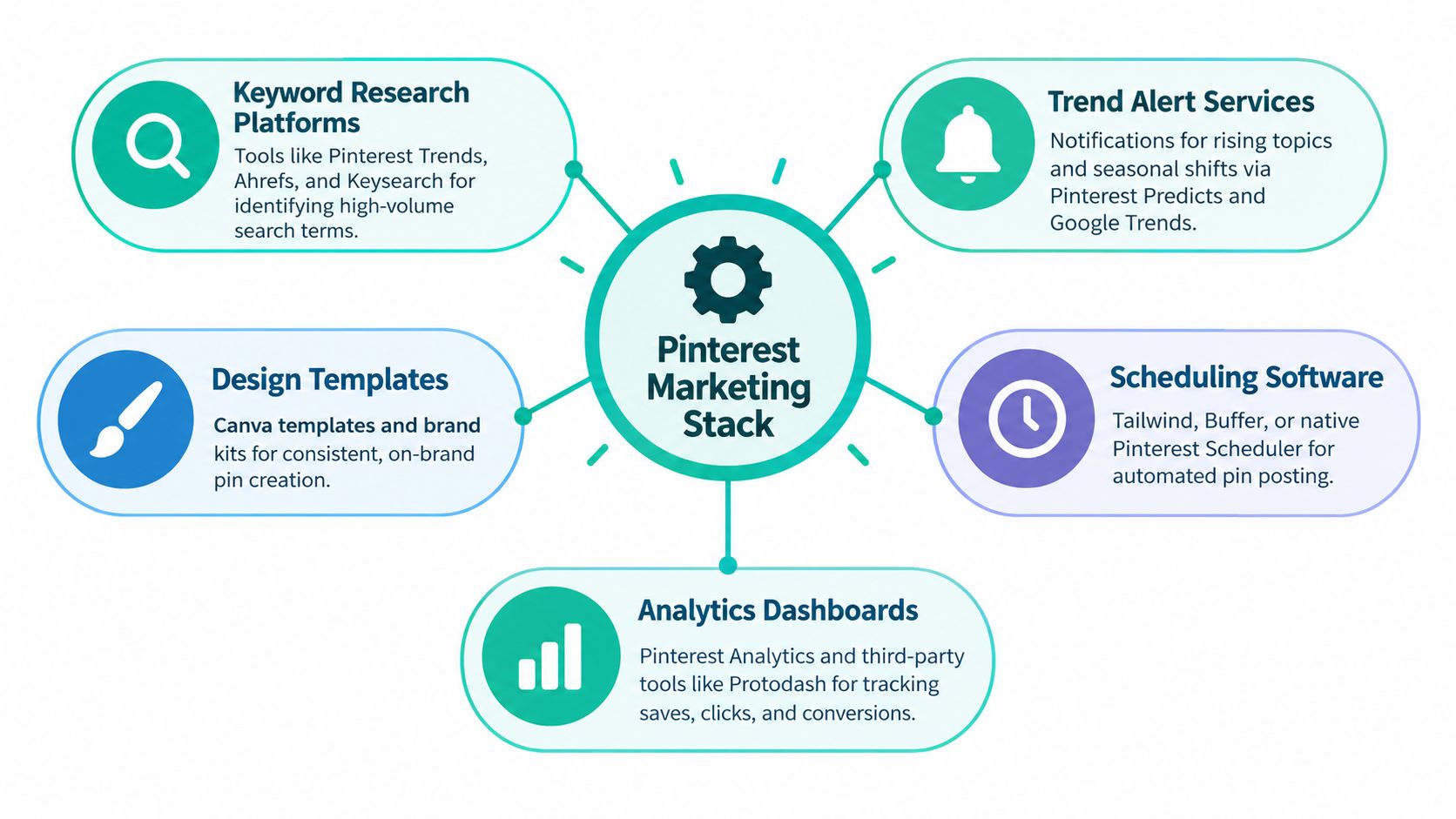
Research tools help turn broad themes into usable content plans. Pinterest Trends can show platform interest, while SEO platforms such as Ahrefs or Keysearch can support broader keyword investigation. These tools don't replace judgment. A phrase is valuable only when the business can create a relevant answer or offer around it.
Trend alerts help the strategist notice rising topics and seasonal shifts. Pinterest Predicts and Google Trends can inform planning, but alerts should lead to a content decision, not automatic publishing. A trend that doesn't fit the brand or inventory is noise.
Design systems provide reusable templates, brand colors, typography, image rules, and approval standards. Canva can support collaborative production, especially when a business wants a strategist to work inside a controlled visual system.
Scheduling and analytics keep the queue moving and show what deserves another test. Native Pinterest scheduling, Tailwind, and Buffer can support publishing, while Pinterest Analytics and other dashboards help separate exposure from website activity.
Where automation changes the strategist's workload
Automated pin-production platforms can generate branded designs and supporting copy from product listings, articles, feeds, or connected stores. They can also support metadata preparation, board selection, and recurring publishing. That changes the strategist's job from manually producing every asset to designing the rules, reviewing samples, choosing priorities, and improving the system.
The human layer still matters. Someone must decide whether a product image is persuasive, whether a promise is accurate, whether a landing page is ready, and whether a generated variation represents the brand. The strategist also needs to manage exceptions, such as discontinued products, weak imagery, inappropriate seasonal references, or overlapping campaigns.
For teams researching website data extraction and automation infrastructure, a comparison of a Firecrawl alternative can provide useful context before they choose supporting tools. That research belongs upstream of the Pinterest workflow, where clean product and content data make downstream automation more reliable.
A practical stack-building principle is one tool per stage, automation for repetition, human review for meaning. Add UTM tags to destinations, connect catalogs where product freshness matters, and link Pinterest activity to analytics or CRM records. The strategist should be able to trace a pin from source data to creative, board, destination, and business outcome.
Short Case Examples and Measurable Outcomes
The most useful case examples don't promise a universal result. They show how a particular constraint changes the work. Because account history, creative quality, offer strength, and destination performance vary widely, the examples below are representative scenarios rather than claims about verified client results.
A store with a large visual catalog
A home furnishings store has strong product photography but publishes only when someone remembers to create a pin. Its strategist groups products into search-led collections, builds boards around room and use-case themes, and creates several creative angles from the same catalog data.
The operational problem isn't a lack of products. It's the time required to turn those products into consistent, relevant Pinterest assets. A structured production pipeline lets the strategist review batches, reject weak images, and keep the best collections active without designing every asset from scratch.
Lesson: Catalog scale creates opportunity only when the team can connect products to search intent and maintain production quality.
A publisher with a deep archive
A food blogger has years of recipes but a board structure that mixes desserts, weeknight meals, drinks, and holiday content. The strategist reorganizes the boards, refreshes older creative with clearer titles and stronger imagery, and connects each pin to the most relevant recipe page.
The work doesn't require publishing a new article for every opportunity. It improves how existing content is packaged and discovered. The strategist then compares performance by recipe category and creative angle to decide which archive areas deserve more attention.
Lesson: An underused content library can become a strategic asset when the account structure reflects how readers search.
A stationery brand with frequent product changes
A wedding stationery shop adds new designs regularly and struggles to keep Pinterest links aligned with current products. A catalog workflow can reduce the manual gap between inventory updates and pin production, while the strategist controls collection priorities, seasonal messaging, and quality checks.
This approach is particularly useful when the business needs many product variations but can't afford to treat every listing as a separate design project. Automation handles repeated preparation. The strategist protects relevance, presentation, and conversion intent.
Lesson: Automation is most valuable when the business has repeatable inputs and a human owner for prioritization.
| Niche | Primary Tactic | Headline Result | Lesson |
|---|---|---|---|
| Home furnishings | Search-led collections and batch creative | More consistent coverage of product and room themes | Volume works when every variation has a clear purpose |
| Food publishing | Board restructuring and archive refresh | Existing content becomes easier to discover | Refreshing useful assets can be more efficient than starting over |
| Wedding stationery | Catalog-connected production | Product updates can flow into a controlled publishing queue | Automation supports scale when data and quality checks are reliable |
The common thread isn't a guaranteed performance lift. It's division of labor. Strategy sets direction, automation reduces repetitive handling, and review keeps the output useful.
Decision Framework, Common Mistakes, and Next Steps
The DIY-versus-hire decision becomes clearer when you answer four practical questions:
- How much pin production does the business need? A small, focused library may be manageable internally. A large catalog or several content streams usually demands templates, batching, delegation, or automation.
- How much protected time is available each week? If Pinterest work always loses to customer service and fulfillment, the publishing system won't remain reliable.
- Who owns visual quality? A strategist can direct creative, but the business still needs usable photography, product information, brand assets, or a capable design partner.
- What must change over the next six months? A clear growth target supports focused measurement. An unclear target may call for a strategy project before a large production commitment.
Mistakes that create busywork
- Publishing without search research: Attractive pins may fail to match the language people use.
- Treating Pinterest like Instagram: A follower-first approach overlooks Pinterest's discovery and search behavior.
- Ignoring creative refreshes: A useful page can lose attention when its presentation becomes stale or generic.
- Buying followers or repins: Artificial activity doesn't solve weak relevance, poor destinations, or unclear offers.
- Underestimating production: Research, design, copy, metadata, QA, scheduling, and reporting all require ownership.
Use a staged plan rather than rebuilding everything at once. Start with a 30-day audit of current analytics, boards, links, creative, and top content. Document the existing publishing output so you know whether the bottleneck is strategy, production, or consistency.
Next, test one automation workflow on a small, clearly defined batch. Review every output before it enters the queue. Set three KPIs that match the business goal, such as qualified impressions for awareness, outbound clicks for acquisition, or tracked conversions for commerce.
At the 60-day decision point, choose whether to scale the workflow, hire a strategist, or continue DIY with clearer rules. Revisit the decision each quarter using the same questions. Pinterest favors businesses that build systems around intent, useful creative, reliable destinations, and steady learning.
Pin Generator turns product listings, blog posts, feeds, and connected store data into branded Pinterest pin designs, copy, metadata, and scheduled publishing workflows. If repetitive production is slowing your visual search strategy, visit Pin Generator to evaluate a more structured way to keep your account supplied with relevant creative.