
Pinterest Automation Tools That Transform Your Growth
28 August 2025
Think of Pinterest automation tools as your own personal marketing assistant. They’re software platforms built to manage, create, and schedule your content, saving you from spending hours glued to the platform every single day. They handle the grunt work so you can focus on the bigger picture.
What Pinterest Automation Really Means for Marketers
Let's get one thing straight: this isn't about old-school schedulers that just push out a pin at a pre-set time. Modern Pinterest automation is about building a smart, self-sufficient content engine that works for you 24/7.
It's the difference between handing out flyers one by one versus deploying an intelligent marketing machine. Manual pinning is like standing on a street corner, slowly handing out flyers with a limited reach. A powerful automation tool, on the other hand, is like a machine that not only designs and prints your flyers but also knows the best neighborhoods to deliver them to and the exact moment people are most likely to read them.
This is the real magic of today's Pinterest automation tools. They tackle the platform's biggest challenge head-on: the relentless need for a high volume of fresh, optimized, and consistent content.
The Scale of Modern Pinterest Marketing
Success on Pinterest isn't just about pretty pictures; it's a numbers game. As of 2025, Pinterest has ballooned to a massive 570 million monthly active users worldwide—that's a 10% jump in just one year.
To get in front of that audience, the algorithm demands an almost unbelievable amount of content. Top brands are now publishing 15-30 optimized pins every single day, 365 days a year. On top of that, they're constantly A/B testing visuals and tweaking their strategy based on what's working. That kind of volume is simply not sustainable for a human over the long haul, which is why automation is no longer optional. It's essential.
You can learn more about the demands of the Pinterest algorithm from industry experts, but the takeaway is clear.
Automation is no longer a luxury; it's a fundamental requirement for any serious Pinterest marketing strategy. It transforms your role from a content creator bogged down by repetitive tasks to a high-level strategist who guides an efficient, data-driven machine.
Shifting from Execution to Strategy
This is where you unlock the real value. Instead of burning hours each week designing pins, writing descriptions, and manually uploading everything, you can pour that energy into work that actually moves the needle.
- Strategic Planning: Dive into your analytics to spot winning content themes and figure out what your audience really wants.
- Creative Direction: Dream up big campaign ideas and pillar content that your automation tool can then slice and dice into dozens of unique pins.
- Community Engagement: Actually talk to your followers! Build a real community around your brand instead of just posting and ghosting.
This screenshot from the Pin Generator homepage shows just how powerful this can be. You can see how one single URL can instantly be turned into a bunch of different pin designs.
The interface makes it obvious how these tools take one piece of content and multiply its reach by creating tons of different, eye-catching pins for various boards and audiences. This is exactly how you achieve the high-volume posting schedule that the Pinterest algorithm loves.
The True Benefits of Automating Your Pinterest Strategy
Bringing Pinterest automation tools into your marketing mix isn't just a small efficiency hack—it’s a fundamental shift in how you work. It’s about trading in the endless, tedious grind for smart, high-level strategy. This move unlocks benefits you simply can't get by pinning manually, and they show up in three key areas: more time, better performance, and real, long-term growth.
This is your chance to stop being a content factory worker and start being the architect of your brand's success. Let's dig into what that actually looks like.
Reclaim Your Most Valuable Asset: Time
Think about your current Pinterest routine. Seriously, add it up. How many hours a week go into designing pins, crafting descriptions, hunting for keywords, and uploading everything one by one? Now, what if you could get back 90% of that time? That’s the first—and most tangible—win you get with automation.
These tools are built to take over the repetitive, high-volume tasks that suck the life out of your creative energy. They handle bulk uploads and smart scheduling, letting you map out weeks or even months of content in a single sitting. Your job changes from constantly feeding the machine to just steering it in the right direction.
With automation, you go from a reactive state of "what do I post today?" to a proactive one of "what are our strategic goals this quarter?" The tool handles the daily grind, freeing you to focus on what actually grows your business.
Achieve Data-Driven Performance
Guesswork is the enemy of a solid Pinterest strategy. Automation tools run on data, giving you a massive leg up by helping you make smarter, more informed decisions. Instead of just throwing pins out there and hoping something sticks, these platforms analyze engagement patterns to find the exact moments your audience is online and ready to browse.
But it goes way beyond just timing your pins right. Many of the better Pinterest automation tools also help you nail the content itself.
- Keyword Suggestions: They’ll surface trending and high-impact keywords, making sure your pins actually show up when people search for them.
- AI-Powered Visuals: Some tools can even spin up multiple visual variations of a single pin. This lets you A/B test different designs to see what your audience loves, all without firing up Canva yourself.
- Performance Analytics: You get clear, easy-to-read reports on which pins, boards, and topics are driving the most clicks and sales.
This means every single pin you publish is more strategic, better targeted, and has a much higher chance of hitting its mark.
Build Sustainable and Consistent Growth
If there's one secret to winning with the Pinterest algorithm, it's consistency. The platform absolutely loves accounts that publish fresh, quality content on a reliable schedule. For a human, keeping that pace up day after day is a one-way ticket to burnout. For an automation tool, it’s just another Tuesday.
Automation ensures your content calendar never has an off day. It keeps pinning for you on weekends, holidays, and even while you’re on vacation. This steady, unwavering consistency signals to Pinterest that your account is a valuable, active resource, which leads to better visibility and a wider reach over time.
This is how Pinterest automation reshapes brand growth—by creating a continuous, data-driven content pipeline. Tools like Tailwind and SocialPilot have features for smart scheduling and bulk uploading that let teams post 10-20+ pins per day without breaking a sweat. It’s no surprise that brands using automation see better visibility and higher e-commerce sales, especially when you consider that 85% of weekly Pinterest users have bought products based on pins they saw. If you want to dive deeper, you can discover more insights about how automation drives brand growth and reshapes marketing strategies.
How to Evaluate Pinterest Automation Tools

So you're ready to find a Pinterest automation tool. Awesome. But a quick search reveals dozens of options, and they all seem to promise the world. How do you sort through the noise and find the one that’s actually going to work for you?
It’s easy to get overwhelmed. Some tools are just basic schedulers, while others are full-blown content creation machines. To pick the right one, you need to know what to look for—the non-negotiable features that truly separate the game-changers from the time-wasters.
Think of this as your buyer's guide. We’re going to break down the key features that matter, giving you a checklist to find the perfect tool for your goals.
AI-Powered Pin Creation
Let’s be honest: the biggest time-suck in Pinterest marketing is the endless need to create fresh pins. This is where a modern tool with AI can be a lifesaver. Forget just scheduling pins you’ve already made; the best tools create them for you.
You should be looking for a platform that can take a single URL—from a blog post or a product page—and spit out dozens of unique, on-brand pin designs. This single feature can reclaim hours you'd otherwise spend wrestling with templates in Canva. It cracks the code on content creation, ensuring you never run out of fresh pins to post.
Intelligent Scheduling and Bulk Management
Okay, you've got a pile of great pins. Now what? A simple scheduler lets you pick a date and time, but a truly intelligent one takes the guesswork out of it. It does the heavy lifting for you.
A powerful scheduling feature isn't just about queuing content; it's about optimizing for maximum impact. The tool should understand your audience's behavior and Pinterest's algorithm to ensure your pins are seen by the right people at the right time.
Here’s what makes a scheduling feature stand out:
- Smart Scheduling: The tool should analyze your account’s performance to pinpoint the best times to post for engagement, then automatically drop your pins into those high-impact slots.
- Bulk Management: You need the ability to upload and schedule hundreds of pins at once. This is how you map out your content calendar for weeks—or even months—in one sitting.
- Content Spreading: To keep your account healthy and avoid looking spammy, the tool should intelligently spread your pins across different boards over time instead of dumping them all at once.
If you want to dive deeper into this, we’ve put together a detailed guide to Pinterest scheduling tools that compares different approaches.
Essential Features of Pinterest Automation Tools
When you're comparing tools, it helps to have a clear breakdown of what each feature actually does for you. Here’s a quick-glance table of the must-have functionalities and the real-world benefits they deliver for your Pinterest strategy.
| Feature | Core Function | Primary Benefit |
|---|---|---|
| AI Pin Creation | Generates multiple unique pin designs from a single URL or piece of content. | Saves hours of manual design work and solves the "what to post" problem. |
| Intelligent Scheduling | Analyzes performance data to automatically schedule pins for optimal engagement. | Maximizes reach and impact by posting when your audience is most active. |
| Bulk Management | Allows for uploading, editing, and scheduling hundreds of pins at the same time. | Boosts efficiency, letting you plan your content calendar far in advance. |
| Advanced Analytics | Provides in-depth data on pin performance, traffic sources, and outbound clicks. | Provides actionable insights to refine your strategy and prove your ROI. |
| Content Repurposing | Integrates with blogs, e-commerce stores, or RSS feeds to auto-create pins. | Automates content workflow, turning existing assets into a constant stream of pins. |
Having a tool that checks all these boxes means you’re not just automating tasks; you’re building a smarter, more effective Pinterest machine.
Advanced Analytics and Insights
You can't grow what you don't measure. Pinterest’s built-in analytics are a good starting point, but a top-tier automation tool will give you much deeper, more useful insights that tie your Pinterest activity directly to business goals.
Don't settle for vanity metrics like impressions. The best platforms show you exactly which pins, boards, and even design styles are driving the most traffic back to your website. That’s the data you need to stop guessing and start making strategic decisions.
A great analytics dashboard should instantly answer questions like:
- Which of my blog posts gets the most clicks from Pinterest?
- What were my top-performing pin designs this month?
- Are video pins or static images working better for my account?
This level of detail turns your analytics from a report card into a roadmap for what to do next.
Seamless Content Repurposing
Every blog post, product, or YouTube video you've ever made is a potential goldmine for Pinterest content. A killer automation tool makes it ridiculously easy to tap into that goldmine.
Look for features like direct integrations with Shopify to automatically create product pins, or an RSS feed connection that turns every new blog post into a batch of fresh pins without you lifting a finger.
This is all about efficiency. It means every piece of content you create can work for you on Pinterest with almost zero extra effort. By plugging directly into your content sources, the tool builds a self-powering marketing engine that keeps your account growing.
Comparing the Top Pinterest Automation Tools
Alright, now that you know what to look for, let's dive into the actual Pinterest automation tools on the market. On the surface, a lot of them seem to offer the same things, but when you dig in, you’ll find they have very different philosophies and are built for different types of users.
Think of it this way: choosing the right tool isn’t about finding the one "best" option. It’s about finding the one that fits your workflow, your goals, and your budget like a glove.
The space is pretty crowded, but a few names consistently rise to the top. We're going to look at three of the heavy hitters—Pin Generator, Tailwind, and SocialPilot—to see how they stack up. This isn't just a list of features; it's a breakdown of how each one can become your perfect partner in crime for Pinterest marketing.
Pin Generator: The All-In-One Content Engine
Pin Generator was built for creators who want to automate the entire process, from the spark of an idea all the way to a published Pin. Its secret sauce is a seriously powerful AI Pin creation engine. You can literally just drop in a link to a blog post or a product page, and it will churn out dozens of unique, on-brand Pin designs in seconds.
This makes it a dream for solo entrepreneurs, bloggers, and e-commerce shops that are constantly stretched for time and don't have a designer on standby. It tackles the single biggest headache in Pinterest marketing head-on: the never-ending demand for fresh content.
- Best For: Bloggers, affiliate marketers, and small e-commerce businesses who need a high volume of Pins without a dedicated design team.
- Key Strength: An integrated AI that turns your existing content into a nearly endless stream of new Pins with almost zero effort.
- Workflow Focus: A true start-to-finish system that handles Pin design, keyword optimization, and smart scheduling all under one roof.
Tailwind: The Data-Driven Community Hub
Tailwind has been a powerhouse in the Pinterest world for ages, and for good reason. Its main strengths are its incredibly deep analytics and its unique community features. If you're the kind of marketer who loves to geek out on data, Tailwind is for you. It gives you detailed reports on Pin performance, board health, and the absolute best times to post.
One of its most famous features is Tailwind Communities (you might remember them as Tribes). This lets you team up with other creators in your niche to share each other's content, which is a fantastic way to get your Pins in front of new, highly relevant audiences.
- Best For: Marketing teams, agencies, and seasoned Pinterest managers who make decisions based on hard data and want to tap into community engagement.
- Key Strength: Top-tier analytics and the one-of-a-kind Tailwind Communities feature for collaborative content sharing.
- Workflow Focus: Squeezing every last drop of performance out of your content through precise scheduling and community-powered distribution.
SocialPilot: The Versatile Multi-Platform Manager
Where Pin Generator and Tailwind are laser-focused on Pinterest, SocialPilot zooms out to see the bigger picture. It's a full-blown social media management tool that supports a ton of platforms, including Pinterest, Instagram, Facebook, and LinkedIn. That makes it a fantastic pick if you're trying to wrangle your entire social media presence from a single dashboard.
People love SocialPilot for its clean, easy-to-use interface and its wallet-friendly price tag. For Pinterest, it offers solid scheduling and content curation tools. Just keep in mind that it doesn't have the heavy-duty AI creation of Pin Generator or the community features of Tailwind.
- Best For: Social media managers and businesses looking for an affordable way to manage all their social accounts, including Pinterest.
- Key Strength: A versatile, all-in-one platform for managing your entire social media strategy, not just a single channel.
- Workflow Focus: Centralizing all your social media tasks to make managing multiple channels more efficient.
At-a-Glance Pinterest Automation Tool Comparison
Sometimes, you just need a quick snapshot. This table breaks down the core strengths of each tool to help you see where they shine.
| Tool | Best For | Key Strength | Price Point |
|---|---|---|---|
| Pin Generator | Bloggers & E-commerce | AI-Powered Pin Creation | $ |
| Tailwind | Agencies & Data-Lovers | Advanced Analytics & Communities | $$ |
| SocialPilot | All-in-One Social Managers | Multi-Platform Management | $ |
Choosing the right tool isn't just a small decision—it has a real impact on your bottom line. Pinterest delivers 33% more referral traffic to shopping sites than Facebook and boasts a return on ad spend 32% higher than other digital ad platforms. To get a piece of that action, you need the right tool in your corner.
You can find more info by digging into these insights on Pinterest's financial impact.
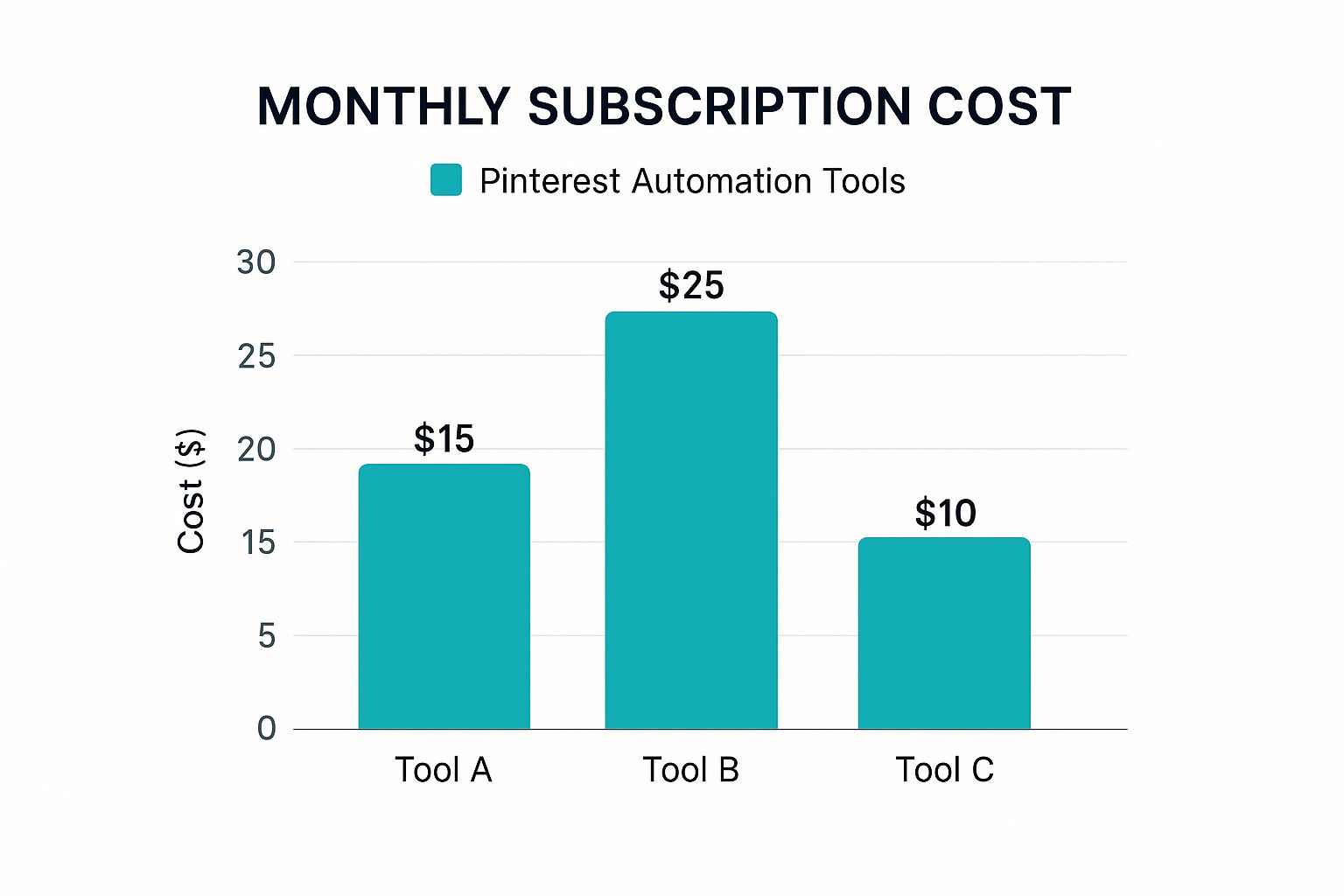
As you can see, pricing often reflects how specialized a tool is. Your final choice really boils down to what you need most: a dedicated Pinterest machine that does it all, or a jack-of-all-trades that can manage your entire social media world.
How Pin Generator Streamlines Your Entire Workflow
Most Pinterest automation tools tackle just one piece of the puzzle—usually scheduling. Pin Generator is built differently. Think of it less as a simple scheduler and more as a complete content creation and management system, designed to connect every single step of your Pinterest marketing.
It bridges the frustrating gap between finding an idea, designing a pin, researching keywords, and finally, getting it published. Instead of juggling three or four different tabs and tools, you get one seamless workflow. It turns a clunky, multi-step process into a smooth, efficient assembly line for your Pinterest content.
Imagine your latest blog post or a new product page is a block of raw material. Pin Generator is the factory that takes that single piece and automatically churns out dozens of finished pins, ready to go, without you needing to manually oversee every step of production.
From URL to a Flood of Fresh Pins
The real magic happens with Pin Generator's AI-powered design engine. This is the feature that will make your jaw drop. Forget spending hours in Canva painstakingly creating one pin at a time. Here, you just give it a URL.
From that one link, the tool gets to work, generating a whole collection of unique, high-quality pin designs. It intelligently pulls images, titles, and key text from your page and mixes them with great-looking, customizable templates. Just like that, you have an instant library of fresh content ready to go. This one feature alone completely demolishes what is often the most time-consuming part of running a successful Pinterest strategy.
Pin Generator transforms content creation from a manual, one-at-a-time chore into a bulk, automated process. You're no longer just scheduling content; you're manufacturing it at a scale that was previously impossible without a full-time design team.
Intelligent Scheduling and Seamless Integration
Once your pins are created, Pin Generator’s smart scheduling kicks in. It’s not just about dumping your content into a queue. The tool strategically plans out when to post everything for maximum impact, letting you schedule hundreds of pins at once. This ensures your account stays consistently active for weeks, or even months, with just a few minutes of work.
This workflow gets even better with direct integrations for the platforms you’re already on.
- WordPress: Automatically turn every new blog post into a fresh batch of pins, ready to schedule.
- Shopify & Etsy: Seamlessly pull in your product listings to create a never-ending stream of shoppable pins.
- RSS Feeds: Hook up any content feed to keep your Pinterest boards populated with new material on autopilot.
These connections mean Pin Generator isn’t just working for you; it works with your existing content ecosystem to create a self-powering marketing machine. To really get a sense of what's possible, it helps to understand how an AI Pinterest pin generator can fundamentally change your content strategy and save you countless hours.
A Complete Content and Management System
By bringing together AI-driven design, smart scheduling, and direct integrations, Pin Generator really stands apart from other Pinterest automation tools. It's not just another helper app; it’s the central command center for your entire Pinterest operation.
The platform even has built-in tools for keyword research and trend analysis. This lets you optimize every single pin for discoverability right inside the same dashboard where you create and schedule them. It’s a holistic approach that ensures every pin isn't just pretty, but also strategically aimed to reach the right people.
At the end of the day, Pin Generator is built to maximize your efficiency so you can see real growth. It streamlines the whole workflow, letting you slash the time you spend on repetitive tasks and focus on the big-picture strategy that actually moves the needle for your business.
Got Questions About Pinterest Automation? We've Got Answers.
Jumping into Pinterest automation tools can feel like you've just discovered a secret marketing superpower. But with great power comes… well, a lot of questions. Is this even safe? Will my account get banned? Can I just set it and forget it?
It's completely normal to have these thoughts. So, let's clear the air. We’re going to tackle the biggest questions and concerns that pop up when creators and businesses think about automating their Pinterest game. The goal here is to give you straight, honest answers so you can make a smart decision.
Is It Safe to Use a Pinterest Automation Tool for My Account?
This is the big one, isn't it? And the answer is a huge YES… with one very important condition. It's only safe if you stick with an official Pinterest Marketing Partner. Tools like Pin Generator or Tailwind have been vetted and approved by Pinterest itself because they play by the rules, using the platform's official API.
Think of the API as a special, secure bridge between the tool and Pinterest. Approved partners use this bridge to interact with your account in a way that Pinterest has pre-approved. They’re working with Pinterest, not against it, so their actions never look spammy or suspicious.
On the flip side, sketchy, unapproved bots that scrape the site or use back-door methods are a one-way ticket to getting your account flagged or even shut down for good. The takeaway is simple: your absolute number one priority should be to check if a tool is an official partner. It’s the only real insurance you have.
Can Automation Just Replace Manual Pinning Altogether?
Not quite. It’s better to think of automation as your most productive employee, not a replacement for you, the CEO. It’s built to crush the repetitive, time-sucking tasks that are crucial for growth but would make any sane person want to tear their hair out.
Here’s how to think about the division of labor:
- Your Automation Tool Handles: Scheduling hundreds of pins at the perfect times, creating 50 different pin designs from a single blog post, and ensuring you have a constant stream of content going live.
- You Handle: The big-picture strategy. You’re the one who dives into analytics to see what’s working, engages with your followers in the comments, and comes up with the brilliant content ideas in the first place.
The magic really happens when you blend the machine-like consistency of automation with your own human creativity and strategic insights. Let the tool worry about the grunt work so you can focus on being the brains of the operation.
Automation is about making your efforts smarter, not obsolete. It frees you from the drudgery of how and when to post, so you can pour all your energy into the what and why behind your content.
How Long Before I Actually See Results from This?
You'll feel the benefit of saved time almost instantly, which is a huge win in itself. But when it comes to seeing real, measurable growth in traffic and clicks, you need to play the long game. For most accounts, it takes about 3 to 6 months of consistent, automated pinning to see a significant impact.
So, why the wait? Pinterest isn't like other social platforms where content has a short lifespan. It's a visual search engine. When you publish a pin, it gets indexed and starts circulating, and its momentum can build for months or even years. The goal isn't a one-hit wonder; it's to build a massive, evergreen library of content that works for you 24/7.
This is exactly why automation is so powerful. It provides the relentless consistency needed to build that library. By publishing a steady stream of quality pins every single day without fail, you're feeding the algorithm exactly what it wants and building a compounding effect. Be patient. Consistency is your superpower here.
What's the Difference Between a Scheduler and a Full Automation Tool Anyway?
This is a great question, and the difference is massive. It’s like comparing a simple delivery truck to an entire automated factory.
A basic scheduler is just the delivery truck. You do all the hard work first—you design the pin, write the description, and choose the keywords. The scheduler’s only job is to take that finished package and drop it off at the time you specify. That's it.
A full automation tool like Pin Generator is the whole factory. It's an active part of the creation process. You give it the raw material—say, a URL to one of your blog posts—and it gets to work. It will:
- Generate dozens of unique, eye-catching pin designs for you.
- Write compelling, optimized descriptions with AI.
- Find the best keywords to help your content get discovered.
- Schedule everything out at the optimal times for engagement.
A scheduler just publishes what you’ve already made. A true automation tool helps you create, optimize, and publish from scratch, turning a multi-step headache into one seamless workflow.
Ready to stop spending hours manually pinning and start building a content machine that runs itself? Pin Generator brings together AI design, smart scheduling, and powerful integrations to put your Pinterest growth on autopilot. Generate your first pins for free and see what it can do for you.