
The Best Pinterest Pin Maker to Automate Your Pins
15 August 2025
For so many creators, the promise of all that Pinterest traffic feels like a mirage. It's always just over the horizon, buried under a mountain of tedious design work. The best Pinterest pin maker, Pin Generator, cuts right through that by automating the whole messy process. It scans any website and instantly whips up beautiful, traffic-driving pins. The goal? To help you make Pinterest pins without the headache and start seeing real growth, today.
How A Pinterest Pin Maker Can Unlock Growth
Think of your website—whether it's a blog, an e-commerce store, or a portfolio—as a goldmine packed with content. Every single product, article, and image is a potential doorway for a new customer. A Pinterest pin maker is like your own personal mining crew, automatically digging through that content and turning it into hundreds of valuable assets that pull visitors in from Pinterest.
This isn't just about making pretty pictures. It's about building a powerful, automated engine that consistently drives traffic back to your site.

The old-school way of doing Pinterest is a grind. You design pins one by one, agonize over catchy descriptions, and then manually schedule everything. It's slow, repetitive, and just doesn't scale. Pin Generator completely flips that model on its head by scanning any website to generate Pinterest pins for you. This frees you up to think about strategy instead of just churning out content.
And that kind of automation is more important than ever. Pinterest isn't just big; it's growing and full of engaged users. As of late 2024, the platform has over 553 million monthly active users worldwide—an impressive 11% jump from the year before. This isn't just a number; it's a massive, expanding audience that's actively looking for what you have to offer. For a deeper dive into these numbers, you can explore what they mean for marketers who want to understand Pinterest's marketing power.
From Manual Labor To Automated Success
Seriously, think about how long it takes to make just ten unique pins by hand. You have to find the right images, pick fonts, write compelling copy, and then get them scheduled. That’s easily a few hours of work.
Now, what if you could create 100 unique, optimized pins in just a few minutes? That’s the real magic of an advanced Pinterest pin maker.
This comparison of manual versus automated workflows shows just how dramatic the difference is.
Manual vs Automated Pin Creation
| Feature | Manual Pin Creation | Automated Pinterest Pin Maker |
|---|---|---|
| Time Investment | Hours per batch of pins (e.g., 2-4 hours for 10 pins) | Minutes for hundreds of pins |
| Content Generation | Requires finding images and writing text for each pin | Automatically pulls images and text from your URL |
| Design Consistency | Difficult to maintain a consistent brand style | Easily maintained using pre-made templates |
| Scalability | Very low; output is limited by your available time | Extremely high; generate and schedule in bulk |
| Effort Level | High; involves repetitive design and scheduling tasks | Low; set it up and let the tool do the work |
This shift from manual effort to automated efficiency is a total game-changer, especially for these groups:
- Bloggers and Content Creators: Instead of getting stuck in a design tool for hours, you can scan your latest article and instantly get dozens of pin variations. This drives a steady stream of traffic to all your new posts.
- E-commerce Owners: An automated pin maker can crawl your entire store and create pins for every single product. This is where direct integrations with platforms like Shopify, Etsy, and WooCommerce become incredibly powerful.
- Marketers and Agencies: Managing multiple client accounts gets so much easier. You can automate pin creation and scheduling across the board, delivering better results with far less overhead.
The real power of a tool like Pin Generator is how it hooks directly into your content. By scanning any website with a sitemap—from a WordPress blog to an Amazon affiliate page—it intelligently grabs your images and text to build pins for you.
This seamless connection means your Pinterest marketing is always in sync with your website. Every new product you list or blog post you publish becomes an instant opportunity for Pinterest traffic, with no extra work on your part.
At the end of the day, a modern Pinterest pin maker is much more than a simple design tool. It's a strategic asset that turns your website into a self-powering source of Pinterest content, helping you drive traffic, boost sales, and grow your brand with incredible efficiency.
The Core Features of a High-Performing Pin Maker
Not all pin makers are built the same. Sure, a basic graphic editor gives you a blank canvas and a few templates, but a truly great Pinterest pin maker acts more like an intelligent marketing partner. It's the difference between being handed a hammer and some nails versus having a skilled crew build the house for you. The best tools are packed with features designed specifically to drive growth, traffic, and sales.
A top-tier tool moves way beyond simple design. It automates the whole creation process, from digging up ideas to scheduling the final pin, making sure every single one is set up for maximum impact. This is where Pin Generator really stands out, turning what used to be a manual chore into a powerful strategic advantage by helping people make Pinterest pins by scanning any website.
Automated Content Scanning and Pin Creation
At its heart, a powerful Pinterest pin maker needs to be able to scan your website and do the heavy lifting. Imagine just pointing a tool at your blog, Shopify store, or Etsy shop and watching it pull all the ingredients it needs to create dozens of unique pins in minutes.
How does it work? By intelligently scanning any website with a sitemap. The tool finds the key pieces and turns them into ready-to-go pin components:
- Images: It automatically grabs product photos, blog post images, and any other visuals right from your pages.
- Titles: It uses your page titles and headings to generate compelling, SEO-friendly text overlays for your pins.
- Descriptions: Meta descriptions and page content get repurposed into optimized pin descriptions, saving you a ton of writing time.
This single function means you can generate a massive number of pins directly from the content you've already created, without ever touching a design program. For anyone with a large product catalog or a backlog of blog posts, it’s a total game-changer.
The real magic is turning your entire website into an endless content machine. Every product you add to Shopify or WooCommerce, and every article you post on WordPress, instantly becomes fresh fuel for your Pinterest strategy.
Seamless Platform Integrations
To be genuinely useful, a pin maker has to play nice with the platforms you already rely on. This smooth connection removes all the friction and makes creating pins feel like a natural part of your daily workflow. Pin Generator was built on this very idea, offering solid integrations for all kinds of users.
Whether you're running an e-commerce empire or you're a full-time blogger, these integrations are a huge deal. An Etsy seller can whip up pins for their entire inventory, while an affiliate marketer can create pins for their Amazon product links. This flexibility means that no matter where your content is, from a WordPress blog or Shopify store to any website that has a sitemap, you can turn it into Pinterest traffic.
AI-Powered Design and SEO Optimization
A truly advanced pin maker doesn't just pull your content—it improves it using AI. It won't just slap some text on an image. Instead, it generates multiple design variations, experimenting with different layouts, fonts, and colors to keep your feed diverse and interesting. This is exactly what the Pinterest algorithm wants to see; it loves fresh, unique content.
AI also gives your SEO a serious boost. It can automatically generate several title and description options, all packed with relevant keywords to help your pins show up in search. Instead of guessing what might work, the tool hands you optimized text built to get clicks. This mix of automated design and smart SEO is what separates a simple tool from a true growth engine, helping you make Pinterest pins that actually work.
How Pin Generator Turns Any Website Into Pins
The real magic of a great Pinterest pin maker is how it turns what you already have into a constant stream of fresh, engaging content. Just think about it: your entire website, every blog post and product page, is a goldmine of potential pins. Pin Generator is basically the key to that goldmine, letting you automatically convert your existing content into a visual marketing machine.
The process is surprisingly simple but incredibly effective. The tool acts like a smart content scout. You just give it a single URL or your website's sitemap, and Pin Generator gets to work, scanning the page to pull out all the essential bits and pieces needed for a great pin.
It’s way more than just a simple copy-and-paste job. The tool intelligently analyzes your content, grabbing things like page titles, meta descriptions, headings, and—most importantly—all the images. This becomes the raw material for its creative engine, which means you can stop manually hunting for assets and get back to your business.
From Website Scan to a Whole Batch of Pins
Once Pin Generator has scanned your URL, this is where the fun starts. It doesn't just spit out one single pin. Nope. It generates a whole batch of unique, ready-to-go pins in just a few seconds. It's like having a professional design team on standby that instantly gets your content and churns out dozens of creative options for you.
This completely eliminates that dreaded creative bottleneck. Instead of staring at a blank canvas wondering where to start, you’re handed a full collection of pins, each with different image crops, text overlays, and color schemes, all just waiting for your final nod of approval.
This simple workflow shows just how fast you can go from an idea to a published pin.
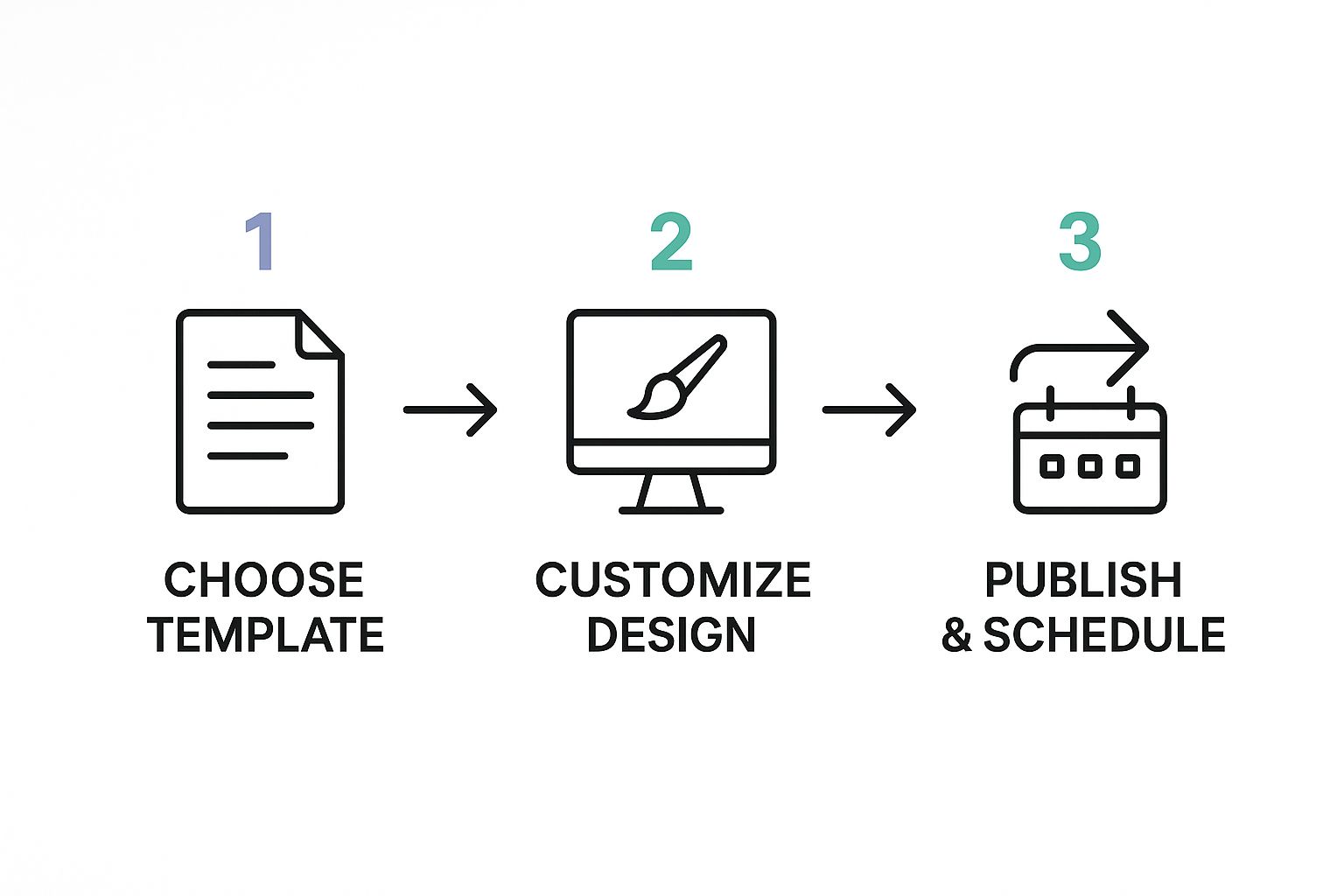
The process puts the focus back where it should be: on strategy and scheduling, not on tedious, manual creation.
Seamless Integrations for Every Creator
What really makes a Pinterest pin maker a must-have tool is its versatility. We built Pin Generator with that in mind, making sure it integrates smoothly with the platforms you're already using. This direct connection lets you generate pins without ever having to break your stride.
These integrations are designed to work for just about any kind of online business or content creator out there:
- WordPress Blogs: Instantly turn your latest blog post into dozens of unique pin variations. This is perfect for driving a steady flow of fresh traffic to your articles right when they go live.
- Shopify and WooCommerce Stores: Automatically scan your entire product catalog. The tool pulls product images, titles, and prices to create shoppable pins that send customers right to your checkout page.
- Etsy Shops: This is a total game-changer for Etsy sellers. You can create a constant stream of beautiful pins for your listings, boosting your visibility and sales without sinking hours into design.
- Amazon Affiliate Links: Promoting affiliate products has never been easier. Just paste an Amazon link, and the tool will generate pins that help you drive that commission-generating traffic.
- Any Website with a Sitemap: If your website has a sitemap—and most do—Pin Generator can read it. That means you can create pins for literally any page on your site, no matter what platform you built it on.
This unmatched compatibility makes Pin Generator the ultimate tool for driving traffic from Pinterest. It breaks down the walls between your content and your audience, wherever your digital home happens to be.
By bridging that gap, the tool makes sure every single piece of content you create has the chance to become a traffic-driving powerhouse on Pinterest. It’s simply a smarter, more efficient way to make Pinterest pins and start seeing real results.
Best Practices for Creating Pins That Convert
It’s one thing to make a pin. It's a whole different ballgame to create one that actually stops the scroll, gets that coveted click, and drives real traffic to your site. Success on Pinterest isn't about just churning out content; it's about having a solid strategy rooted in what makes users tick and what the platform's algorithm loves.
If you follow a few core best practices, you can turn your pins from simple images into little conversion machines.
This is exactly where a quality Pinterest pin maker becomes your secret weapon. Instead of trying to juggle all these design rules from scratch, the best tools have these principles baked right into their templates and workflows. You get to focus on your core message while the tool handles the design heavy lifting, making sure every single pin you create has the best possible shot at success.

The power behind this strategic approach is undeniable when you look at how Pinterest influences real-world spending. In 2024, Pinterest raked in over $3 billion in revenue, which shows just how engaged its users are and how well its shopping features work.
Here's the kicker: an incredible 85% of weekly Pinterest users have bought something based on pins they’ve seen. That’s a direct line from pin creation to consumer action. If you want to dive deeper, you can explore more about Pinterest's impact on purchasing decisions and how it shapes what people buy.
Design for a Vertical, Mobile-First World
Let's be real: most people are scrolling through Pinterest on their phones. This means your pins have to be designed to look fantastic in a vertical format, grabbing attention instantly on a small screen.
- Optimal Aspect Ratio: Stick to a 2:3 vertical aspect ratio. The sweet spot is 1000 x 1500 pixels. This size takes up maximum screen real estate, making your pin impossible to miss.
- High-Quality Visuals: Use crisp, clear, high-resolution images and videos. Anything blurry or pixelated looks amateur and gets scrolled past in a heartbeat.
- Bold Text Overlays: The image is your hook, but the text on top is what reels them in. Use big, easy-to-read fonts that spell out exactly what someone gets for clicking—whether it's a recipe, a how-to guide, or a product they'll love.
Craft Compelling Copy and Calls-to-Action
Once you've caught their eye, your words need to seal the deal. This goes for the text on the pin itself and in the pin's title and description. A great Pinterest pin maker can even help by generating multiple SEO-friendly options for you to choose from.
Your copy needs to be all about the benefits, and you have to include a clear Call-to-Action (CTA). Don't just write "Chocolate Chip Cookies." Instead, try "The Easiest One-Bowl Chocolate Chip Cookie Recipe." Then, slap a CTA like "Get the Recipe" or "Click to Bake" right on the image to tell people what to do.
Think of your pin as a mini-advertisement. It needs to quickly communicate value and tell the user exactly what to do next. Ambiguity is the enemy of conversions.
Leverage Pinterest SEO for Discoverability
At its heart, Pinterest is a visual search engine. That means keywords are your best friends. To make sure your pins pop up when people are searching for ideas, you need to put on your SEO hat.
Here’s where you should strategically place your keywords:
- Pin Title: This is prime real estate for keywords. Make your title descriptive and think about what a user would actually type into the search bar.
- Pin Description: Write a detailed, keyword-rich description. Weave in related keywords naturally to give Pinterest more context about your awesome content.
- On the Pin Itself: Yep, Pinterest's algorithm can read the text on your pin image. Make sure your main keyword is right there on the design.
- Board Names: Pin your content to relevantly named boards that are also optimized with keywords in their own titles and descriptions.
By consistently following these practices, you create a powerful feedback loop. Well-made pins get more engagement, which tells the Pinterest algorithm your content is high-quality, which leads to more reach and, ultimately, more traffic. A smart Pinterest pin maker automates the tough parts—design and SEO—making it easier than ever to roll out these winning strategies at scale.
Getting to Know the Pinterest Audience
Before you can create a pin that really connects, you have to know who you’re talking to. It’s not just about crunching numbers; it’s about understanding the people behind the searches and saves. Knowing who’s scrolling gives you a massive advantage and is the secret to making pins that truly resonate.
When you get this right and tailor your content to the platform’s core users, your engagement can go through the roof. This is where a good Pinterest pin maker really shines, letting you quickly tweak your designs and messaging to match exactly what your audience is looking for.
Who’s Actually Using Pinterest?
Pinterest’s audience isn’t like other platforms—they’re active, inspired, and ready to take action. A closer look at the user base reveals some key trends that can give your content strategy a serious boost. For starters, the platform is heavily dominated by women, making up about 69.4% of its global users.
Digging a little deeper, the biggest and most engaged group is women between 25-34, who account for over 20% of all users. But things are changing. Gen Z is the fastest-growing demographic on the platform, bringing new energy and different tastes into the mix. You can read up more on these demographic shifts over at Sprout Social.
These aren't just random stats; they're your roadmap. They tell you who is most likely to see your pin and what they're probably interested in.
When you get a handle on these core demographics, you can stop making generic pins and start creating content that feels like it was made just for them. That personal touch is what turns a casual browser into a loyal follower.
How to Tailor Your Pins for the Right People
Once you know who’s on Pinterest, you can start making smarter creative decisions. Different groups have their own unique preferences, from visual styles to the topics they're searching for. A flexible Pinterest pin maker is perfect for this, letting you cater to these different tastes without having to start from scratch every single time.
Here's how you can adjust your approach:
-
For Millennial Women (Ages 25-34): This audience is often in a planning mindset. Think home decor, new recipes, wedding ideas, and parenting hacks. They love pins with a clean, aspirational vibe, warm color palettes, and text overlays that offer clear, helpful information.
-
For the Growing Gen Z Audience: This group is all about authenticity, creativity, and self-expression. They’re drawn to content on fashion, beauty tutorials, DIYs, and social causes. To grab their attention, go for bold colors, eye-catching video pins, and trendy, informal fonts.
To really connect with these users, your keyword strategy has to be as strong as your visuals. Our guide on Pinterest keyword research will walk you through finding the exact terms these groups are typing into the search bar. When you nail both your visuals and your SEO, you create a powerhouse pin that drives way more traffic. Your Pinterest pin maker is the tool that helps you bring it all together and execute this strategy efficiently.
Got Questions About Pin Makers? We've Got Answers.
Jumping into a new tool always brings up a few questions. An automated Pinterest pin maker is a serious game-changer for your marketing, but it's totally normal to wonder how it all works. Let's tackle the most common questions we hear to clear things up and show you just how powerful a tool like Pin Generator can be.
Think of this as your cheat sheet for understanding how to get your Pinterest growth on autopilot.
Can a Pin Maker Really Create Unique Designs Automatically?
Yes, and this is where the magic happens. A smart Pinterest pin maker like Pin Generator doesn't just slap your images onto the same tired template. It uses AI to pull images from your URL and then intelligently cycles through a massive library of fonts, color palettes, and layouts to generate hundreds of genuinely distinct pin variations.
This means your Pinterest feed stays fresh and visually interesting, which is exactly what you need to stop scrollers in their tracks. More importantly, it feeds the Pinterest algorithm what it loves most: new, original content. You get to scale your output without your profile looking like a copy-and-paste job.
Will Using an Automated Tool Get My Account Flagged for Spam?
This is a super important question, and the answer is no—as long as you're using a quality tool designed to work with Pinterest. A top-tier pin maker like Pin Generator is built from the ground up to avoid spammy behavior.
The secret is variation.
By creating unique pin visuals and optimized descriptions for every post, even if they point to the same blog post or product, the tool mimics what a human would do. It tells Pinterest you're consistently providing fresh, valuable content. This is the complete opposite of what gets accounts in trouble: posting the exact same image and description over and over again.
A smart pin maker plays by the rules. It’s all about creating a steady stream of high-quality, diverse content that people actually want to see—which is exactly what Pinterest wants to promote.
How Does It Work With My Shopify or Etsy Store?
The integration is incredibly slick and designed to turn your products into a non-stop traffic engine. For e-commerce stores on platforms like Shopify, Etsy, or WooCommerce, a tool like Pin Generator can scan your entire sitemap.
It automatically pulls all the key details:
- Product images and galleries
- Product titles
- Pricing and sale information
From there, it creates beautiful, shoppable pins for your products in bulk. We're talking about generating dozens—or even hundreds—of unique, optimized pins for your entire catalog in just a few minutes. It builds a direct highway from discovery on Pinterest right to the checkout page on your site, driving traffic and sales with almost zero manual effort.
Is This Good for Beginners Who Can't Design?
Absolutely. In fact, it's perfect for you. Tools like Pin Generator are made for entrepreneurs, bloggers, and marketers—not professional graphic designers. You don't need an ounce of design experience to create pins that look amazing and get clicks.
The platform gives you professionally designed templates and AI-powered suggestions, so your pins are effective right out of the gate. It completely eliminates the design bottleneck that trips so many people up. This frees you to focus on your actual business while the best Pinterest pin maker handles the creative heavy lifting for you.
Just drop in a link from any website—a WordPress blog post, an Amazon affiliate product, you name it—and let the tool get to work. It scans the page, pulls the important stuff, and generates a whole batch of pins ready to start driving traffic today.
Ready to stop wasting hours creating pins by hand and start getting real traffic from Pinterest? Pin Generator is the best Pinterest pin maker for scanning any website—from Shopify and Etsy to your personal blog—and turning your content into hundreds of unique, optimized pins in minutes.