
Your Strategic Pinterest Posting Schedule (And How to Automate It)
17 August 2025
When it comes to a solid Pinterest schedule, the magic is in strategic consistency. We’re not just talking about pinning randomly; we're talking about a calculated plan that signals to the Pinterest algorithm that your account is an active, reliable source of ideas. This is how you get seen and drive real traffic. A winning strategy involves publishing fresh content daily—usually between 5 to 15 new Pins—and making sure they go live when your audience is actually scrolling.
Why Your Pinning Schedule Can Make or Break Your Growth
Have you ever felt like you're pinning into the void? You share a bunch of Pins one day, get busy, and then nothing for a week. If that sounds familiar and the traffic isn't flowing, you're definitely not alone.
Here’s the hard truth: Pinterest rewards consistent effort more than anything else. A random, scattershot approach just confuses the algorithm. But a steady, strategic schedule? That tells Pinterest you’re a serious creator who consistently provides value. It’s not about pinning 24/7; it's about pinning smarter.
Think of it this way: Pinterest’s job is to give users exactly what they’re looking for, right when they’re looking for it. A well-planned schedule is what feeds that system, signaling that your content is fresh, relevant, and deserves a spot in front of eager Pinners.
How Many Pins Should You Actually Post a Day?
There's no single "right" answer here, because the best pinning frequency really depends on where you're at with your website. A brand-new blog has different needs than a well-established e-commerce site.
Here’s a simple breakdown based on experience:
- For New or Relaunching Websites: Your main job is to build authority from scratch and get your content indexed. An aggressive approach of 10 to 15 fresh Pins per day works wonders here. This high volume is a powerful way to get on the algorithm's radar, test what resonates, and start building that initial momentum.
- For Established Websites: You already have a footprint, so the game changes. Now, it's all about maintaining that momentum with high-quality content. A steady rhythm of 5 to 8 fresh Pins daily is perfect for driving sustained growth without burning out your audience (or yourself).
Adjusting your volume based on your growth stage is one of those small tweaks that makes a huge difference.
To make this crystal clear, I've put together a simple blueprint you can use as your starting point.
At-a-Glance Pinterest Pinning Blueprint
Use this table as your starting point. It breaks down the recommended daily pinning frequency based on your website's current stage.
| Your Website Stage | Recommended Daily Pins | Primary Goal |
|---|---|---|
| New or Relaunching | 10 – 15 Fresh Pins | Build authority, get indexed, gain initial traction |
| Established & Growing | 5 – 8 Fresh Pins | Maintain momentum, nurture audience, drive consistent traffic |
| Mature & Stable | 3 – 5 Fresh Pins | Focus on quality, test new formats, sustain presence |
Remember, these are guidelines. The key is to find a sustainable rhythm that works for you and stick with it.
Automate Your Way to Consistency
Let's be real: who has time to manually pin multiple times a day, every single day? It's a recipe for burnout. This is exactly why automation tools like Pin Generator are a game-changer.
You can set up your ideal pinning schedule once—how many Pins, what time zone, which time slots—and let the tool do the heavy lifting for you.
A winning Pinterest strategy isn't about frantic bursts of activity. It’s built on a steady, automated consistency that works in the background, even when you’re focused on other things.
With Pin Generator, you can literally define your daily pin count, set your audience's time zone, and even specify two different posting windows to catch both the morning coffee scrollers and the late-night planners. It’s how you guarantee your content gets in front of the right eyeballs at the right time, day in and day out.
This need for a consistent, fresh stream of content is only becoming more important. Pinterest is on track to hit 570 million users in 2025, with Gen Z now making up a massive 42% of that audience. To stay relevant in this growing ecosystem, the platform itself now recommends posting 5 to 15 fresh Pins daily. You can dig into more of these audience trends over on Tailwind's blog.
Finding Your Daily Pinning Sweet Spot
Alright, let's tackle the million-dollar question: how many pins should you actually be posting every day? There’s no magic number that works for everyone. The right answer really depends on where you are in your journey—whether your website is brand new or has been around the block a few times.
It all comes down to finding the right velocity. You want to post enough to keep the Pinterest algorithm interested but not so much that the quality of your pins starts to suffer.
The term you'll hear a lot is fresh pins. This is just Pinterest-speak for a new image or video that hasn't been seen on the platform before. It can link to an old blog post, but the visual itself must be new. Pinterest loves this.
Pinning Strategy for New Websites
If you’re just starting out with a new blog or website, your main goal is to get on Pinterest's radar. Fast. You need to build up a presence and show the algorithm that you're a serious, active creator.
For this phase, I've found a more aggressive (but still manageable) approach works wonders.
- Daily Pin Count: Shoot for 10-15 fresh pins per day.
- The Goal: This higher volume helps you quickly build up a library of content. It’s also the fastest way to test what your audience actually clicks on and helps you get indexed in Pinterest's search results much quicker.
Think of it this way: every single pin is another chance to rank for a new keyword and pull in that initial wave of traffic.
You're essentially front-loading your effort to speed up the "getting to know you" phase with the Pinterest algorithm. It’s a short-term sprint that sets you up for a long-term marathon.
Pinning Strategy for Established Websites
Now, if your website already has some history and a decent stream of traffic, your strategy changes. The focus shifts from that initial land grab to maintaining momentum and refining quality. You’ve built the foundation; now you just need to keep it strong.
For an established site, consistency is way more important than sheer volume.
- Daily Pin Count: A steady rhythm of 5-8 fresh pins per day is perfect.
- The Goal: This cadence keeps your account active and your audience engaged without overwhelming them. It signals to Pinterest that you're a reliable source of quality content for the long haul.
At this stage, you're not trying to prove yourself from scratch. You're reinforcing the authority you've already built. A more moderate pace is not only sustainable but also prevents your followers from getting pin fatigue.
Automating Your Daily Pin Count with Pin Generator
Let’s be real—manually creating and scheduling this many pins every single day is a recipe for burnout. This is exactly where a tool like Pin Generator becomes your secret weapon.
Inside the scheduling settings, you can literally just tell it how many pins to post for you each day.
Whether you're aiming for 15 pins for your new site or a steady 7 pins for your established one, the tool makes sure it happens. You just set your timezone, pick a couple of ideal time slots for pinning, and let it do the work. Pin Generator handles the rest, making sure your account hits its daily quota consistently. This kind of smart automation is the key to maintaining the perfect Pinterest posting schedule without losing your mind.
Pinpointing Your Audience's Peak Engagement Hours
Figuring out what to pin and how often is a huge step, but it's only half the battle. The other, equally critical piece of your Pinterest posting schedule is pinning when your audience is actually online and ready to engage.
Pinning at random times is like setting up a shop but only opening it in the middle of the night—you’ll miss almost everyone.
While your own Pinterest Analytics will give you the most tailored insights, general data provides a fantastic starting point. Broad research consistently shows that users are most active during evening hours on weekdays and then again mid-morning on weekends. This is why you often see advice suggesting that pins published between 8 PM and 11 PM on weekdays, and 8 AM to 11 AM on weekends, tend to get the most traction.
But just sticking to one time slot can still leave a lot of traffic on the table.
The Dual-Window Strategy for Maximum Reach
A more advanced strategy I swear by involves using two distinct time windows to capture different user behaviors. Think about it: the person scrolling for quick inspiration with their morning coffee has a completely different mindset than the person meticulously planning a project after dinner.
By pinning in both windows, you cater to both audiences.
This dual-window approach is simple but incredibly effective:
- Morning Window (e.g., 7 AM – 9 AM): This grabs the early risers, the commuters on their phones, and anyone looking for a spark of inspiration to start their day.
- Evening Window (e.g., 7 PM – 10 PM): This targets the after-work crowd, the hobbyists, and the serious planners who are deep in a project and saving ideas for later.
This strategy ensures your content is consistently visible during the platform's busiest hours. You're effectively doubling your chances of being seen by a wider slice of your audience across different routines and even time zones.
Automating Your Time Windows with Pin Generator
Let's be real—manually timing your pins for these specific windows is a massive pain. This is exactly where automation becomes your best friend. Pin Generator was built with this dual-window strategy in mind.
Inside the scheduling setup, you don’t just pick a single time. You can specify two separate time windows and lock in your target time zone. For example, if you're a food blogger targeting a US audience, you might set your schedule to pin between 7-9 AM and 6-9 PM EST.
By automating your pinning within these two peak windows, you ensure perfect timing without ever having to think about it. The system intelligently spreads your daily pins across these optimal periods, maximizing visibility while you focus on other things.
This set-it-and-forget-it approach transforms your Pinterest posting schedule from a daily chore into a powerful, automated growth engine. It perfectly combines the "how many" with the "when," giving every single pin the best possible chance to succeed.
To dive deeper into finding your specific audience's best times, check out our guide on the best times to post on Pinterest.
Automating Your Perfect Pinning Schedule
Figuring out your daily pin count and best posting times is one thing. Actually executing that plan day in and day out is a whole different ballgame. This is exactly where automation comes in, turning your Pinterest posting schedule from a nagging daily chore into a hands-off growth machine.
Instead of being chained to your computer, manually uploading every single Pin at just the right moment, you can set your strategy once and let a tool do the heavy lifting.
This guarantees perfect consistency—and consistency is the secret sauce for winning on Pinterest. The algorithm loves accounts that provide a steady drip of fresh content, and automation is the most reliable way to deliver.
Setting Up Your Automated Schedule in Pin Generator
Putting your schedule on autopilot with Pin Generator is refreshingly simple. The tool is built around this exact strategic framework, letting you lock in your entire pinning plan with just a few clicks. The goal is to take your decisions about volume and timing and turn them into a system that just works.
Here’s how to get your ideal schedule dialed in:
- Set Your Daily Pin Count: First, tell the tool how many pins you want to publish each day. If you have a newer site, you might start with 10-15 pins to build momentum. For an established site, 5-8 pins per day is a great target for maintenance.
- Select Your Time Zone: This one’s critical. Always, always choose the time zone where most of your audience lives. If you're a UK-based blogger but your readers are mostly in the US, you need to set your schedule to a US time zone like EST or PST.
- Define Your Two Time Windows: Now you’ll implement that dual-window strategy. Set up a morning window (say, 7 AM to 9 AM) and an evening one (maybe 6 PM to 9 PM). Pin Generator will then intelligently space out your daily pins across these two peak engagement periods.
That’s it. Those three settings are all it takes to automate your Pinterest presence the right way.
A Real-World Scheduling Example
Let's walk through a scenario. Imagine you're a food blogger with a well-established website, and your audience is primarily in the United States. Your goal is to publish 7 fresh pins per day.
Inside Pin Generator, your setup would look just like this:
- Pins Per Day: 7
- Time Zone: America/New_York (EST)
- Time Window 1: 7:00 AM – 9:00 AM
- Time Window 2: 6:00 PM – 9:00 PM
With these settings locked in, Pin Generator will automatically publish your 7 pins every single day, spreading them out within those morning and evening slots to maximize visibility. This means you’re catching both the "what's for dinner?" crowd in the morning and the late-night recipe browsers without ever having to log in and do it yourself.
This simple flow diagram breaks down the core steps of setting up your automated Pinterest workflow.
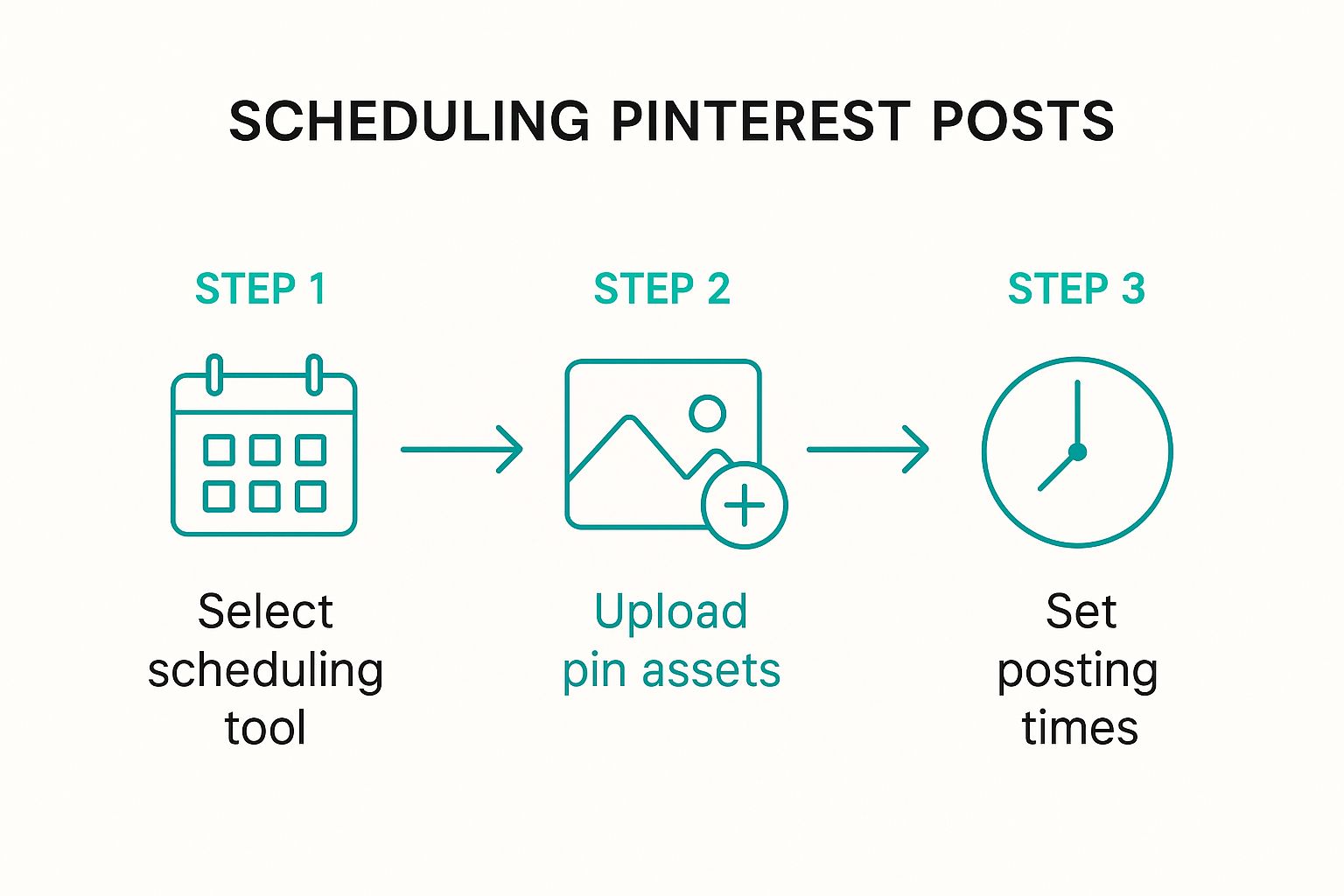
As you can see, automation boils your strategy down to the essentials: choosing your tool, feeding it content, and defining your times.
The True Power of Automation for Growth
Automating your schedule isn't just a time-saver; it’s about ensuring the kind of algorithmic consistency that Pinterest thrives on. When you pin manually, life gets in the way. You get busy, you forget a day, and your momentum grinds to a halt. An automated system never has an off day.
By automating your pinning schedule, you remove the single biggest obstacle to Pinterest growth: inconsistency. Your account works for you 24/7, building authority with the algorithm even when you're offline.
This is why a solid automation tool is a non-negotiable for anyone serious about Pinterest marketing. If you want to dive deeper into the mechanics, our detailed guide on how to schedule Pinterest posts breaks down even more advanced techniques.
Ultimately, automation is the bridge between having a smart strategy and actually executing it flawlessly.
Why Pinterest Isn't Your Average Social Media Channel
If you’re just copying and pasting your Instagram or Facebook strategy over to Pinterest, you're making a huge mistake. Seriously. You’re leaving the platform’s biggest superpower on the table.
Unlike the blink-and-you'll-miss-it feeds on other networks, a Pin's life isn't measured in minutes or hours. It's measured in months—sometimes even years. This single, fundamental difference is why your entire game plan, especially your pinterest posting schedule, needs a complete rethink.
Think about it. A post on Facebook or X (what used to be Twitter) is ancient history by lunchtime. On Pinterest, a Pin is an evergreen asset. It can catch fire months after you’ve published it, continually sending traffic your way. You aren't just posting for today; you're building a searchable, visual library for tomorrow's customers.
It’s All About the Long Game
You need to stop thinking of Pinterest as a social feed and start treating it like a visual search engine. That's exactly what it is. People aren't there to catch up on what their friends did last night. They're there to plan.
They're looking for dinner ideas, planning a renovation, or dreaming up their next vacation. This future-focused mindset is key. They save Pins to boards and come back to them weeks, months, or even a year later when they're ready to act.
This is what gives your content such an incredible shelf life. And it’s precisely why having a consistent, automated schedule is so incredibly powerful. Every single Pin you schedule is another evergreen asset you're adding to your collection, just waiting to be discovered.
On other platforms, you're shouting into a crowded room, hoping someone hears you right now. On Pinterest, you're carefully placing a book on a library shelf, knowing the right person will find it eventually.
Let the Numbers Do the Talking
The difference becomes even more stark when you look at the data on posting frequency. On a platform like X, it’s not uncommon for businesses to post 18.1 times per week. It’s a volume game.
But on Pinterest? Marketing experts agree that pinning just 1 to 3 times daily is often the sweet spot. It’s about quality and relevance, not just blasting out content.
This slower, more deliberate pace is baked into the platform’s DNA as a discovery engine. And don't mistake a lower posting volume for lower impact. In fact, Pinterest drives 33% more traffic to e-commerce sites than Facebook does. That's a massive difference. If you want to dive deeper into how posting frequency stacks up across different networks, you can discover more insights on Hootsuite's blog.
Getting your head around this core distinction—long-term value over short-term buzz—is the absolute foundation of a winning Pinterest strategy. It makes a consistent, automated schedule not just a nice-to-have, but a non-negotiable for real, sustainable growth.
Answering Your Top Pinterest Scheduling Questions
Alright, even with the best tools, you're bound to have some questions as you start building out your Pinterest schedule. That’s completely normal. Let's walk through a couple of the most common ones I hear, so you can fine-tune your strategy and get the most out of your automated workflow.
How Many Pins Should I Be Pinning Each Day?
This is the big one, and the answer isn't one-size-fits-all. It really boils down to how long your website has been around.
-
For Brand New Websites: You need to be more aggressive right out of the gate. I recommend aiming for 10-15 fresh Pins a day. The goal here is to quickly build authority and get Pinterest's algorithm to notice you. Think of it as a sprint to get that initial traction.
-
For Established Websites: If your site has been around for a while, you can shift gears. Your focus is now on quality and sustained growth. A steady pace of 5-8 fresh Pins per day is perfect for keeping your momentum without spamming your followers.
Inside Pin Generator, you’ll see the "Pins Per Day" field right in your settings. Just pop your number in there, and the tool takes care of the volume for you.
What's the Best Way to Set Up My Daily Schedule?
This is where strategy really comes into play. It’s not just how many Pins you post, but when they go live. My go-to method is to create two separate posting windows to catch your audience at different times of the day.
I like to think of it as fishing. You want to cast your line when the fish are biting—once in the morning when people are scrolling for inspiration with their coffee, and again in the evening when they're planning projects.
Setting this up in Pin Generator is a breeze.
You just define your first time window—say, 7 AM to 9 AM—and then your second one, like 6 PM to 9 PM. The most important part? Make sure you set the right time zone for where most of your audience lives.
Once that’s set, the tool intelligently spreads your daily Pins across those two peak periods. It's a completely hands-off way to make sure you're always posting at the most impactful times.
Ready to stop guessing and put your Pinterest growth on autopilot? With Pin Generator, you can lock in your daily pin count, define your peak posting windows, and let the smart scheduler do all the heavy lifting. It's time to build a powerful Pinterest presence that works for you around the clock.
Start your free trial of Pin Generator today and see the difference a consistent, automated strategy can make.