
Unleash Ideas with a Random Pinterest Pin Generator
6 October 2025
We’ve all been there. Staring at a blank content calendar, wondering how on earth you're going to come up with another fresh pin idea. Creative burnout is a real drag, especially when you're trying to keep a Pinterest account buzzing. This is exactly where a random Pinterest pin generator can feel like a secret weapon, acting as your personal brainstorming partner to breathe new life into your strategy.
Escaping the Pinterest Content Rut
Relying on the same old pin formats and content angles is a recipe for audience fatigue and stagnant growth. Let's be honest, Pinterest is a visual playground that demands constant freshness. When your creative well runs dry, your traffic and engagement are the first things to take a nosedive.
Think of a pin generator not as a replacement for your creativity, but as a spark for it. It's a fantastic way to break out of your own creative echo chamber by throwing unpredictable ideas your way, keeping your boards dynamic and your followers clicking.
This is a huge deal on a platform with such a massive, active audience. In 2025, Pinterest clocked in around 578 million monthly active users worldwide, with nearly half of them jumping on the platform every single week. That's a massive opportunity to connect with people who are actively looking for new ideas.
Why Fresh Ideas Matter So Much
When you consistently put out varied, interesting content, you're sending a strong signal to the Pinterest algorithm that you're an active, valuable creator. It’s tempting to stick with what you know, but playing it safe is a surefire way to limit your reach. A generator can nudge you to explore new content pillars you might have completely overlooked.
- Discover Untapped Angles: It might suggest a "how-to" pin for a product you've only ever shown in lifestyle shots.
- Spark New Visual Concepts: A simple text prompt can be all it takes to inspire a completely new design template you'll use for months.
- Smash Through Creative Blocks: When you feel totally stuck, it gives you an immediate starting point. No more blank-page paralysis.
Just take a look at the Pinterest feed. It's a competitive space where visually distinct and fresh ideas are absolutely essential to get noticed.
You can see how everything from video pins to static images and idea pins are all fighting for attention. Your content needs to be different to make an impact.
The real magic of a random Pinterest pin generator is its ability to shatter your content patterns. It forces you to think beyond your usual categories and create pins that can pull in entirely new segments of your audience.
If you're serious about breaking free from repetitive content and injecting some real creativity into your Pinterest game, learning about automating content creation with smart AI tools can be a game-changer. These tools work with your creative process, making sure you always have a fresh perspective ready to go.
Comparing Manual vs Generator-Assisted Ideation
See how a generator can supplement your traditional content brainstorming process for more efficient and creative results on Pinterest.
| Aspect | Manual Brainstorming | Using a Pin Generator |
|---|---|---|
| Speed | Can be slow, especially during creative blocks. | Instantly generates dozens of ideas in seconds. |
| Variety | Often limited by personal biases and past success. | Introduces unexpected angles and formats. |
| Burnout Factor | High. The pressure to innovate is constant. | Low. Acts as a brainstorming partner, reducing pressure. |
| Scalability | Difficult to scale without a large team. | Easily scales idea generation for high-volume pinning. |
| Keyword Exploration | Relies on manual research and familiar terms. | Can suggest niche keywords you might have missed. |
While manual brainstorming will always have its place for deep, strategic planning, adding a generator to your toolkit is a smart move. It handles the heavy lifting of initial idea generation, freeing you up to focus on refining the best concepts and creating truly standout pins.
How to Choose the Right Pin Generator

Picking the right random Pinterest pin generator isn't about grabbing the one with the longest feature list. It's about finding a tool that actually fits your workflow and what you're trying to achieve on Pinterest. The options out there are surprisingly diverse, from super simple text prompters to slick platforms that practically dream up entire visual concepts for you.
Think about it this way: a food blogger trying to spin one recipe into dozens of unique pins has totally different needs than an e-commerce brand that needs to showcase a new product line.
The blogger needs a generator that's a beast at spitting out catchy titles and calls-to-action. The e-commerce store, on the other hand, would benefit more from a tool that suggests different visual layouts and creative ways to photograph their products.
Key Features to Look For
When you're comparing tools, try to look past the shiny marketing copy and focus on what's actually going to save you time. A gorgeous interface is useless if it doesn't mesh with how you already create content.
Here’s what I’d keep an eye on:
- Customization and Niche Focus: Can you tell it what not to suggest, or guide it toward your main content topics? The best tools let you rein in the randomness so the ideas are always relevant to your audience.
- Integration with Design Tools: A generator that hooks directly into Canva or provides its own editable templates is a game-changer. It closes the gap between coming up with the idea and actually making the pin.
- AI-Powered Copywriting: Don't just settle for title ideas. Look for tools that can also whip up SEO-friendly descriptions. Some of the more advanced generators can even write compelling copy for Idea Pins, which is a massive time-saver.
The best pin generator feels less like a tool and more like a creative partner. It should give you enough structure to stay on-brand but also provide that random spark you need to climb out of a content rut.
At the end of the day, you're looking for something that removes friction from your process, not adds another complicated step.
Matching a Tool to Your Needs
So, where’s your biggest bottleneck? Is it writing headlines that make people click? Or is it just staring at a blank screen trying to think of a fresh visual?
A DIY home improvement blogger, for example, might get a ton of value from a generator that suggests project-based titles like "Weekend DIY Under $50" or "Budget-Friendly Reno Ideas."
Meanwhile, a graphic designer might need a tool that suggests creative ways to showcase their portfolio or ideas for client testimonial pins. It's all about your specific pain points.
Your perfect random Pinterest pin generator will feel like a natural part of your strategy. For a deeper dive into how these tools fit into a bigger marketing plan, check out our guide on using a pin generator for Pinterest. It’s packed with more context and advanced tips.
Remember, the right choice is the one you’ll actually open up and use consistently.
From Random Prompt to Polished Pin Concept
This is where the magic really happens. A random Pinterest pin generator is fantastic for breaking through creative blocks, but an idea is just that—an idea. It's what you do with that spark of inspiration that separates a pin that just sits there from one that actually drives traffic.
Think of it as turning a raw ingredient into a finished dish. Let's walk through how this plays out.
Imagine you run a blog focused on home and garden topics. You're stuck for ideas, so you plug "urban gardening" into a generator. The tool might give you a pretty straightforward, if slightly bland, prompt like "compact herb garden for apartment kitchens."
Okay, it’s a solid starting point, but it’s not going to stop the scroll. This is where your expertise comes in. Instead of just running with it, you can instantly make it more compelling by tapping into a common pain point.
How about something like: "No Yard? No Problem! Create a Thriving Kitchen Herb Garden." See the difference? It's immediately more personal, relatable, and offers a clear solution.
Building Out the Pin Concept
A catchy title gets the attention, but you need to build out the rest of the concept to get that coveted click. The pin has to deliver on the promise of the headline.
Here's how I'd flesh out our herb garden idea:
- Nail the Description: Keep it short and pack it with related keywords. Something like: "Learn how to start a compact herb garden right in your apartment kitchen! Perfect for small spaces and beginners, this guide covers everything from choosing pots to the best herbs for indoor sunlight. #UrbanGardening #KitchenGarden #ApartmentLiving"
- Decide on Visuals: What does this pin look like? You need a clear vision. For this one, I'm picturing a bright, high-quality photo of a sunny kitchen windowsill lined with fresh herbs in cute, stylish pots. The image should scream "aspirational but achievable."
- Add a Text Overlay: The title is your main overlay, but you can add a little extra something to boost curiosity. A small banner saying "5 Must-Have Herbs" is a perfect way to hint at the value inside and encourage them to click through for the details.
The infographic below really breaks down this simple workflow—from a computer-generated idea to a piece of content ready for your scheduler.
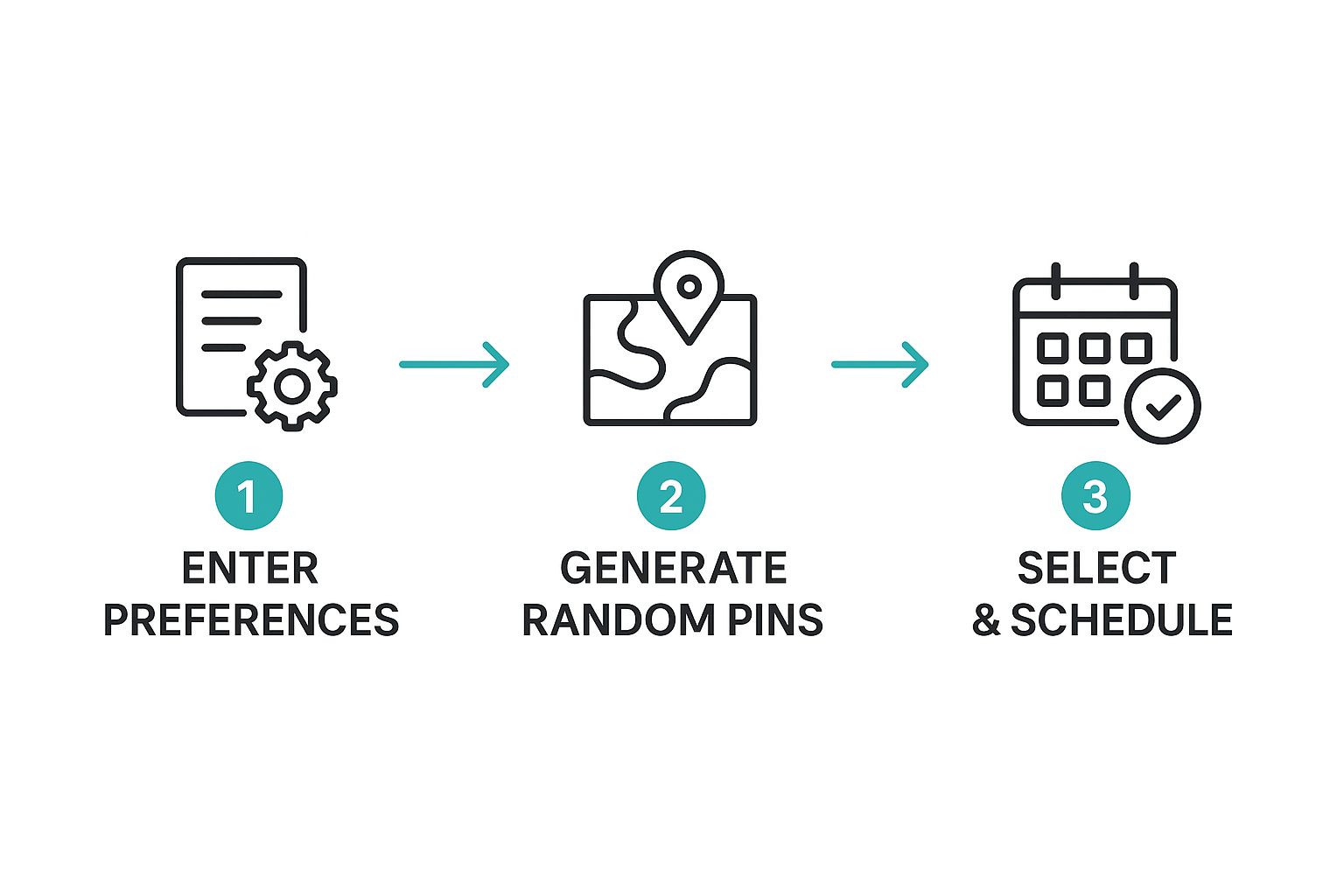
This process shows you how a tool can handle the initial grunt work, leaving you free to do what you do best: adding the creative, strategic touches that make a pin truly connect with people.
The generator’s role is to answer the question, "What should I post about?" Your role is to answer, "Why should my audience care?" That's the crucial step where a random idea becomes a polished, strategic pin.
This transformation is the heart of a smart Pinterest strategy. You're combining the speed of a tool with your own unique knowledge of your audience. You're not just filling your content calendar; you're solving real problems for people, one pin at a time.
Turning Generated Ideas Into High-Performing Pins
Think of an idea from a random Pinterest pin generator as your launchpad, not the final destination. The real magic happens when you take that raw concept and shape it into a pin that actually stops the scroll, gets clicks, and brings people back to your site. Execution is everything here.
So, where do you start? The very first thing I do is inject my own unique brand voice. If the tool spits out something generic like "easy weeknight dinner," I don't just run with it. For my brand, which is all about clean eating, I'd transform that into "15-Minute Clean Eating Dinners Your Family Will Actually Love."
See the difference? That little tweak makes the content feel authentic and personal, not like it was written by a robot. It’s this human touch that turns a generic prompt into a pin that performs. The generator is your brainstorming partner—it's there to get the creative juices flowing, not to do all the work for you.
Crafting Pins for Clicks and Conversions
Once you've got your unique angle, it's time to zero in on the three elements that make or break a pin: the title, the description, and the visual. Each one has a critical job to do.
- SEO-Driven Titles: Your title has to be catchy, sure, but it also has to be searchable. Weave your keywords in naturally to grab the attention of people who are actively looking for what you offer.
- Keyword-Rich Descriptions: This is your second chance at SEO gold. Use the description to sprinkle in related keywords and give a clear, concise summary of what someone gets when they click through.
- A Clear Call-to-Action (CTA): You have to tell people what to do next. Simple phrases like "Click to read the full recipe" or "Shop the look now" are direct and effective at guiding users off Pinterest and onto your website.
The most effective pins act as a bridge between a user's problem and your solution. The generated idea points you in the right direction, but your strategic execution builds the bridge.
This whole process is so important because people on Pinterest are in discovery mode. An incredible 96% of Pinterest searches are unbranded, which shows just how much users rely on the platform to find new ideas, not just specific brands. By optimizing your generated ideas, you're putting your content right in their path.
Ultimately, turning ideas into real results is a constant cycle. You get a steady stream of concepts from the generator, and then ongoing marketing performance optimization is what ensures those ideas actually connect with your audience and convert. For a deeper dive, check out our guide on crafting the perfect Pinterest pin.
Take Your Pin Generation Strategy to the Next Level
Once you’ve got the hang of basic idea creation, it's time to unlock your random Pinterest pin generator's true power. This is where the tool stops being just an idea machine and becomes a core part of your entire marketing engine.
One of my favorite pro moves is A/B testing headlines. Don't just settle for the first title that comes to mind. For a single blog post, generate five totally different title concepts with your tool. Create a unique pin for each one, schedule them out, and then just watch. In a few weeks, you'll have hard data showing which style of headline actually connects with your audience. That insight is gold for all your future content.
Systemize Your Workflow for Maximum Impact
If you really want to level up, start batching your pin creation. I block out one session a month to generate a massive list of pin ideas. This lets me map out my entire content calendar in one sitting, which is a huge efficiency boost. Plus, it guarantees I'll have a steady stream of fresh content going out, keeping the algorithm happy.
Here's a tip: Don't just take the generated ideas at face value. Look for the patterns. If the tool keeps spitting out topics you haven't touched on yet, you've just stumbled upon a content gap in your niche—one your competitors are probably missing, too.
This systematic approach also helps you zero in on who's actually on Pinterest. As of 2025, about 70% of Pinterest users are women, with the 25-34 age group being the largest slice of the pie. Knowing this, you can use the generator to specifically explore angles that resonate with this audience. Think budget-friendly home decor hacks or quick weeknight meals for the family. For more juicy stats, check out these insights on Pinterest's powerful user demographics.
When you start using tactics like these, your pin generator transforms. It's no longer just a helper for when you're stuck; it becomes a systematic engine driving real, data-informed growth for your brand.
Common Questions About Pin Generators
Whenever you're thinking about adding a new tool to your workflow, it’s natural to have a few questions. And when it comes to something like a random Pinterest pin generator, it’s smart to tackle those hesitations head-on. Let's clear up a couple of the big ones so you can jump in with confidence.
Probably the biggest worry I hear is, "Won't this just make my content look generic?" The answer is a hard no—as long as you use it the right way. Think of the generator as a brainstorming partner, not a robot that does your job for you.
Its role is to give you a creative spark, that little nudge toward an angle you might have completely missed. Your job is to take that spark and light it up with your brand's voice, your unique visual style, and the value only you can provide. The best pins are always a mix of the tool’s random creativity and your human touch.
How Often Should You Use a Generator?
There's no magic number here, but the key is to build it into your regular content planning. Many creators I know have found a good rhythm by firing it up once a week or even once a month to batch a huge list of ideas. This way, you’re never staring at a blank content calendar wondering what to post next.
A pin generator is your secret weapon for those moments when you feel completely stuck. It’s the perfect on-demand tool for smashing through creative blocks and getting an instant jolt of inspiration.
Are Free Pin Generators Worth It?
Absolutely. A free tool is a fantastic way to dip your toes in the water. It’s perfect for getting a feel for the workflow and generating simple, text-based ideas without spending a dime.
But, if you find yourself using it consistently, the paid versions are where the real magic happens. They often unlock powerful features that can seriously speed up your entire process:
- AI-Driven Visual Suggestions: Get ideas for layouts and imagery that actually work.
- Deeper Niche Customization: Tell the tool exactly what topics to focus on for more relevant ideas.
- Scheduling Software Integrations: Push your best ideas straight into your content calendar.
My advice? Start with a free tool and see how it fits. If you love it, you can then figure out if a premium option makes sense for your specific Pinterest strategy and goals.
Ready to stop staring at a blank page and start creating pins that actually drive traffic? Pin Generator can help you come up with hundreds of fresh ideas in seconds. Try Pin Generator today and see how easy Pinterest marketing can be.