
Your Guide to a Pin Generator for Pinterest
30 September 2025
If you've ever felt like you're stuck on a content treadmill, manually churning out pins day after day, a pin generator for Pinterest is exactly what you need. It can take your Pinterest marketing from a soul-crushing chore to a streamlined, automated machine that grows your traffic for you. The goal? To create hundreds of on-brand pins in just a few minutes.
Why a Pin Generator Is a Marketing Game Changer
So many bloggers, marketers, and e-commerce brands hit a wall with Pinterest. I've seen it time and time again. The biggest roadblocks are almost always the sheer amount of time it takes and the struggle to keep every single pin looking consistent with your brand.
Let's be real: spending hours every single day inside a design tool just isn't a sustainable path to long-term growth. This is where a dedicated pin generator completely flips the script.
Instead of creating one-off designs, you're suddenly able to mass-produce visually stunning pins that never stray from your brand guidelines. This simple shift is huge. It means you can finally A/B test different designs, headlines, and calls-to-action to figure out what your audience actually responds to. Most importantly, it helps you nail that consistent posting schedule that the Pinterest algorithm absolutely loves.
Overcoming the Manual Grind
The biggest win here is getting back your most valuable resource: your time. By automating the design part of the process, you can easily free up hours every single week.
Imagine what you could do with that extra time. You could dive into your analytics, refine your keyword strategy, or actually engage with your community—all things that directly move the needle for your business.
This is especially true if you're in e-commerce. A pin generator is a massive shortcut for your social media marketing for e-commerce efforts, giving you a serious leg up in reaching new customers.
The real power of a pin generator isn't just making more pins; it's about making smarter pins, more consistently, without the burnout. It turns Pinterest from a content treadmill into a strategic asset.
To really drive the point home, let's look at a side-by-side comparison.
Manual Pin Creation vs Using a Pin Generator
Here's a direct comparison that shows the efficiency gains and strategic benefits of adopting a pin generator over traditional manual methods.
| Feature | Manual Pin Creation | Using a Pin Generator |
|---|---|---|
| Time Investment | High: Hours per week spent designing, writing, and scheduling individual pins. | Low: Minutes to generate and schedule hundreds of pins at once. |
| Output Volume | Low: Typically 1-5 unique pins per piece of content. | High: Can create 20-100+ pin variations from a single URL. |
| Brand Consistency | Challenging: Requires strict adherence to brand guides for every single pin. | Effortless: Templates ensure every pin is automatically on-brand. |
| A/B Testing | Difficult: Creating enough variations to test effectively is very time-consuming. | Simple: Easily generate multiple headlines, images, and CTA variations to test. |
| Scheduling | Tedious: Requires uploading and scheduling each pin one by one. | Integrated: Often includes built-in bulk scheduling and smart shuffling features. |
| Creative Burnout | Common: Repetitive design tasks quickly lead to fatigue and uninspired content. | Rare: Automation handles the repetitive work, freeing you for high-level strategy. |
As you can see, the difference isn't just about saving time—it's about enabling a much more effective and sustainable Pinterest strategy.
Tapping Into a Growing Audience
The potential to reach people on Pinterest is absolutely massive, and it's not slowing down. As of the first quarter of 2025, Pinterest is boasting an incredible 570 million monthly active users, which is a 10% jump from the previous year.
But here's the stat that really matters for businesses: a staggering 85% of weekly Pinners have actually bought something based on pins they saw from brands. That number alone shows just how critical this platform is.
This growing, purchase-ready audience is out there, actively searching for what you have to offer. A pin generator is the tool that ensures you can show up for them consistently.
Getting Your First Pin Generation Workflow Running
Jumping into a pin generator for pinterest isn't about getting bogged down in technical details. It's really about building a smart, repeatable system that saves you time in the long run. The first few steps are designed to be quick and easy, so you can get to the creative part faster.
First thing's first: you need to securely connect your Pinterest account. This is usually just a simple, one-time login that authorizes the tool to schedule pins directly to your boards. With that out of the way, the real magic starts. It's time to teach the generator about your brand's unique look and feel.
Dialing in Your Brand Kit for Consistency
Think of your brand kit as the visual DNA of your content. To keep everything looking consistent, you'll want to get your core brand elements uploaded right away.
This usually means:
- Your Logo: Make sure to upload a high-resolution version. This will get automatically placed on your pin templates.
- Brand Colors: Plug in the specific hex codes for your main and secondary color palettes.
- Custom Fonts: If you use specific fonts, upload the files. This ensures every single pin's text is perfectly on-brand.
Taking a few minutes to do this pays off massively. It guarantees that whether you're creating 10 pins or 1,000, each one will instantly look like it came from you. This is huge for building brand recognition.
The real goal of a pin generator workflow isn't just about speed. It's about building a system where brand consistency is the default, not something you have to worry about every time.
Connecting Your Content Sources
Once your brand visuals are locked in, the next step is to tell the generator what content it should be promoting. This is where you connect your various content sources, and what you use will depend on your business.
A food blogger, for example, would probably connect their blog’s RSS feed to automatically pull in new recipes as they're published. An e-commerce store could link up their Shopify product catalog. An affiliate marketer might just upload a simple spreadsheet of URLs.
The image below really brings to life what a well-oiled workflow can achieve.
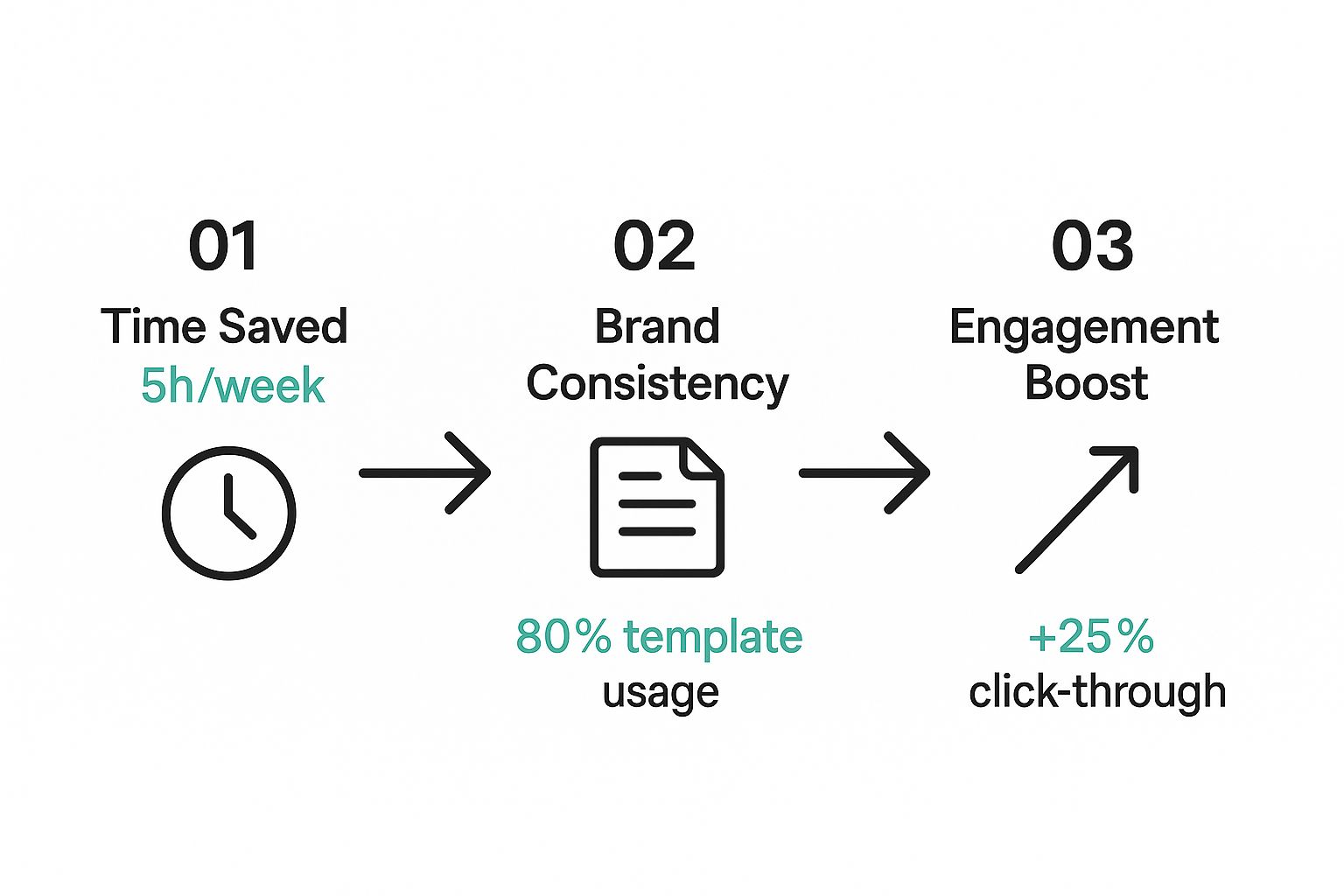
As you can see, the time you invest upfront leads directly to massive time savings, better brand consistency, and a real boost in engagement down the line. It helps to have a broader understanding of AI for content creation to see how these specialized tools fit into the bigger picture.
By setting up these inputs, you create a seamless pipeline that flows from your content straight to your Pinterest boards. This leaves you with just one final, creative task: designing your first set of pin templates. These are the foundational designs the tool will use to spin up endless on-brand variations for you.
Designing High-Performing Pins at Scale
Let's get one thing straight: using a pin generator for pinterest isn't about spamming your boards with a bunch of identical, low-effort pins. The real goal is to produce quality content at a high volume. It all starts with building a solid foundation of versatile templates that you can adapt endlessly to keep things feeling fresh.
I recommend starting with just a handful of core templates. Each one should have its own distinct feel. For instance, you could design one that's very image-focused, another that uses a bold text overlay to grab attention, and maybe a third with a cool collage layout. This variety is key to preventing your followers from getting "design fatigue."
And before you get too deep into designing, make sure your templates are set up for success. That means using the right dimensions. We've got a whole guide breaking down the ideal Pinterest pin dimensions that you'll want to check out. Getting this right from the beginning ensures your pins look crisp and professional on every device.
Making Your Content Dynamic
This is where the magic really happens. A good pin generator lets you use dynamic text overlays. Think of these as smart placeholders in your templates that automatically pull in different headlines and descriptions for every new pin you create. It’s a deceptively simple feature that makes each pin feel unique, even if it shares the same basic layout.
To really kick things up a notch, you can feed your keyword research directly into this process. Say you have a list of long-tail keywords for a specific blog post. You can plug those into the generator to instantly create dozens of pin variations, each with its own unique, SEO-friendly title.
Your goal is to build a system where every single pin is not just visually appealing but also strategically optimized to be found. When you combine strong templates with keyword-rich text, you're essentially creating a powerful engine for organic reach.
This is more important than ever when you consider the sheer amount of content on Pinterest. By 2024, users had saved over 240 billion Pins. Standing out in that sea of content requires smart design and even smarter SEO. Ultimately, this strategic approach is what separates a successful, automated Pinterest strategy from one that just feels repetitive and spammy.
Automating Your Pinterest Schedule for Maximum Reach
Look, creating beautiful pins is just the first step. The real growth on Pinterest? It comes from scheduling those pins smartly and consistently. A pin generator for pinterest is what turns this from a daily grind into a set-it-and-forget-it system that brings in steady traffic.
This is where you shift from just making pins to building a strategic posting calendar. Instead of logging in to manually upload every single pin, you set up a queue. This queue then automatically publishes your pins at the best possible times for your audience. Trust me, this level of consistency is a massive signal to the Pinterest algorithm that your account is active and worth showing to more people.
One of the best things about Pinterest is the long life of your content. Unlike a tweet or an Instagram post that's gone in a flash, pins can drive clicks for months after you post them. This long-term value is exactly what makes Pinterest such a powerhouse for website traffic.
Building a Smart Scheduling Plan
A smart schedule isn't just about posting a lot; it's about being precise. Let’s say you run an e-commerce store and you're launching a new line of fall sweaters. Your goal is to create a sustained "drip" of content that builds excitement, not a single blast that's quickly forgotten.
You could set up your Pin Generator with some simple but powerful rules:
- Targeted Boards: Make sure specific sweater designs go to the right boards. Think "Cozy Fall Fashion," "Knitwear Inspiration," and "Autumn Outfit Ideas."
- Smart Intervals: Set your scheduler to publish a new pin every 3-4 hours. This keeps your content popping up throughout the day without spamming anyone's feed.
- Content Rotation: Don't post the same pin to the same board too often. A good rule of thumb is to wait at least 7-10 days to keep things fresh.
This approach builds momentum naturally. What's even better is that an AI-powered scheduler can dig into your account's performance data to figure out when your followers are most active, getting you more reach without any extra work on your part.
A well-automated schedule is your secret weapon for Pinterest growth. It ensures your best content is seen by the right people at the right time, turning your creative efforts into measurable results like clicks and sales.
By planning ahead, you can line up weeks or even months of content in a single sitting. This is a game-changer. For even more tips on getting this right, check out our guide on creating an effective Pinterest posting schedule. It's full of actionable strategies to help you transform Pinterest from a time-suck into a powerful, automated marketing asset.
Advanced Strategies to Maximize Your Results
Once you've got the basics of automation down, it's time to get a lot more strategic. Let's move beyond just scheduling pins and dive into the growth tactics that really scale your efforts on Pinterest.
This is where you can start leveraging a pin generator for pinterest to do some seriously powerful things, like large-scale A/B testing. Instead of manually creating two or three pin variations to see what sticks, imagine generating dozens at once.
You can test everything—different images, headlines, calls-to-action, or color schemes—and get data back lightning fast. This is how you quickly discover what your audience actually responds to and then double down on it.
Automating Your Content Pipeline
For e-commerce brands, this is a total game-changer: integrating your product feed. You can set up a completely automated pipeline where new products are instantly turned into fresh pin designs. No more manual work every time you add something to your store.
You can even take it a step further by connecting a feed of user-generated content. This adds authentic social proof to your marketing mix, all without you lifting a finger. It creates a constant stream of new, relevant content that keeps your boards fresh and super engaging for your followers.
The ultimate goal here is to create a self-sustaining system. To do that, you have to focus on the metrics that actually matter—like outbound clicks and saves, not just impressions. This data is your roadmap for refining your entire strategy.
By continuously analyzing the performance of your generated pins, you can fine-tune your templates and content sources. This creates an awesome feedback loop where your automation gets smarter and more effective over time, driving real, meaningful results for your business.
Got Questions About Pin Generators?
When you first dip your toes into using a pin generator for Pinterest, a few questions always seem to pop up. I get it. It sounds a bit too good to be true. Let's walk through the most common ones so you can get started with confidence.
One of the biggest hang-ups I hear is the fear of automation getting your account into trouble. The short answer? Not if you're smart about it. The key is using an official Pinterest Marketing Partner, because these tools are built from the ground up to play by Pinterest's rules.
Is Using a Pin Generator Actually Safe for My Account?
Yes, as long as you stick with a reputable tool, using a pin generator is completely safe. Official Pinterest partners aren't some back-alley operation; they're designed to work directly with the platform's API and stay within the terms of service.
The real danger isn't the tool—it's how you use it. If you start pinning the same URL a dozen times a day or churning out low-quality, spammy-looking pins, you're asking for trouble.
The goal here is to amplify your strategy, not to spam your followers. By scheduling a variety of fresh designs at natural intervals, your account will stay in excellent standing with Pinterest.
So, How Many Pins Should I Be Scheduling Per Day?
There's no single magic number, and frankly, anyone who tells you there is is selling something. Consistency is always, always more important than sheer volume.
For most creators, a solid starting point is scheduling between 5 to 15 new, unique pins each day. That's a goal that feels overwhelming manually but becomes incredibly easy with a good pin generator.
Don't just dump them all at once, either. Spread them out across your most relevant boards throughout the day. This simple trick keeps your account looking active and gives your content more chances to be seen. Keep an eye on your Pinterest Analytics to see what frequency works best for your audience—that's the only data that really matters.
A pin's success comes down to its design, its relevance, and its SEO. It has nothing to do with how it was created. Generated pins are just as effective as manual ones because you still have full control over the quality and branding of your templates.
Ultimately, these tools are about working smarter, not harder. They let you test different designs and scale up what's working way faster than you ever could by hand. More often than not, this leads to even better performance over time.
Ready to stop wasting time and start growing your Pinterest traffic on autopilot? Pin Generator gives you the tools to create, schedule, and automate hundreds of on-brand pins in minutes. Start your journey to effortless Pinterest marketing today.