
How to add Amazon affiliate links to product pins
Steps to add Amazon affiliate links and capture the pictures
If you're using Pin Generator to drive affiliate sales, then you need to include the correct outbound URL in your pin.
- Use the Amazon product link without your affiliate ID when creating the pins
- Finalize your design with the images that have been pulled through
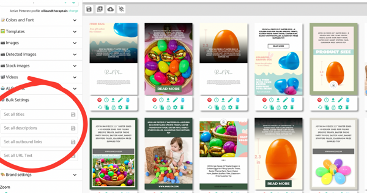
- Add your affiliate link in the Bulk Settings section from the left-hand menu
You can find out more about marketing your Amazon affiliate products with this video, where Ollie addresses the topic of links at 7 minutes and 30 seconds: https://www.youtube.com/watch?v=TUh0B46iSnA&ab_channel=OliverBoyers.