
How to Create Stunning AI Generated Pinterest Pins with Pin Generator
12 August 2025
Let’s be honest: creating a ton of high-quality Pinterest pins is a grind. If you want to see real results, you need a high volume of fresh visuals, but who has the time? This is where AI-generated pins completely change the game.
Tools like Pin Generator can take any website URL and, within seconds, spin it into dozens of unique, eye-catching pin designs. The AI doesn't just slap an image on a template; it handles the whole nine yards—writing catchy titles, crafting compelling descriptions, and even generating brand-new imagery from scratch. It's like having a design assistant who works at lightning speed.
Why AI-Generated Pins Are Your New Secret Weapon
Pinterest is, at its core, a visual search engine. To win here, you need two things: creativity and consistency. For bloggers, marketers, and online stores, that’s a massive challenge. How do you keep feeding the beast with fresh content without hitting total burnout?
This is exactly where AI-generated Pinterest pins become your secret weapon. Instead of painstakingly designing every single pin, AI tools give you a much smarter workflow. They take over the most draining parts of content creation, so you can finally focus on the bigger picture.
Overcoming Creative Bottlenecks
We've all been there—staring at a blank canvas, completely out of ideas. The pressure to be constantly creative can be paralyzing. Think of AI as your personal brainstorming partner. It can serve up endless variations of designs, headlines, and calls to action, ensuring your content pipeline never runs dry.
A single blog post can suddenly become 10 or 20 different pin concepts, each one tailored to a slightly different angle or keyword. It’s the perfect cure for creative block.
By letting AI handle the repetitive grunt work of design and copywriting, you free up your time for what really matters: strategy and analysis. You get to shift from being a content creator to a content strategist—and that's what truly drives growth.
Tapping into a Purchase-Ready Audience
Pinterest isn't just a place for inspiration; it's a powerful commerce platform. People aren't just scrolling—they're actively planning their next purchase.
The platform's user base is growing fast, and it's attracting a younger, digitally-savvy crowd, with 42% of its users now being Gen Z. These are shoppers who are ready to discover and buy.
The numbers don't lie. Referral traffic from Pinterest to e-commerce sites is 33% higher than from Facebook, and ads on the platform deliver a 32% greater return on ad spend. Since most people use Pinterest on their phones, the vertical format of AI-generated pins is already optimized to meet them right where they are. These figures highlight a massive opportunity just waiting for you. You can dive deeper into these trends with updated Pinterest statistics.
How to Generate AI Pinterest Pins with Pin Generator
Imagine turning any blog post or product page into a dozen unique Pin ideas in just a few seconds. This is the absolute core of Pin Generator, and it's where you first see the magic of AI-generated Pinterest pins come to life. Instead of staring at a blank canvas, you're starting with your own content and letting the AI do the heavy lifting.
The process couldn't be simpler. You just grab a URL—whether it's for a new blog post, a Shopify product, or an Etsy listing—and paste it into Pin Generator. The AI immediately scans the page to pull out important images and text, giving you a visual starting point right away.
From URL to Multiple Pin Designs in Seconds
After the AI scans your link, it doesn’t just spit out a single, lazy option. It creates a whole variety of Pin designs for you to choose from. It also automatically writes titles and descriptions based on what it found on your page. This isn't just basic copy-pasting; it's smart content repurposing that will save you a ridiculous amount of time.
For instance, if you have a blog post about "10 Healthy Smoothie Recipes," the tool can instantly spin that into multiple pins, each one focused on a different recipe or a unique health benefit.
This workflow is a total game-changer, especially for bloggers and e-commerce stores who need a constant flow of fresh Pins. It completely removes the friction of having to start from scratch every single time you want to post.
A Deeper Dive Into Pin Generator's AI Toolkit
Pin Generator does more than just pull existing content. It gives you a full suite of AI tools to tweak and perfect your Pins. On top of generating pins from a URL, the platform gives you powerful tools to:
- Write and Remix Titles & Descriptions: Let the AI whip up different titles and descriptions with a single click. This makes it super easy to A/B test different hooks and see what resonates with your audience.
- Generate AI Images: You can instantly create brand-new, unique images using the built-in AI image generator. This is a lifesaver when your original blog post is short on good visuals or you just want something totally fresh and eye-catching.
- Generate Alt Text: The AI can also write descriptive alt text for your pin images. This is a huge deal for both accessibility and Pinterest SEO, and it’s a step most people forget.
This chart breaks down how you can define what you need, create a unique AI image, and then get the pin ready to publish.
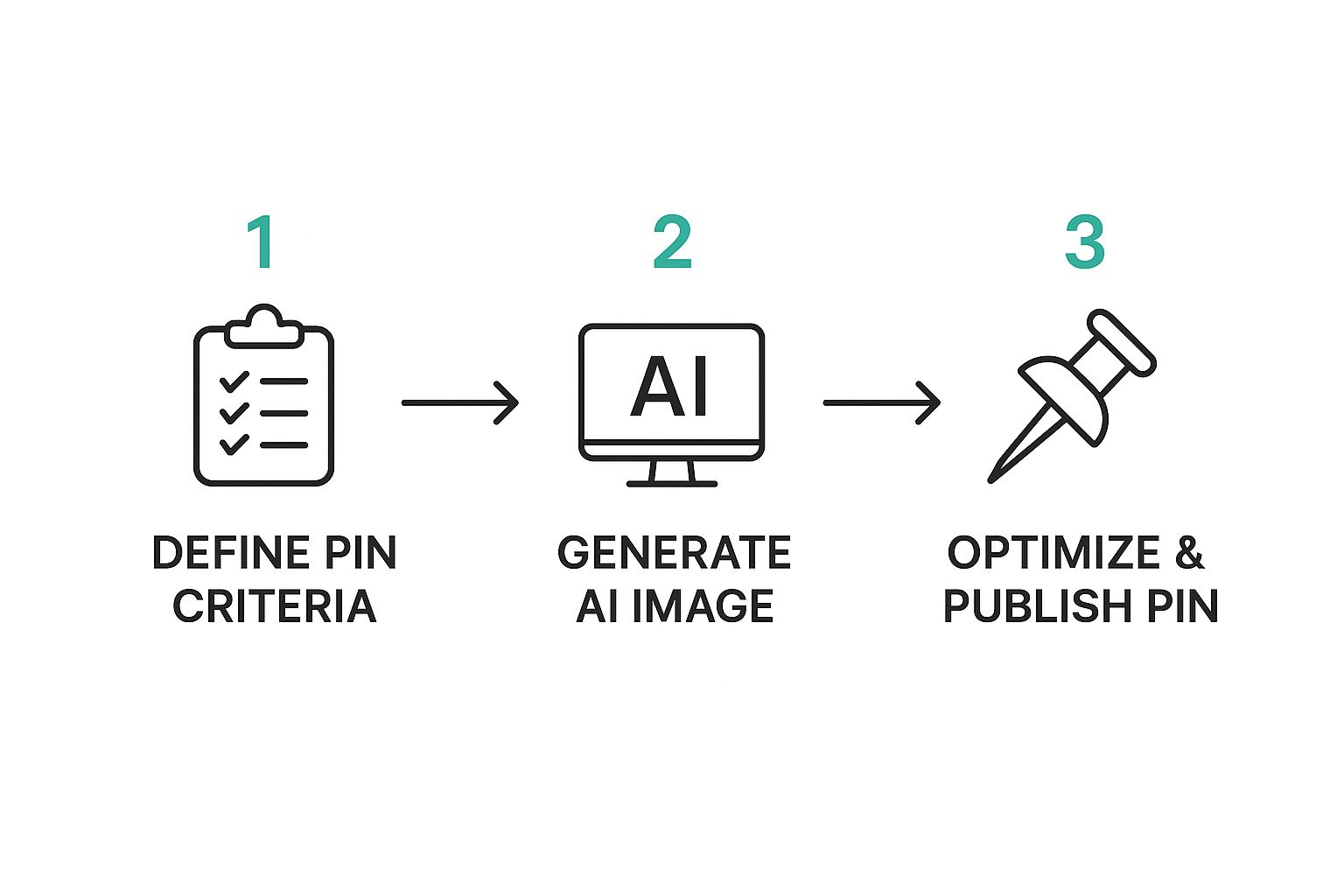
As you can see, it's a straightforward, three-part flow that takes you from the initial idea all the way to a fully optimized pin that's ready to go live.
From here, you can jump right into scheduling. You can schedule your new pins in batches with the Intelligent Scheduler or put your content on autopilot with AutoPins, which pulls from a source like an RSS feed to automatically create and post for you. It’s all designed to keep your profile active and driving traffic 24/7.
Refine Your Designs with AI-Powered Creativity
Getting a good design is just the start. What really makes a Pin connect with your audience is that touch of personalization. After Pin Generator works its magic and gives you a batch of pins from your URL, the real fun begins in the AI editing suite. This is your creative playground, where you take a great starting point and turn it into a high-performing pin that’s undeniably you.
The whole process feels incredibly natural. You’re not stuck with the first draft. Instead, you have a whole suite of AI tools ready to help you tweak, remix, and perfect every last detail. It’s this blend of AI speed and human control that makes creating AI generated Pinterest pins so darn effective.
Craft Compelling Text with an AI Writer
Let’s be honest: your Pin's title and description are what make people stop scrolling and click. They need to be snappy and convincing. Pin Generator's built-in AI writer takes the guesswork out of finding the right words. With just one click, you can spin up several different titles and descriptions, each offering a slightly different hook or keyword angle.
I find this feature especially powerful for A/B testing. You can whip up two or three versions of the same Pin, pop in a different headline for each, and let your audience's behavior tell you what works best. It's a ridiculously fast way to learn what your followers actually respond to.
On top of that, the AI also handles the descriptive alt text for your Pin images. This is a huge deal for both accessibility and Pinterest SEO, but it's something that often gets pushed to the bottom of the to-do list. The AI makes sure your Pins are optimized for screen readers and search algorithms, giving your visibility a nice little boost without you lifting a finger.
Generate Unique On-Brand AI Images
Now for the real game-changer: the integrated AI image generator. What happens when your blog post is all text and no compelling visuals? Or when you need a very specific image that simply doesn't exist? This is where the magic happens. The tool lets you create brand-new, high-quality images that fit your brand aesthetic, right inside the platform.
Instead of spending hours scrolling through stock photo sites for the same tired images everyone else is using, you can generate visuals that are 100% unique to you. Just feed the AI some simple text prompts, and watch it create images that match your specific color palette, mood, and style.
Think about the possibilities:
- For a food blogger: Prompt an image of a "rustic wooden table with a steaming bowl of vegan chili, topped with fresh cilantro."
- For a fashion brand: Create a "flat lay of a summer dress, sunglasses, and a straw hat on a clean, white background."
- For a DIY site: Generate a visual of "a brightly lit workshop with neatly organized tools on a pegboard."
This is how you ensure every single Pin feels fresh and stands out in a super crowded feed. Using an advanced Pinterest AI generator like this one essentially puts a complete creative studio at your fingertips.
By combining AI-generated text, AI-generated images, and your own strategic oversight, you can produce a steady stream of truly unique Pins. This moves you beyond simple automation and into the realm of AI-assisted creativity.
To really understand the power you're working with, it helps to break down what Pin Generator’s AI is doing behind the scenes. Each feature is designed to tackle a specific part of the Pin creation process, saving you time while improving quality.
Pin Generator AI Features for Maximum Impact
| AI Feature | Function | Key Benefit |
|---|---|---|
| URL-to-Pin Creation | Analyzes a webpage and automatically generates multiple Pin designs. | Instantly creates a variety of on-topic Pins, eliminating creative block. |
| AI Text Writer | Generates multiple titles, descriptions, and alt text for each Pin. | Speeds up copywriting and optimizes Pins for SEO and accessibility. |
| AI Image Generator | Creates unique images from text prompts directly within the editor. | Provides endless, on-brand visual assets without needing stock photos. |
| Smart Templates | Offers AI-powered, professionally designed templates as a starting point. | Ensures designs are visually appealing and follow Pinterest best practices. |
| Branding Kit | Automatically applies your brand colors, fonts, and logo to new Pins. | Maintains perfect brand consistency across all your content with zero effort. |
These capabilities work together to create a seamless workflow, allowing you to focus on the high-level strategy while the AI handles the heavy lifting.
Best Practices for Using AI on Pinterest
Let's be honest, using AI for your Pinterest marketing is all about working smarter, not just faster. While a tool like Pin Generator can whip up dozens of AI generated Pinterest pins in a flash, the real win is building a brand that people trust and love. This is where you blend the awesome efficiency of AI with your own human strategy.
Think of AI as your super-capable assistant. It does the heavy lifting—drafting designs, writing copy, and handling the scheduling grunt work. But you? You're the creative director, providing that final seal of approval and making sure every single Pin feels true to your brand.
Keep It Real with a Human Touch
Pinterest thrives on inspiration and authenticity. As AI-generated content becomes more common, keeping that genuine feel is what will set you apart. People follow you for your unique take on things, so every Pin, even one started by AI, needs to have your voice.
Pinterest itself is getting serious about transparency. With the rise of AI visuals, the platform has started adding a ‘Gen AI’ label to images created or modified by AI. It’s a smart move to maintain user trust by being upfront about how content is made. If you want to dive deeper, you can read more about how Pinterest is adapting to AI content and what it means for creators like us.
Your most valuable contribution is the final human review. It’s the step that separates high-quality, on-brand content from generic, automated posts. This review ensures that AI’s output matches your brand's unique voice and high standards.
Your Final Human Review Checklist
Before hitting "schedule" on a batch of AI-generated Pins, always give them a quick once-over. This final check is what turns a good Pin into a great one.
- Check the Text: Does the title and description actually sound like something you'd say? Don't be afraid to tweak the wording to match your personality and make sure the call-to-action is crystal clear.
- Review the Visuals: Is the image high-quality and relevant? Look closely for any weird AI artifacts or mistakes and ensure the overall aesthetic fits your board.
- Confirm Brand Consistency: Do the colors, fonts, and your logo look right? A consistent visual identity is how people start recognizing your brand instantly.
- Verify the Link: This is a big one. Always double-check that the Pin links to the right URL. A broken link is a dead end for your audience and a totally wasted opportunity.
When you treat AI as your most valuable assistant instead of a replacement, you get the best of both worlds. It frees you from the tedious tasks, letting you focus on the big-picture strategy that truly grows your Pinterest presence.
Automate Your Pinning with an Intelligent Scheduler
Creating gorgeous AI generated Pinterest pins is a huge win, but it’s really only half the battle. If you want to see real growth on Pinterest, you have to pin consistently. And let's be honest, that can feel like a full-time job. This is where Pin Generator really shines, letting you move beyond manual pinning and into smart automation.
After you've designed a perfect set of pins, you can use the Intelligent Scheduler to schedule pins in batches. Instead of guessing when to post, the tool helps you spread your content out automatically, making sure it gets in front of your audience at the best possible times. This is a massive time-saver. What used to be a tedious, click-heavy task now takes just a few seconds.
Put Your Pinterest on Autopilot with AutoPins
Ready to take that a step further? Imagine your Pinterest account essentially running itself, publishing fresh, on-brand content day in and day out without you lifting a finger. That's not a fantasy—it's exactly what the AutoPins feature does.
AutoPins is a true set-and-forget system that allows you to automatically create and schedule pins on a revolving schedule. You can hook it up to a content source, like your blog’s RSS feed, and it will automatically pull your latest articles, generate brand new pins for them, and post them on a schedule you define.
For instance, you could set it up to:
- Grab a new blog post every Monday.
- Generate 5 unique pin designs for that post.
- Schedule those pins to go out all week long to your most relevant boards.
This is a game-changer. It keeps your profile buzzing with fresh content, which is a huge signal to the Pinterest algorithm. Your brand stays visible and drives traffic 24/7, even when you’re completely unplugged and focused on other things.
The Power of Smart Scheduling
A consistent pinning schedule is absolutely critical for winning on Pinterest. The algorithm loves active accounts that share quality content regularly. By automating this piece of the puzzle, you're guaranteeing you stay in the game, feeding the algorithm exactly what it wants and keeping your profile in front of your ideal audience.
This kind of automation frees you from the daily grind. You can batch-create your pins for an entire week or month in one go, set the schedule, and let the system do the heavy lifting. It transforms your Pinterest marketing from a constant time-suck into a strategic, automated asset for your business.
If you really want to become a pro at this, our guide on how to schedule Pinterest posts breaks down even more advanced strategies.
Of course. Here is the rewritten section, crafted to sound human-written and match the specified expert tone and style.
Your AI Pinterest Questions, Answered
Jumping into AI for your Pinterest marketing is a smart move, but I get it—it can bring up a lot of questions. You might be wondering about pin quality, if it's even safe, or how much time you'll actually get back.
Let's walk through the common concerns I hear all the time. My goal is to give you the confidence to start using a tool like Pin Generator with a clear, effective strategy.
Is It Safe to Use AI for Pinterest Pins?
Yes, it's completely safe. The trick is to think of AI as your creative assistant, not a spam cannon.
Tools like Pin Generator are built to help you make high-quality, relevant content that people on Pinterest actually want to see. The platform wants good content, and AI can help you deliver it. The most critical step, though, is always your final human review. That final check ensures every Pin sounds like you and reflects your brand's unique voice.
As long as you’re focused on creating real value for your audience, AI is an incredibly powerful—and totally safe—tool to have in your back pocket.
Can AI Create Pins That Actually Get Clicks?
Absolutely. I've seen it firsthand. Modern AI tools are trained on massive amounts of data about what works on Pinterest. They can whip up designs, headlines, and descriptions that are already primed for engagement.
The real game-changer is using integrated features, like an AI image generator, to create visuals that are 100% unique. You can finally break free from the sea of overused stock photos everyone else is using.
It's the combination of smart AI suggestions and your own strategic oversight that creates Pins that look great and drive clicks. You get the speed of automation paired with the creative control that delivers real results.
How Much Time Can I Really Save with a Pin Generator?
The time savings are massive. Seriously. If you've ever designed a Pin from scratch, you know it can easily eat up 15-30 minutes just for one. You have to design it, write the copy, and figure out the keywords.
With Pin Generator, you can plug in a single URL and get a dozen different Pin variations in less than a minute. The AI does the heavy lifting on the initial designs and copywriting.
When you factor in automated scheduling with features like AutoPins, which can run your content calendar on repeat, you’re looking at saving hours every single week. That’s time you can pour back into big-picture strategy instead of getting stuck in the content creation weeds.
Do I Still Need to Understand Pinterest SEO?
A basic grasp of Pinterest SEO is always a good thing, but an AI tool handles most of the nitty-gritty for you. Pin Generator was built from the ground up with SEO in mind.
Here’s how it works for you:
- Its AI writer crafts titles and descriptions packed with relevant keywords.
- It automatically adds SEO-friendly alt text to every single image.
- The designs themselves are based on visual best practices that the Pinterest algorithm loves.
Think of it as your personal SEO assistant. It takes care of the technical details, letting your strategic knowledge guide the overall direction for maximum impact. You point it where to go, and the tool handles the optimization.
Ready to get your time back and finally get ahead on Pinterest? Give Pin Generator a try and see just how easy it is to create high-performing Pins in a few clicks.