
AI Pin Generator for Shopify Your Ultimate Guide
3 September 2025
If you're running a Shopify store, you already know Pinterest is a goldmine for traffic and sales. The real challenge? Keeping up with the relentless demand for fresh content. This is where an AI pin generator for Shopify comes in. It connects directly to your store, automatically pulls your product listings, and can whip up hundreds of unique pins. It basically turns your entire catalog into a non-stop marketing machine.
The New Way to Market Your Shopify Store on Pinterest
Let's be honest, manually creating Pinterest pins for every single product in your Shopify store is a soul-crushing time sink. You have to download images, fire up a design tool, write compelling copy, and then upload everything one by one. It's a huge bottleneck, and it's the main reason so many store owners can't consistently tap into Pinterest's massive, purchase-ready audience.
This is exactly where an AI pin generator for Shopify changes the game.
Picture a tool that securely links to your store and gets immediate access to your entire product catalog. That tedious, multi-step process I just described? It disappears, replaced by a simple, automated flow.
Transforming Your Catalog into Content
The real magic is how this tech directly imports your product data. We're not just talking about images. A smart generator grabs all the crucial elements needed for pins that actually convert:
- Product Images: It pulls all your high-res product photos automatically.
- Titles and Descriptions: It uses your existing product details as a launchpad for pin copy.
- Pricing Information: It can overlay prices right onto the pins, catching the eye of deal-seekers.
- Product URLs: Every single pin generated links back to the correct product page. No more broken links or manual copy-pasting.
This direct connection means you can say goodbye to manual data entry, saving you countless hours. For a Shopify store with hundreds of products, this isn't just an improvement; it's a complete shift in how you operate. You can turn your entire inventory into a dynamic stream of marketing assets in minutes, not weeks.
The real power here is scale. Instead of painstakingly creating one pin for one product, you can generate 50 unique pin variations for that same product with just a few clicks. That kind of volume is exactly what you need to satisfy the Pinterest algorithm, which absolutely loves fresh, consistent content.
By automating the most time-guzzling part of the equation—the content creation itself—you're suddenly free to focus on high-level strategy. You can spend your time analyzing what's working, engaging with your followers, and fine-tuning your marketing plan instead of getting bogged down in the minutiae of pin design.
Syncing Your Products for Effortless Pin Creation
Okay, let's get down to business. The first thing you need to do to turn your product catalog into a Pinterest marketing machine is to connect it to an AI pin generator. This sounds technical, but it’s designed to be incredibly straightforward. Think a few clicks to authorize the connection between your Shopify store and a tool like Pin Generator.
You'll be prompted to grant some permissions during this setup. This isn't just a formality; it's what gives the AI secure access to your product data—images, titles, prices, descriptions, the works. This direct sync is the secret sauce to ditching hours of manual pin creation.
Connecting and Importing from Your Shopify Store
The connection process leans on Shopify's seriously powerful infrastructure, which is built to handle a staggering amount of data. Just to give you an idea, during the 2023 Black Friday Cyber Monday weekend, Shopify's platform crunched through 57.3 petabytes of data and peaked at 284 million requests per minute.
It’s this kind of industrial-strength backend that supports the thousands of apps, including AI pin generators, that need seamless data access to do their job. You can read more about Shopify's massive data capabilities and how they make app integrations like this possible.
Once you've made that connection, your AI pin generator for Shopify will display your entire product list, ready for you to select what you want to work with. Here's how it typically works:
- Authorize the Connection: Within the pin generator, you'll simply connect your Shopify account.
- View Your Product Feed: The tool will instantly populate a list with all your products, pulled directly from your store.
- Select Your Products: Check the boxes next to the products you want to create pins for. You can choose a single product, a whole collection, or your entire catalog.
- Generate Pins: With your products selected, you hit the "Generate" button, and the AI gets to work creating multiple unique pin designs based on your product data.
This simple workflow shows how it all comes together—from your product feed to pins being published automatically.
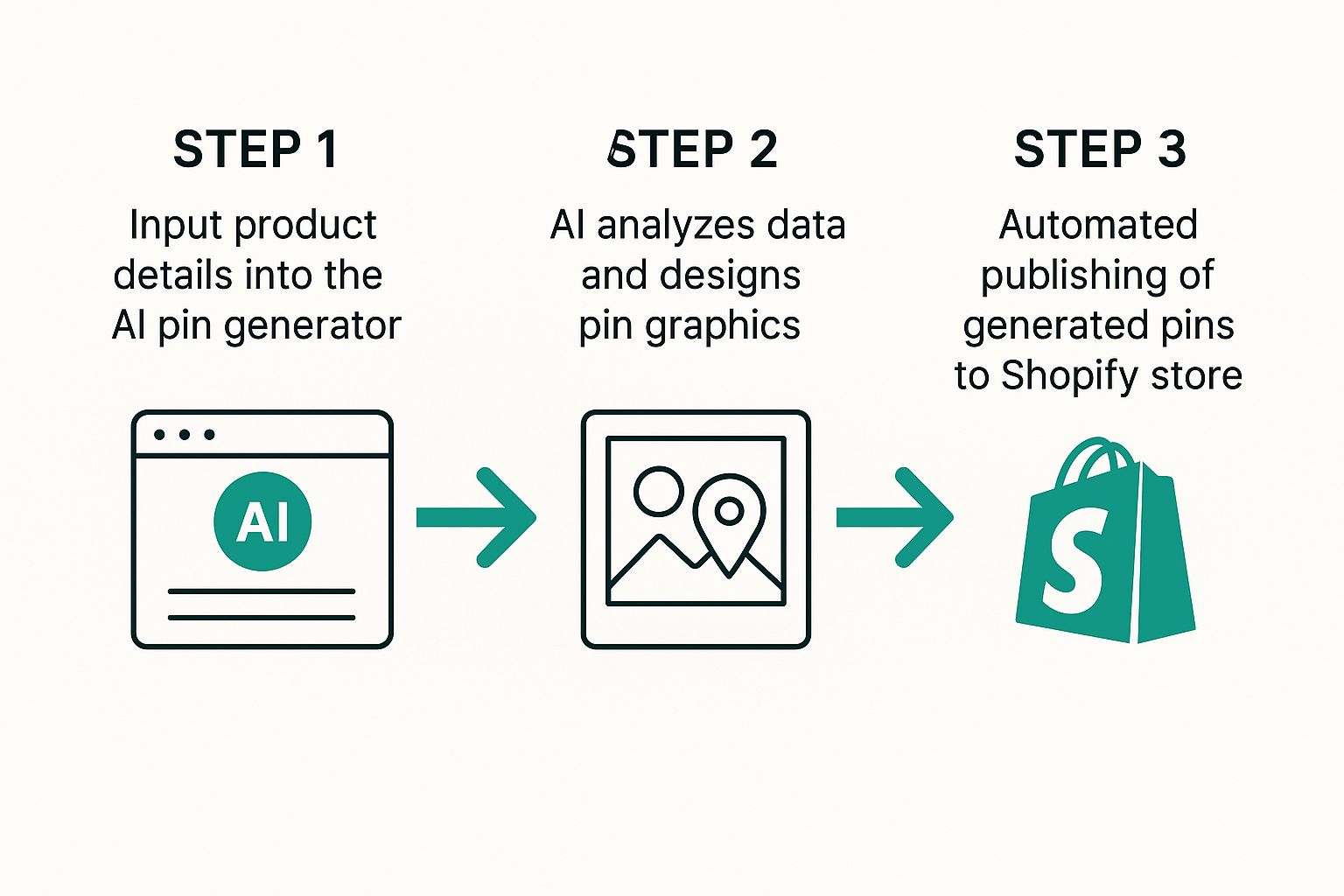
The AI basically acts as a bridge, transforming raw product data into marketing assets that are ready to go live, with very little effort on your part.
Selectively Importing Products for Targeted Campaigns
Now, you don't have to dump your entire store in at once. One of the most powerful features of a good AI pin generator is the ability to be selective. This is a game-changer for creating focused, effective campaigns.
For instance, you might decide to only import:
- Specific Collections: Pull in just your "Summer Collection" or "Best Sellers" to create a campaign that’s timely and hits all the right notes.
- New Arrivals: Shine the spotlight on your newly launched products to give them that initial boost in visibility they need.
- Products with Multiple Variants: A smart tool can handle products with different colors or sizes, often creating unique pins for each variant to show off your full range.
This kind of selective import gives you surgical control, making sure you’re only generating pins for the products you want to push right now.
Pro Tip: I always recommend starting small. Import a single, popular collection first. This lets you test out different pin designs and messaging on a smaller scale before you go all-in with your entire catalog. It’s a low-risk way to figure out what really connects with your audience.
Crafting On-Brand Pins with AI Customization
Alright, you've got your Shopify products synced up. Now for the fun part: making sure every pin looks and feels like your brand, not some generic template.
This is where you graduate from just importing data to actually taking creative control. A solid AI pin generator for Shopify isn't about mindlessly pumping out cookie-cutter designs. It’s about giving you a seriously powerful foundation that you can tweak to perfection.
It all starts with templates. Instead of staring at a blank canvas and wondering where to begin, you get a whole library of designs that are already proven to work on Pinterest. Find a few that match your brand's vibe—whether that's clean and minimalist, loud and bold, or soft and playful—and use them as your creative launchpad.
But picking a template is just step one. The real magic happens when you start making it your own.
Infusing Your Brand Identity
Brand consistency is everything, and a smart AI tool gets that. You can set up your brand’s core visual elements once, and from then on, every single pin the AI generates will look like it came straight from your own design team.
You'll want to dig into these key customization features:
- Brand Colors: Plug in your specific hex codes. This ensures every pin, every time, uses your exact brand palette. No more "close enough."
- Custom Fonts: Got a specific font you use everywhere? Upload it. This keeps your typography consistent across your website, social media, and now, your pins.
- Logo Integration: Set your logo to be automatically added to every design. It's a simple way to build brand recognition with every single impression.
Getting this set up means that even if you create 20 different pin variations for one product, each one will still be perfectly on-brand. It's that mix of speed and brand control that makes an AI pin generator a game-changer for any Shopify store.
To give you a clearer picture, here's a quick rundown of the customization features you should look for and why they matter.
AI Pin Customization Features
| Feature | Description | Impact on Engagement |
|---|---|---|
| Template Library | Access to pre-designed, performance-tested pin layouts. | Quickly create visually appealing pins that are already optimized for Pinterest's format, leading to higher initial click-through rates. |
| Brand Kit Setup | A central place to save your brand's logos, color palettes, and custom fonts. | Ensures every pin is consistent, building brand recognition and trust with your audience over time. |
| Dynamic Text Overlays | Automatically pulls product titles and prices onto the pin image. | Grabs attention immediately and provides key information without the user needing to read the description, increasing the likelihood of a save or click. |
| Image Editing Tools | Basic tools to crop, resize, or add filters to your product images within the generator. | Allows for quick adjustments to make your product photos pop and fit better within the chosen pin template. |
| AI Copy Refinement | AI suggestions to rewrite pin titles and descriptions for better keyword optimization. | Helps your pins rank higher in Pinterest search, getting your products in front of users actively looking for what you sell. |
Ultimately, these features work together to let you create a high volume of unique, on-brand pins without spending hours on manual design work.
Refining AI-Generated Copy
Beyond the visuals, the AI gives you a huge head start on your pin titles and descriptions by pulling information directly from your product listings. But you should always, always give this text a final polish. This is your chance to inject your brand’s unique voice and sprinkle in some SEO magic for Pinterest search.
AI tools are getting scarily good at this. Some advanced tools can analyze data from platforms like Google and TikTok to spot emerging trends. Imagine knowing there's a sudden spike in searches for "portable cold plunges" right as you're listing one. This kind of insight lets you tweak your pin descriptions with keywords that are hot right now, putting your products in front of a much bigger audience. You can discover more about how Shopify is using AI to spot trends and how it can boost your store's performance.
Think of the AI's output as a solid first draft. Let it do the heavy lifting to save you time, then you swoop in for a few minutes to add that human touch—your brand's personality and some well-researched keywords. That final step is what turns a good pin into a great one that actually drives traffic and sales.
Put Your Pinterest Posting on Autopilot
Let's be real: consistent pinning is the key to winning on Pinterest, but who actually has the time to do it manually? This is where the magic of an AI pin generator for Shopify truly comes into its own. It's not just about whipping up pins in a flash; it’s about building a content machine that runs for you, day and night.
A smart schedule gets your AI-generated pins in front of your audience exactly when they're scrolling. This isn't just a "nice to have"—it directly translates into more engagement, more clicks, and more traffic heading straight to your store. The goal here is to stop posting whenever you remember and start building a reliable, automated content stream that works.
Building a Smart Content Calendar
First things first, you need to tell your pins where to go. Assigning them to specific Pinterest boards is a non-negotiable. For instance, if you’re in the handmade jewelry game, you’ll want all your "gold necklace" pins funneling into a "Gold Jewelry Collection" board, while your "silver earring" pins go to a separate one. It keeps your profile tidy and makes it dead simple for shoppers to find what they love.
Next up, you need to decide how often you'll post. The aim is to keep your feed feeling fresh without overwhelming your followers. For a typical Shopify store, pinning 8-12 new product pins daily is a solid place to start. This frequency keeps you top-of-mind and consistently drives traffic back to your product pages.
The real secret sauce is consistency over sheer volume. It’s far better to post 10 fantastic pins every single day at the right times than to drop 100 pins at once and then go radio silent for a week.
Even Shopify is all-in on this kind of automation. Their "Sidekick" AI chatbot helps merchants with store management, and "Shopify Magic" is there to help create content. These tools are all part of a bigger shift toward automating and personalizing everything, which lines up perfectly with using an AI scheduler for your pins. You can discover more insights about Shopify's AI updates to see just how deep this trend goes.
Finally, the best part: let the AI handle the timing. Most modern schedulers can analyze your audience's activity to pinpoint the absolute best times to post. This data-driven approach takes all the guesswork out of the equation, making sure your pins land with maximum impact. To really nail down your strategy, check out our deep dive into AI automated pin generation and get your schedule dialed in.
Advanced Strategies to Maximize Your Reach

So, you've got your basic pinning schedule on autopilot. Awesome. Now it's time to get a little more strategic and really dial things in for maximum impact. This is where we move beyond just making pins and start thinking about what actually makes them work.
A huge piece of that puzzle is digging into Pinterest-specific keyword research. The beauty of a connected AI pin generator for Shopify is that it's already pulling your product titles and descriptions, giving you a fantastic head start. Your job is to take that foundation and build on it. Use the Pinterest search bar just like a potential customer would. See what phrases they're using to find products like yours, and then weave those exact terms into your AI-generated copy.
The Power of Fresh Pins and Video Content
The Pinterest algorithm is always hungry for new content. That's where the idea of "fresh pins" comes into play, and it's absolutely critical. A fresh pin is just a new image or video linking to one of your products—even if you've linked to that same product a hundred times before.
Your AI generator is the perfect tool for this. You can crank out dozens of unique designs for a single Shopify item without breaking a sweat. This constant flow of new visuals signals to Pinterest that you're an active, valuable account, which helps boost your overall reach.
And don't just stop at static images. The best AI generators can take your standard product photos and whip them up into short, eye-catching video pins. It's no secret that video grabs attention and drives way more interaction.
Takeaway: Making multiple unique pin designs for the same product isn't being repetitive; it's a core growth strategy. You're feeding the algorithm what it wants (fresh content) while also getting more chances to see which visuals truly click with your audience.
Analyzing and Refining Your Approach
To really get the most out of this, you have to close the feedback loop by looking at your results. Jump into your Pinterest Analytics. What's working? See which of your AI-generated designs are bringing in the most impressions, saves, and—most importantly—outbound clicks to your Shopify store.
Start looking for patterns. Maybe you'll notice that pins with bold text overlays are crushing your minimalist designs. Or perhaps video pins are getting all the love for a specific product category.
Use these little nuggets of data to guide your next batch of creations. Tweak your templates. Refine your copy. When you combine powerful creation tools with smart scheduling and a little bit of analysis, you turn your Pinterest account into a finely tuned traffic engine for your store.
For a deeper dive into scheduling, check out our guide on the best Pinterest scheduling tools to really optimize your entire workflow.
Common Questions About AI Pin Generators
Jumping into any new tool can feel like a leap, especially when it involves your Shopify store. So, let's tackle some of the most common questions that pop up for store owners when they're thinking about using an AI pin generator.
How Does the AI Actually Connect to My Shopify Store?
The secret sauce is a super simple, secure integration. Most of the top tools, like Pin Generator, have a dedicated Shopify App or use a secure API connection to link everything up. When you first set it up—which seriously takes just a few minutes—you basically just grant the app permission to see your product catalog.
This isn't some complex, techy process. Once you give it the green light, the tool can instantly pull your product images, titles, descriptions, and prices right from your store. That direct line is what completely erases the soul-crushing task of manual data entry. You can literally turn your entire product lineup into a mountain of fresh pins in no time.
Can I Actually Customize the Pins It Makes?
Oh, absolutely. The AI is there to do the heavy lifting and get you a fantastic first draft, but you always have the final say and complete creative control.
You can easily jump in and:
- Swap Templates: Flick through a whole library of designs and find the ones that match your brand’s vibe.
- Lock in Your Branding: Slap on your specific brand colors, fonts, and logo to make sure every pin feels like you.
- Tweak the Copy: Refine the AI-generated titles and descriptions. This is your chance to inject your unique voice and sprinkle in those all-important keywords.
This way, even when you're creating hundreds of pins, you know each one perfectly aligns with your brand's look and feel.
The real power comes from blending automation's speed with your own creative vision. The AI gets rid of the repetitive work, freeing you up to focus on the strategic details that make your brand pop on Pinterest.
Is Using an Automation Tool Like This Safe?
Yep, when you use it the right way, it's not just safe—it's a huge advantage for your Pinterest account. Pinterest’s algorithm absolutely loves accounts that consistently share fresh, high-quality content. An AI generator is your best friend for meeting that demand without burning out.
The trick is to set a natural, reasonable posting schedule. Something like 10-15 pins per day keeps your account active and dynamic in a way the algorithm rewards, without ever looking spammy. The initial setup usually takes less than 15 minutes, meaning you can have a brand new, automated Pinterest strategy up and running in under an hour.
Ready to stop wasting hours on manual pin creation and start driving real traffic from Pinterest? Pin Generator can help you create hundreds of high-quality, on-brand pins for your Shopify store in minutes. Get started today at Pin Generator.