
Your AI Pin Generator for WordPress Guide
4 September 2025
What if you could turn every blog post and product page on your website into dozens of unique Pinterest pins, almost instantly? That's exactly what an AI pin generator for WordPress does. It scans your existing content and automates the entire design process, churning out a steady stream of fresh visuals ready to be scheduled.
For bloggers and e-commerce stores, this is a total game-changer for unlocking Pinterest's massive traffic potential without sinking hours into manual design work.
The Future of Pinterest Marketing Is Here
Imagine taking every piece of content you've ever created for your WordPress site and turning it into a marketing powerhouse on Pinterest—all without ever opening a design tool. This isn't some far-off dream; it's what an AI pin generator for WordPress makes possible today. This kind of tool plugs right into your existing workflow, intelligently reading your content and whipping up beautiful, on-brand pins automatically.
But this goes way beyond just saving time. It’s about building a consistent, powerful presence on a platform known for driving serious traffic and sales. For bloggers, this means every new article can spawn multiple pins the second it goes live. For e-commerce stores, every single product page becomes a potential traffic magnet.
Instantly Scan Your Entire Website
One of the most powerful features of a tool like Pin Generator is its ability to scan your entire WordPress website or blog to generate Pinterest pins instantly. In one go, you can generate a massive library of Pinterest pins based on the content you already have. It's an incredibly efficient way to kickstart a new Pinterest strategy or breathe life into an old one.
Here’s a look at how it works:
- Content Recognition: The AI scans your posts, pages, and products, grabbing titles, descriptions, and images to use in the designs.
- Bulk Creation: Instead of making one pin at a time, it generates dozens of unique variations for each piece of content.
- Brand Consistency: It automatically applies your pre-set brand colors, fonts, and logos to every single pin, keeping everything looking polished and professional.
This initial scan can literally create months' worth of content in just a few minutes, filling up your content calendar and giving you a strong foundation on Pinterest from day one.
Automate Future Content with RSS
Beyond that first big scan, you can set up a completely automated system. By connecting your WordPress website to the Pin Generator RSS feed detector, you create a true "set it and forget it" workflow to automatically generate pins when new content is created.
The RSS feed connection is a game-changer for consistency. It tells the pin generator to automatically create new pins whenever you publish new content, ensuring your Pinterest account is always populated with your latest work without you lifting a finger.
This means you can put all your energy into creating amazing blog posts. The moment you hit "publish" in WordPress, the AI gets to work in the background, transforming your new article into a fresh batch of ready-to-schedule pins. It's the ultimate hands-off approach to Pinterest marketing.
Why WordPress Is the Perfect Home for AI Tools
WordPress isn't just a place to park your blog posts anymore. Think of it as a dynamic ecosystem, one that's uniquely built for powerful AI tools to plug right in and get to work. Its open-source DNA and massive plugin library make it the ideal environment for something like an AI Pin Generator for WordPress.
This is huge because it allows the AI to deeply integrate with your website. It can access the content, images, and metadata it needs to actually do its job well. This seamless connection is what lets an AI tool scan your entire library of blog posts or product pages and instantly whip up relevant, on-brand Pinterest pins. It understands everything from your featured images to your SEO titles, using them as building blocks for great-looking designs.
This powerful combo of the world's leading CMS and modern AI lets you automate marketing tasks that used to eat up hours of your day.
The Power of a Massive Community
The sheer scale of the WordPress community is what really drives innovation forward. WordPress isn't just a big player; it dominates the global CMS market with a staggering 43.4% market share. That means it powers over 810 million websites worldwide. You can dig deeper into WordPress's market dominance and its impact here.
This massive user base creates a huge demand for efficiency and smart automation. It also fuels intense competition among developers to build the best solutions, pushing tools like AI pin generators to become smarter and more intuitive with every update. As a user, you're the one who benefits directly from all this action.
The incredible popularity of WordPress guarantees a constant stream of new and improved AI plugins. Developers are laser-focused on creating tools that solve real problems for millions of users, from automating social media to optimizing content.
A Framework Built for Integration
From day one, WordPress was designed to be extended. Its plugin architecture is the secret sauce that makes it so versatile, letting third-party tools add new features right into your dashboard. For an AI pin generator for WordPress, this means it can:
- Directly access your content: The tool can read your posts, pages, and even your WooCommerce products without any clunky setup.
- Connect to your RSS feed: It can easily tap into your site's RSS feed, detecting new content the moment you hit "publish."
- Integrate with your Media Library: The AI can pull images directly from your WordPress media library to use in its pin designs.
This deep integration is the key. It lets you manage your Pinterest marketing from the familiar WordPress environment, turning your website into a true command center.
You can scan your entire WordPress website or blog to generate Pinterest pins instantly. For a completely hands-off approach, you can connect your website to the Pin Generator RSS feed detector to automatically generate pins whenever you publish something new. It transforms a repetitive, manual task into a smooth, automated workflow that just works.
Instantly Generate Pins by Scanning Your Website
This screenshot gives you a sense of just how massive the WordPress plugin ecosystem is. It’s built for powerful integrations like an AI pin generator.
Alright, let's get down to business and see what an AI pin generator for WordPress can really do. This is where you go from just reading about it to actually doing it, turning your entire backlog of content into a Pinterest marketing machine with just a few clicks. The best place to start? A full website scan to generate Pinterest pins instantly.
Think of this initial scan as your ultimate shortcut to building a solid Pinterest presence from day one. Instead of the soul-crushing task of creating pins one by one for every single blog post or product, the tool does the heavy lifting for you. It crawls your whole site, figures out what's important, and pulls together a huge batch of visuals ready for you to look over.
How the Website Scan Works
The process is refreshingly simple. Just give the tool your website’s URL, and the AI handles the rest. It doesn't just glance at your homepage, either. It digs deep into your site's structure to unearth all the great content you've published over the years.
So, what exactly is the AI looking for?
- Published Blog Posts: It finds every article you've ever written, ready to grab titles and images.
- Product Pages: If you're running an e-commerce store, it can scan your WooCommerce products to create shoppable pins.
- Key Pages: You can also point it toward specific pages you really want to promote.
This all-in-one approach makes sure nothing gets missed. Even those old blog posts from years ago can be brought back to life as fresh, new pins, giving them another shot at driving traffic.
The full website scan is like an instant content audit and creation session rolled into one. It surfaces all your best assets and turns them into a ready-to-schedule content calendar, saving you dozens, if not hundreds, of hours of manual work.
From Scan to Scheduled Pins
Once the scan wraps up, the real fun begins. The AI pin generator will show you a gallery of potential pins it has created. Your job is simply to review, make any tweaks, and schedule them. You can quickly add your branding, adjust the text on a pin to hit a specific keyword, or approve dozens of designs in one go.
A little pro tip: configure the tool to prioritize your post's featured image. It’s usually the highest quality and most relevant visual for that piece of content.
The WordPress plugin world is packed with tools built for this kind of automation. In fact, WordPress officially hosts over 1,400 AI-related plugins, which shows you how committed the platform is to integrating this tech. This includes everything from AI content writers to AI-powered page builders.
After that big initial scan, you can set things up to run on autopilot. This is where connecting your WordPress website to the Pin Generator RSS feed detector becomes a total game-changer. Once connected, the tool will automatically spot when you publish new content and whip up a fresh batch of pins for it, all without you lifting a finger.
You can learn more about setting up this hands-free system in our guide to AI automated pin generation. This two-step process—a big scan to start, followed by continuous, automated creation—is the key to keeping your Pinterest account buzzing with fresh content.
Put Your Pinterest Content on Autopilot with RSS
A full website scan is a fantastic way to build out your initial library of pins, but the real magic of an AI pin generator for WordPress is true, hands-off automation. This is where you graduate from manual tasks and build a system that churns out fresh content for you, day and night.
By connecting your WordPress website to the Pin Generator RSS feed detector, you create a seamless "set it and forget it" workflow to automatically generate pins when new content is created.
Imagine publishing a new blog post. Moments later, a whole batch of perfectly designed, on-brand pins are automatically created and queued up, ready to go. This isn’t some far-off dream; it’s exactly what RSS feed automation does. It ensures your Pinterest account always features your latest content, letting you ride the wave of a new post without lifting a finger.
What's a WordPress RSS Feed, Anyway?
So, what is this RSS feed? RSS stands for Really Simple Syndication. Think of it as a clean, standardized list of your website's latest updates. Your WordPress site already has one built-in, presenting your new posts in a simple, machine-readable format that tools can easily understand.
Most AI pin generators are built to "read" this feed. Finding yours is usually a piece of cake. For most WordPress sites, you can find your main posts feed by just adding /feed/ to the end of your domain (like yourwebsite.com/feed/). This simple URL is the key that unlocks continuous, automated pin creation.
Here's a quick visual of how the AI Pin Generator gets up and running on your site.
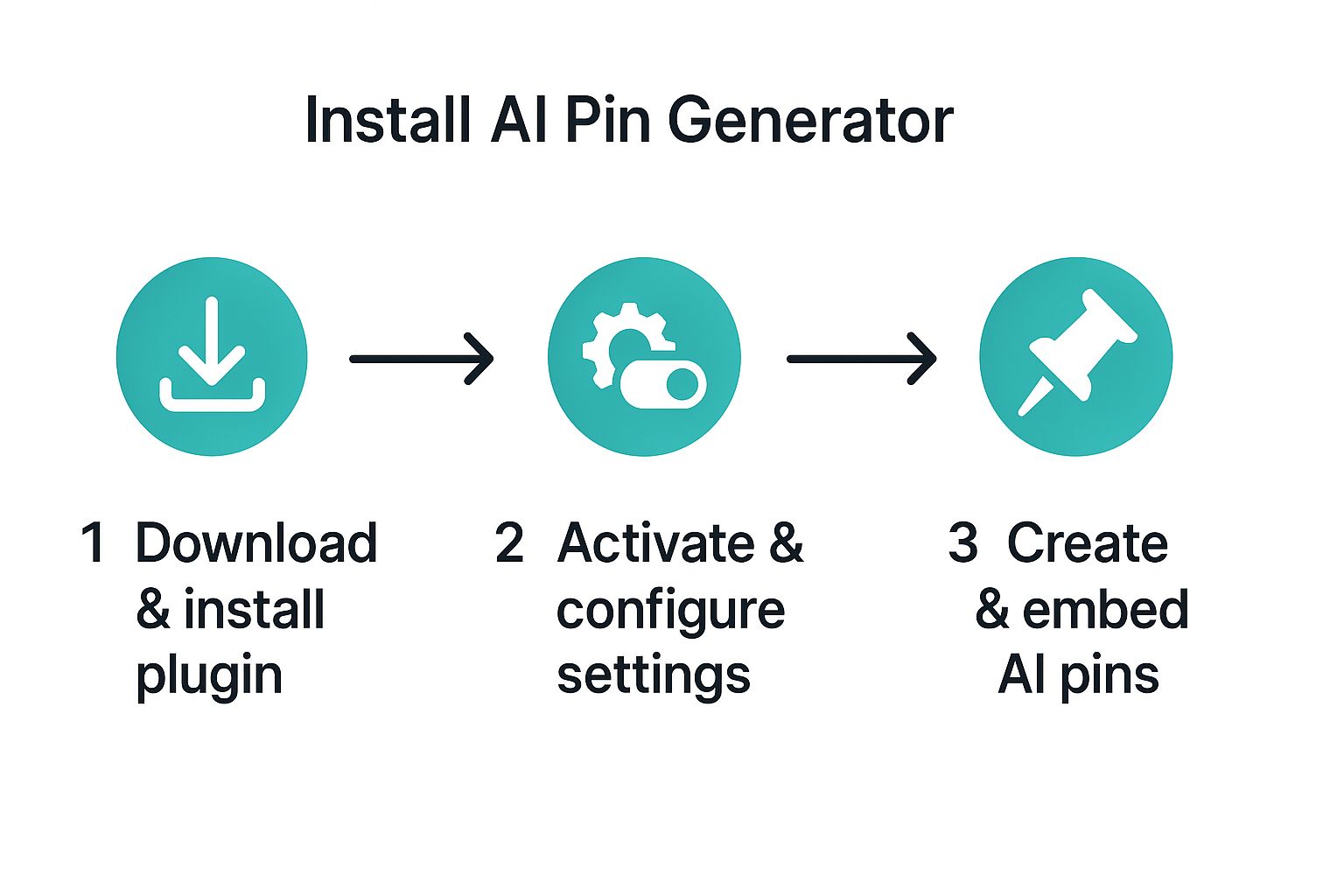
As you can see, the process is designed to be straightforward, with RSS automation being the final, powerful step toward a fully autonomous system.
Setting Up Your Automation Rules
Once you've plugged in your RSS feed, you're not just flipping a switch and hoping for the best. You get to be the director of your automated marketing strategy, setting specific rules that tell the AI exactly what to do. This control is what makes sure the generated pins perfectly match your Pinterest goals.
Here are a few of the key settings you'll want to configure:
- Checking Frequency: How often should the tool check for new posts? You can set it to check every few hours or just once a day, depending on your publishing schedule.
- Target Pinterest Boards: Tell the tool exactly where to send the new pins. You can even get clever and create rules that send posts from specific blog categories to their corresponding Pinterest boards.
- Template Selection: Pick which of your custom-branded templates the AI should use for the new pins. This keeps your visual branding consistent and professional across your entire profile.
By defining these automation rules, you transform the AI from a simple content creator into a strategic marketing partner. It flawlessly executes your Pinterest strategy in the background, freeing you up to focus on what you do best: creating awesome blog content.
Before we move on, let's quickly compare the two main ways to generate pins: the manual website scan we discussed earlier and the RSS automation we're covering now. This should help you decide which method fits your workflow best.
Manual Scan vs RSS Automation Feature Comparison
| Feature | Website Scan (Manual) | RSS Feed Automation (Automatic) |
|---|---|---|
| Best For | Initial setup, bulk pin creation from old content, one-off campaigns. | Ongoing, hands-off pin creation for new content. |
| Workflow | You initiate the scan whenever you want to generate pins. | The system automatically checks for new posts on a set schedule. |
| Content Source | Scans your entire website or specific URLs you provide. | Pulls content only from your site's RSS feed (new posts). |
| Time Investment | Requires manual effort each time you run a scan. | "Set it and forget it" after the initial configuration. |
| Use Case | Populating your Pinterest boards with a large backlog of existing content. | Keeping your Pinterest profile consistently updated with your freshest material. |
Both methods are incredibly useful, but for different reasons. The website scan is your go-to for getting started and reviving older posts, while RSS automation is the engine that will drive your day-to-day Pinterest presence.
This level of detailed control makes the automation both powerful and precise. You can fine-tune the system to match your content cadence and your audience's needs. If you're juggling a busy content calendar, you can find even more ways to streamline your process in our guide to the best Pinterest scheduling tools, which work perfectly with this automated workflow.
Ultimately, this approach turns your WordPress publishing schedule into the driving force behind your entire Pinterest strategy.
Optimizing Your AI-Generated Pins for Performance
Using an AI pin generator for WordPress is an absolute game-changer for speed, but turning that speed into actual traffic requires a smart strategy. Automation gets the pins made; optimization gets them seen.
The real magic happens when you blend the incredible efficiency of AI with your own marketing know-how. This is how you turn a high volume of content into a steady stream of high-performing assets for your business.
It all starts with getting your visual branding locked in. Before you even think about generating a pin, you need to create and upload custom, on-brand templates. This is a non-negotiable step.
Doing this upfront ensures every single pin the AI creates—whether it's from a bulk scan of old posts or your latest RSS feed update—perfectly matches your brand's fonts, colors, and logo. It’s what makes your Pinterest profile look professional and cohesive, building that all-important brand recognition with scrollers.
Fine-Tuning Your AI Text and Titles
While killer visuals are what stop the scroll, it's the text that ultimately drives discovery and clicks. Your AI tool will pull titles and descriptions straight from your WordPress posts, which is a fantastic starting point. But you can do so much better.
Most good AI pin generators let you tweak the text settings. You absolutely need to use this to your advantage:
- Inject Keywords: Manually add your main and secondary Pinterest keywords into the titles and descriptions the AI spits out.
- Create Urgency: Nudge the text to include calls to action like "Shop the look now" or "Get the full recipe here."
- Test Different Angles: For a single blog post, generate a few different pin descriptions. Each one can target a slightly different keyword or speak to a different pain point your audience has.
This little bit of human oversight is what turns a generic, pulled-from-your-blog description into a powerful, SEO-optimized message that helps your pins climb the ranks in Pinterest search.
Don't just settle for the default text the AI gives you. Think of it as a solid first draft. A few minutes spent enriching titles and descriptions with targeted keywords can make a massive difference in a pin's reach and click-through rate.
The growth of AI in the WordPress world has been explosive. These plugins have completely changed how we manage our sites. A recent analysis looked at the top 40 AI-powered WordPress plugins and found they pulled in over 315 million combined visits. That's an average of more than 26 million visits every month across tools for SEO, content creation, and media. This shows just how much people trust these tools for critical tasks. You can read more about the impact of AI on WordPress plugins.
Smart Scheduling for Maximum Reach
Finally, when you post matters just as much as what you post. Instead of just dumping a hundred newly generated pins onto the platform at once, you need to be strategic. Use the built-in scheduler to map out a consistent content calendar.
The best AI pin generator for WordPress will have robust scheduling options that let you do this easily.
Dive into your Pinterest Analytics and find out when your audience is most active. Are they scrolling on Tuesday afternoons or Sunday evenings? Schedule your most important pins to go live during those peak engagement windows to give them the best possible start. This thoughtful approach to scheduling makes sure your content pipeline is always working for you, driving that sweet, steady traffic over time.
Common Questions About AI Pin Generators
Even with the perfect tool sitting right in front of you, it’s totally normal to have a few questions before you jump in. An AI pin generator for WordPress can be a serious game-changer for your marketing, but you want to be sure it actually fits your brand and workflow. Let’s tackle some of the things people usually ask.
A big one is whether an AI tool will get their Pinterest account banned. The short answer is no—when you use it the right way, it should actually improve your account's health. Pinterest’s algorithm absolutely loves consistent posting of fresh content, which is exactly what these tools are designed to help you do. The trick is to schedule pins at a natural, human-like pace and make sure the AI-generated descriptions are high-quality, not just keyword-stuffed spam.
Another common question revolves around branding. Can the AI really use your specific brand fonts and colors? Yes, it can. The best tools let you upload custom templates you’ve already designed in a program like Canva. You just set up your brand kit once, and the AI uses that as the foundation for every pin it creates, keeping everything perfectly on-brand.
How Content and Images Are Selected
So, how does the AI figure out which images to grab from your blog posts? It’s programmed to be pretty smart about it. The tool will almost always go for the Featured Image from your WordPress post first. This makes sense, since that’s usually the main, high-quality visual you’ve chosen for that piece of content.
If for some reason you don’t have a featured image, or if you tell it to look for more options, the AI will then scan the body of your post for other good images. This smart selection process makes sure your pins are always visually tied to the content they’re promoting.
A quick heads-up: While the AI is great at pulling text from your blog post titles and content, solid keyword research is still on you. Think of the AI's output as a strong first draft. Your job is to then jump in and refine it with the target keywords you know will get your pin seen.
This mix of automated speed and your own human oversight is where the magic really happens. You get the efficiency of an AI pin generator for WordPress without sacrificing the strategic insight of a savvy marketer. It’s all about working smarter to hit your Pinterest goals.
You can scan your WordPress website or blog to generate Pinterest pins instantly. Alternatively, connect your WordPress website to the Pin Generator RSS feed detector, and it will automatically generate pins every single time you publish new content.
Ready to finally get your Pinterest marketing on track and win back hours of your week? Pin Generator makes it incredibly simple to turn your WordPress content into a nonstop stream of traffic-driving pins. It's time to stop designing and start growing. Get started with Pin Generator today.