
Master the AI Pin Image Generator
19 September 2025
Let's be real for a second.Let's be real for a second. An AI pin image generator is basically a smart tool that takes your existing content—like a blog post or a product page—and automatically whips up a bunch of high-quality, on-brand Pinterest pins from it. A tool like Pin Generator is built specifically to crush that creative bottleneck we all hit, letting you actually scale up your Pinterest marketing without pulling your hair out.
Why Your Pinterest Strategy Needs an AI Pin Image Generator
Honestly, keeping up with Pinterest's relentless demand for fresh content is exhausting. You're trying to be a designer, a scheduler, and a strategist all at once, which leaves zero time for actual creativity. This is precisely where an AI pin image generator stops being just another tool and becomes your new content creation partner.
This isn't just about saving time; it's about solving the biggest headaches for creators: design burnout and a messy, inconsistent brand presence. Instead of getting stuck in a design tool for hours, you can generate dozens of unique, on-brand pins in just a few minutes.
Overcome Creative Burnout and Scale Production
The constant pressure for "fresh pins" is the biggest hurdle to growing on Pinterest. The platform's algorithm absolutely loves accounts that consistently publish new, unique visuals. But for small business owners or solo creators, trying to create that much content manually is a one-way ticket to burnout.
An AI tool like Pin Generator just eats this problem for breakfast.
- Massive Volume: You can feed it a single blog post URL and get 20-30 unique pin designs back in one shot.
- Endless Variety: The AI is smart enough to mix and match your templates, fonts, and layouts so your feed never looks like a copy-paste job.
- Strategic Focus: By taking design off your plate, you get that time back to focus on what really moves the needle—analytics, keyword research, and planning your next big move.
The real win here isn't just the time saved. It's about shifting your energy from the tedious grind of production to high-impact strategic thinking. You stop being just a content creator and start being a marketing strategist.
Ensure Perfect Brand Consistency
Trying to keep a cohesive look across hundreds of pins when you're making them one by one is almost impossible. A little inconsistency in your colors, a different font here, a misplaced logo there—it all adds up, weakening your brand recognition and making your profile look amateur.
An AI pin image generator solves this with a simple "set it and forget it" approach using brand kits. You input your brand’s specific colors, fonts, and logo just once. From then on, every single pin it generates automatically follows those rules, giving you that polished, instantly recognizable look across the board.
Of course, to get the most out of your AI Pin Image Generator, you need to plug it into your wider marketing strategy. For some great ideas on how to do that, check out these Top Digital Marketing Tips for Small Businesses. It's all about making sure your Pinterest efforts are working in sync with your bigger business goals.
Getting Started: Your AI-Powered Pinterest Workflow
Jumping into an AI pin image generator like Pin Generator isn't just about connecting your account and hitting "go." The real magic happens when you give the AI the right ingredients to work with, setting up your workspace for peak performance from the very beginning.
Think of it like prepping your kitchen before you start cooking a big meal. A little bit of setup ensures every single pin the AI generates is already 90% of the way to perfect and totally on-brand. Trust me, this initial time investment saves you countless editing headaches down the road and pays off big time.
This is more important than ever, given how fast this technology is moving. The global AI image generator market was valued at around USD 9.10 billion in 2024 and is projected to absolutely skyrocket. This reflects a massive wave of creators and businesses jumping on board, and you can read more about this market growth to see where things are headed.
Define Your Brand Kit for Total Consistency
First things first, and this is crucial: define your brand kit. This is the heart and soul of maintaining a cohesive, professional look across every single pin. Without it, the AI is just guessing, which leads to a messy and inconsistent presence on Pinterest.
Inside your Pin Generator settings, you'll want to load up these core elements:
- Brand Colors: Don't just pick "blue." Input the specific hex codes for your primary and secondary color palettes. This guarantees every text overlay, background, and design element perfectly matches your brand's visual identity.
- Custom Fonts: Got a specific font you use on your website and other marketing materials? Upload those font files here. This creates that seamless visual experience your audience recognizes.
- Logo Variations: Add your main logo, but don't forget any secondary marks or icons you use. You can then tell the AI exactly where to place it for the best visibility on different pin styles.
A great real-world example is a home decor blogger gearing up for the holidays. They could create a "Holiday Sparkle" brand kit with festive reds, greens, and a script font, keeping it totally separate from their standard, everyday branding. It’s all about control and consistency.
Strategically Organize Your Pinterest Boards
Next up, you need to tell Pin Generator where to send all these amazing pins it's about to create for you. When you connect your Pinterest account, it will pull in all of your existing boards, but a little organization here goes a very long way.
Start by creating logical groupings for your content. That same home decor blogger might have boards like "Modern Farmhouse Kitchens," "DIY Holiday Decor," and "Cozy Bedroom Inspiration." By organizing your boards within the tool, you can later build campaigns that target these specific categories, making sure every piece of content lands exactly where it needs to be.
This isn't just about tidy filing; it's about building a content distribution blueprint. When you pre-load your blog post URLs and set up smart defaults, you’re basically telling the AI what kind of content to create and where it belongs, automating almost the entire process from start to finish.
How to Generate Your First AI Pin Images
Alright, this is where the magic happens. Let's move past the setup and get our hands dirty creating your first batch of pins with Pin Generator's AI.
Forget staring at a blank canvas or scrolling endlessly through stock photos. The whole thing kicks off with a single piece of content you’ve already created: a URL.
You just pop in a link to a blog post, and the AI does the heavy lifting. It reads your content, pulls out the most relevant images, and even cooks up compelling text overlays for you. It completely flips the script on content creation, turning what used to be a time-suck into a task that takes just a few seconds.
Let’s walk through a real-world example. Imagine you’re a craft blogger and just published a fantastic new guide. Instead of firing up Canva, you'll just feed the URL for that post directly into the tool.
From URL to Instant Visuals
Once you drop that URL in, the AI gets right to work. It’s not just grabbing a random photo; it’s actually analyzing the page to understand the context and pull images that make sense. Within moments, you'll have a whole spread of unique pin designs ready to go.
For instance, if your blog post is about how to create your own cross stitch pattern from any photo, Pin Generator would probably spit out something like this:
- A pin showing a close-up of a finished cross-stitch piece with a "DIY Pattern Guide" overlay.
- Another design featuring a before-and-after of a photo turned into a pattern.
- A collage-style pin combining multiple process shots with a call-to-action like "Create Your Own!"
Each design is a solid starting point. You'll instantly see 10 or more options, each with a different layout, crop, and suggested text. It’s an incredible head start. This instant variety is one of the biggest perks, letting you quickly spot which concepts have potential.
The whole process is incredibly straightforward, as this image shows.
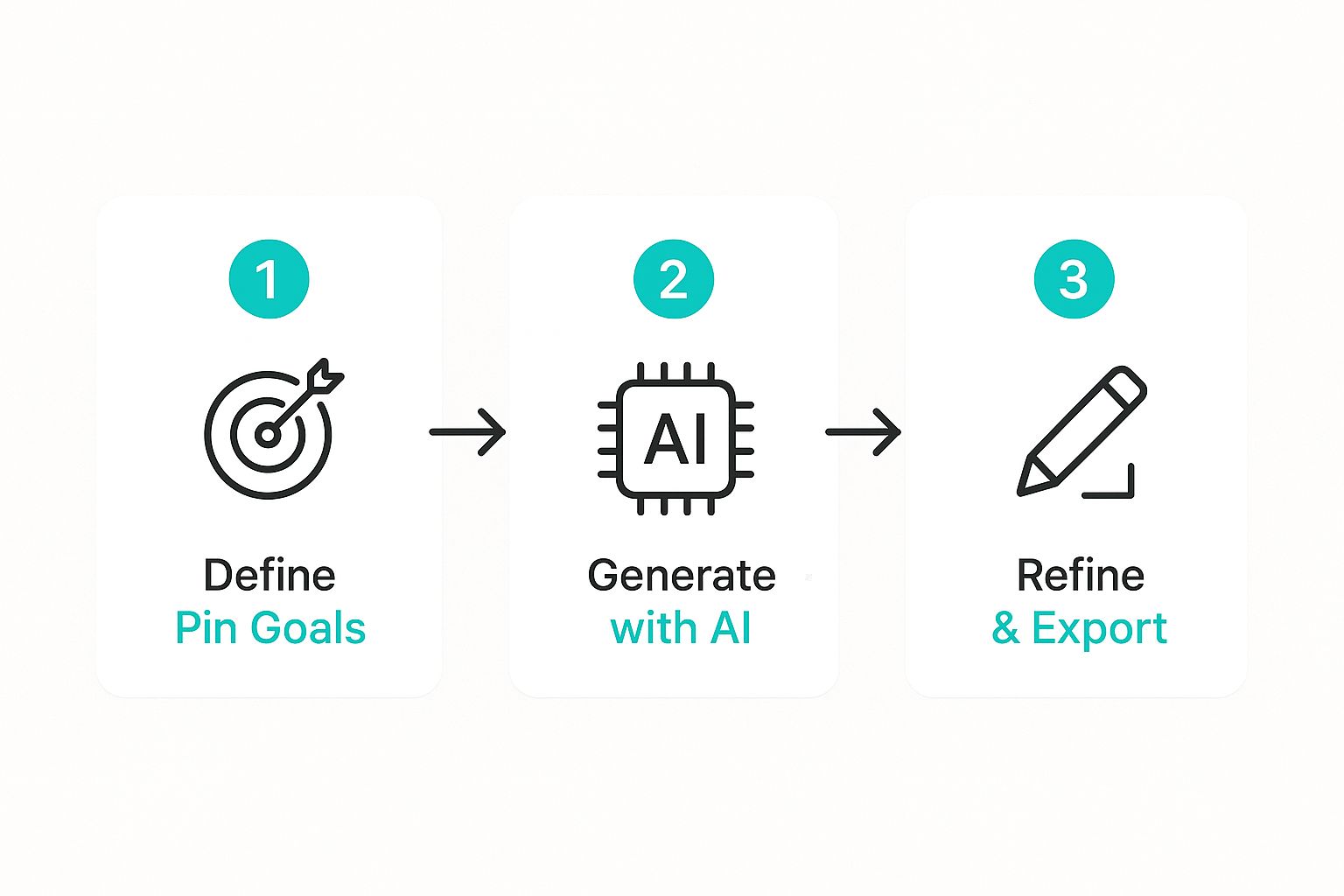
As you can see, the workflow is built for speed, moving you seamlessly from an idea to a polished, ready-to-publish pin without getting bogged down in tedious steps.
Interpreting and Selecting Your Best Designs
With a gallery of options staring back at you, the next move is yours. Not every single pin the AI creates will be a home run, and that's okay. Your job is to quickly scan through and pick out the strongest contenders.
Look for visuals with a strong emotional pull, text that’s easy to read at a glance, and a composition that just pops off the screen.
This is a key part of the workflow, and the more you use the tool, the faster you’ll get at spotting what works. If you want to dive deeper into this, we have a complete guide on creating https://pingenerator.com/blog/ai-generated-pinterest-pins that covers it all.
The goal isn't to just accept the first design the AI hands you. It's about using the generated variety as a creative springboard. You can quickly identify the visuals that will actually resonate with your audience and drive clicks.
This rapid-fire generation is powered by some impressive tech. The AI is constantly learning and improving, which is why it's becoming such an indispensable tool for so many creators. Your initial batch of pins is just the foundation for the next stage: refinement and scheduling.
The summary below highlights the main AI features you'll be using during this process.
Core AI Generation Features in Pin Generator
This table breaks down the key features available during the AI pin generation process and how each one helps you create better content, faster.
| AI Feature | Functionality | Key Benefit for Users |
|---|---|---|
| URL to Pins | Automatically extracts images and text from a URL to create multiple pin designs. | Skips the manual design process, generating dozens of ideas in seconds. |
| AI Text Suggestions | Generates relevant and catchy text overlays based on the page's content. | Overcomes writer's block and provides SEO-friendly title options. |
| Smart Image Cropping | Intelligently crops horizontal images to fit the vertical Pinterest format. | Ensures images are visually appealing and optimized for the platform. |
| Template Variety | Applies a wide range of pre-designed templates to the extracted content. | Provides instant visual diversity without needing design skills. |
These features work together to give you a powerful head start, turning a simple link into a full-fledged Pinterest campaign.
Refining and Customizing Your AI-Generated Pins
Think of the pins that come out of the AI pin image generator as a really solid first draft. The AI does the heavy lifting, but now it’s your turn to sprinkle in your brand’s personality and strategic magic. This is where good pins become great pins—the kind that actually stop the scroll.
The idea isn't to just accept what the AI spits out. A few simple tweaks can make a world of difference in how your pins perform, ensuring they connect with your audience and hit your marketing goals.
Fine-Tuning Your Visuals for Impact
First things first, give your new pins a quick visual once-over. Pin Generator's AI is incredibly smart, but your human eye is the ultimate quality control. You want to make sure the core elements that grab attention are perfectly aligned with your brand’s look and feel.
A few quick adjustments can really elevate your designs:
- Swap the Image: The AI might pull a decent image from your URL, but you probably have a better one. Easily swap the background photo for one of your own branded shots or a more dynamic image that tells a stronger story.
- Apply Color Filters: Use a subtle color filter or overlay to make sure the pin has the right vibe. A warm filter for a cozy home decor brand or a vibrant one for a travel blog can make all the difference.
- Adjust Cropping and Composition: Sometimes, a simple re-crop can put the focus right where it needs to be. Make sure your main subject is front and center, not awkwardly cut off at the edges.
The most effective pins almost always feel authentic and personal. By replacing a generic stock photo with an image of your actual product in use, you instantly build trust and create a visual that resonates way more with potential customers.
Optimizing Text Overlays for Clicks
Your text overlay is basically your elevator pitch on the pin. It needs to be clear, compelling, and readable in a split second, especially since over 85% of Pinterest users browse on their phones. If the text is too small or blends into the background, your message is completely lost.
Let's say you run an e-commerce store selling handmade leather bags. The AI generates a pin for a new tote with the title "Leather Tote Bag." It's a decent start, but we can do so much better.
- Before: "Leather Tote Bag"
- After: "Handcrafted Italian Leather Tote | Free Shipping!"
That one small change adds a key selling point (handcrafted Italian leather) and a powerful incentive (free shipping). Suddenly, the pin is way more likely to attract clicks from people who are actually ready to buy. Always double-check your text for readability, contrast, and persuasive punch.
Strategic Adjustments for Conversion
Beyond just making things look pretty, every change you make should have a purpose. Your goal is to guide the user to take a specific action, whether that’s clicking through to your blog post or hitting "add to cart."
Here are a few strategic tweaks to consider:
- Highlight a Key Feature: For a product pin, edit the text to call out a specific benefit. Instead of just the product name, add a line like "Now with 10 Pockets!" or "Made from Recycled Materials."
- Strengthen Your Call-to-Action (CTA): Ditch the generic "Learn More" for something more specific and enticing. Try "Grab the Recipe," "Shop the Collection," or "Download the Free Guide."
- A/B Test Your Headlines: This is a pro move. Duplicate a pin and change only the headline. Run both to see which one performs better. That data is gold for understanding what language truly clicks with your audience.
By making these thoughtful customizations, you transform the AI’s work into a high-performing marketing asset. This mix of automated speed and smart human oversight is the real secret to crushing it with any AI pin generator.
Automating Your Pinterest Schedule Like a Pro
Creating a whole batch of gorgeous pins with an ai pin image generator is a massive win, but honestly, that's only half the battle. Real, sustainable Pinterest growth comes from consistency, and that’s where automation becomes your best friend. The goal here is to build a content schedule that basically runs itself, populating your boards for weeks—or even months—ahead of time.
This isn't just about clawing back a few hours in your week; it's about building a system that keeps feeding fresh content to Pinterest. This steady stream of visuals is exactly what the algorithm loves to see, and it drives a reliable flow of traffic back to your site without you having to manually push a pin live every single day.
Build a Hands-Off Content Calendar
The whole strategy hinges on batching your work. With Pin Generator, you can plug in a single blog post URL and spin up dozens of unique pin designs in just a few minutes. But instead of dumping them all online at once, you use the built-in scheduler to drip them out over time.
Think about it: one afternoon of focused work could set you up with an entire month's worth of Pinterest content. This flips your workflow on its head, turning a daily chore into a strategic, once-a-month power session. We get into the nitty-gritty of this process in our deep dive on how to schedule Pinterest posts effectively.
The real magic of scheduling is that it keeps your account active and growing, even when you’re on vacation or deep in the weeds on other parts of your business. It’s how you finally get off the content creation hamster wheel.
Advanced Scheduling Tactics for Maximum Impact
Once you've got the basics of scheduling down, you can start layering in some more advanced tactics to really dial in your strategy. These features are all about giving you pinpoint control over where your content goes and when, making sure the right pins hit the right boards at the perfect time.
- Board-Specific Rules: You can set rules to stop the same pin from landing on multiple boards too close together. This is crucial for avoiding spammy behavior and keeps your content feeling fresh across your profile.
- Smart Scheduling: Let the tool do the heavy lifting by analyzing your Pinterest data to figure out the best times to post. It automatically publishes when your unique audience is most active, which pushes your visibility and engagement way up.
For instance, a food blogger could create five different pin designs for their new "Vegan Lasagna" recipe. They could then schedule them to drip out over two weeks, hitting boards like "Vegan Dinners," "Easy Pasta Recipes," and "Healthy Weeknight Meals" at the exact times those audiences are scrolling. This strategic approach makes sure your content gets seen by the biggest possible audience without any extra work on your part.
This kind of automation used to be complex, but it's becoming way more accessible. The Artificial Intelligence image generator market in the United States alone is expected to hit USD 131.2 million in 2024, and it's growing like a weed. That growth is all about the demand for smarter, more personalized marketing—which is exactly what these scheduling tools deliver. You can discover more insights about this market growth to see how it’s shaping the future of content creation.
A Few Common Questions About AI Pin Generators
Jumping into a new tool always brings up a few questions. When it’s an AI pin image generator, it’s only natural to wonder if it’s the right move for your brand.
Will the pins actually look original? Is it really a smart investment for a small business? Let's tackle the big questions we hear all the time from bloggers and e-commerce store owners.
Will My AI-Generated Pins Look Generic?
This is the number one fear, and honestly, it’s a good question to ask. Nobody wants their brand to look like a cheap copy of something else.
The good news? We built Pin Generator specifically to avoid that "cookie-cutter" problem. The whole system is designed to create massive variety while keeping your brand identity locked in.
- It’s Not Just One Template: The tool uses a huge library of professional templates. Instead of just slapping your image onto a single design, it intelligently mixes and matches layouts with your specific brand elements.
- Your Brand Comes First: Your brand is unique, and your pins should be, too. The system merges its template library with your logo, color palette, and fonts, so the final pins feel custom-made for you.
- Built-in Variety is Key: For every single URL you plug in, the AI creates dozens of distinct variations. It plays with different layouts, text placements, and image crops, giving you a constant stream of fresh content.
Is It Worth the Investment for a Small Business?
Absolutely. For a small business or a solo creator, your time is your most valuable—and limited—resource. An AI pin generator gives you an incredible return on investment because it buys back your time.
Think about the hours you currently sink into creating pins by hand in a tool like Canva.
If you spend even five hours a month on pin design, that’s time you’re not spending on tasks that actually grow your business, like writing new content, talking to customers, or improving your products.
Pin Generator can slash those five hours down to about 30 minutes. The time you get back can be poured directly into revenue-generating activities. The value isn't just in the traffic you get from Pinterest; it's in reclaiming a huge chunk of your workweek.
How Does This Tool Handle Pinterest SEO?
Let’s be clear: Pinterest is a visual search engine, which means SEO is everything. We designed Pin Generator with this in mind from day one.
When the tool scans your blog post, it automatically pulls your page title and meta description. This becomes the starting point for your pin's text, making sure your primary keywords are baked in from the get-go.
This creates a super strong link between your pin and your content. But you’re not stuck with it—you still have full control to tweak everything, edit text in bulk, and add all the relevant hashtags you need to really boost your discoverability. It’s all about driving that organic traffic back to your site with way less effort.
Ready to stop wasting time and start driving serious traffic from Pinterest? Try Pin Generator today and see how quickly you can create hundreds of high-quality, on-brand pins for your blog or store. Get started at pingenerator.com.