
Your Guide to an AI Pinterest Pin Creator
9 September 2025
An AI Pinterest pin creator is a tool that completely automates the design, writing, and scheduling of your Pinterest content. It can take what used to be hours of tedious manual work and shrink it down to just a few minutes.
Simply put, these AI tools help bloggers, marketers, and e-commerce stores scale their Pinterest strategy by generating dozens—or even hundreds—of unique pins from a single link or idea.
Why an AI Pin Creator Is a Game Changer
Let's be real: Pinterest isn't just for finding dinner recipes anymore. It’s a massive visual search engine that drives serious traffic and sales. With nearly 570 million monthly active users heading into 2025, its power is impossible to ignore.
The platform is booming, largely thanks to younger users. Gen Z now makes up 42% of its user base, and with over 82% of activity happening on mobile phones, it’s a fast-scrolling, visually-driven world. These users are ready to buy, too—a whopping 85% of weekly users have bought something based on pins they’ve seen. You can dig into more of these numbers in recent Pinterest statistics.
But here’s the catch. To tap into that audience, you need a constant stream of fresh, eye-catching pins. This is the bottleneck where most creators get stuck. Manually designing pins in Canva, writing SEO-friendly descriptions, and scheduling them consistently is a monumental time-suck.
From Hours of Tedium to Minutes of Strategy
This is exactly where an AI Pinterest pin creator comes in and changes everything. It shifts your focus from being a design grunt to a high-level strategist. Instead of burning an entire afternoon just to create a handful of pins, you can generate an entire week's worth of content in the time it takes to drink your coffee.
The benefits are immediate:
- Massive Time Savings: Get hours of your week back by automating the most mind-numbing parts of Pinterest marketing.
- Effortless Brand Consistency: Automatically apply your brand's colors, fonts, and logo across hundreds of pins. No more off-brand oopsies.
- Scaled Content Production: Turn one blog post or product page into a diverse batch of 10, 20, or even 50 unique pin designs without any extra work.
To give you a clearer picture of the difference this makes, let’s compare the old way with the new way.
Manual Pin Creation vs AI Pin Creator
Here's a quick comparison highlighting the key differences in workflow, output, and efficiency between traditional manual design and using an AI-powered tool.
| Aspect | Manual Pin Creation | AI Pinterest Pin Creator |
|---|---|---|
| Time Investment | Hours per week | Minutes per week |
| Content Output | A few pins per article | Dozens of unique pins per article |
| Design Process | Repetitive, manual design in tools like Canva | Automated generation based on your brand templates |
| Brand Consistency | Requires constant manual checking | Automatically applied across all generated pins |
| Scheduling | Manual uploads and scheduling one by one | Bulk scheduling with smart shuffling features |
| Overall Workflow | Tedious and slow | Strategic and efficient |
As you can see, the AI approach isn't just about speed; it fundamentally changes how you can approach your content strategy, allowing for much greater scale and consistency.
This infographic breaks down some of the key performance boosts you can expect from an AI-driven workflow.
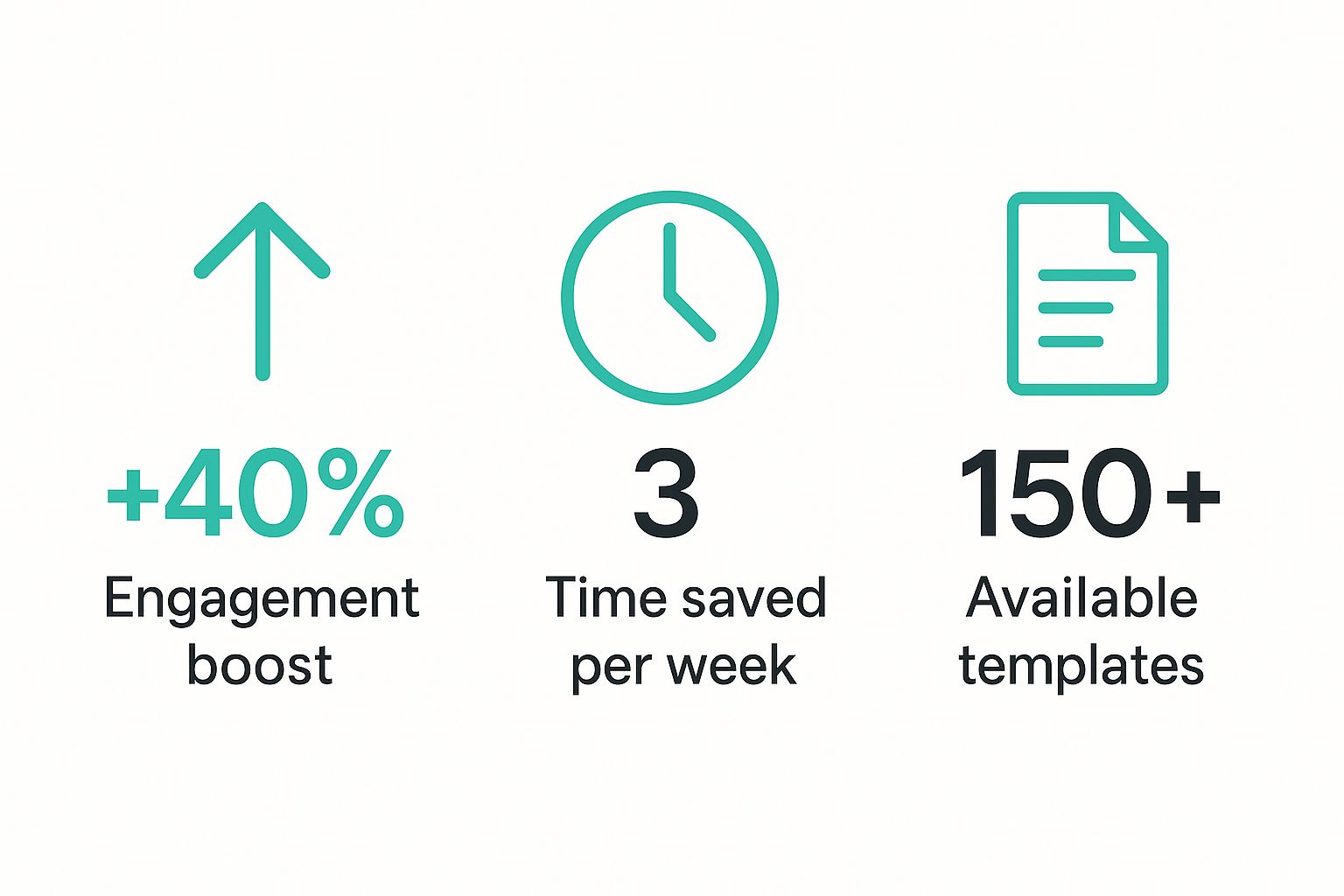
These numbers prove that automation isn't just a time-saver. It directly leads to better engagement, a more robust content library, and ultimately, better results for your business.
Your First Steps with AI Pin Generation
Diving into a new tool can sometimes feel like a lot, but you'd be surprised how straightforward it is to get started with an AI Pinterest pin creator. The whole point is to go from a single URL to a dozen unique pins in just a few clicks—no design software needed.
Let's walk through it. The very first thing you need to do is give the AI some source material. This is usually just a link to a blog post, a product page from your Shopify store, or even an Etsy listing.
Once you pop that URL in, the magic starts. A tool like Pin Generator gets to work scanning the page, pulling out key text for titles, grabbing relevant images to use as backgrounds, and even snagging your brand logo. This isn't just a simple copy-and-paste; it's intelligently analyzing your content to create something new.
Navigating the Initial Dashboard
After the tool processes your link, you'll land on a dashboard filled with pin drafts. It's easy to get distracted by all the options, but for now, just focus on the main generation area where you can preview the pins the AI has cooked up for you.
You’ll immediately see a bunch of different designs. Some will probably be image-heavy (perfect for a travel blog), while others might be more text-focused (great for a how-to guide). The AI does this on purpose to give you a variety of styles, helping you test what might click with your audience.
For instance, if you plugged in a recipe for "Quick Vegan Dinners," you might instantly get pins like:
- A pin with a gorgeous photo of the final dish, with the title overlaid in a nice font.
- A text-based pin that lists the top three ingredients to grab attention.
- A collage-style pin that shows a few steps of the cooking process.
This first batch is a massive head start. It saves you the headache of brainstorming design ideas from scratch and gives you something tangible in minutes, not hours.
Pro Tip: Don't feel like you have to use every single image the AI suggests. You can easily click to deselect any pictures that don't quite match your brand's vibe. My advice? Stick to high-quality, vertical shots—they always perform best on Pinterest.
Fine-Tuning Your First Pin Batch
The AI does the heavy lifting and gets you about 80% of the way there. That last 20% is your chance to add that human touch and make the pins truly yours. Before you hit "schedule," take a minute to look over the generated text.
The AI will pull headlines and snippets directly from your page, but you can—and should—tweak them. For example, we know that Pinterest titles perform best when they are between 60-100 characters. A quick check to see if your generated titles hit that sweet spot can make a huge difference.
Here's a quick mental checklist I run through:
- Check Titles: Are they catchy and within the ideal character count?
- Review Descriptions: Do they naturally include my target keywords? I usually aim for 150-250 characters.
- Select Images: Are the chosen images eye-catching and on-brand?
- Confirm URL: Is the destination link pointing to the right page?
Think about it: if you have a new product, the AI might generate a simple title like "New Blue T-Shirt." With a quick edit, you can turn that into "The Perfect Blue T-Shirt for Summer Outfits," which is way more clickable and better for Pinterest SEO.
This quick refinement process is the final step before you're ready to schedule your pins and start driving traffic. You’ve just turned a single link into a whole set of powerful marketing assets. Nice work.
Customizing Pins for a Strong Brand Identity
The real magic of using an AI pin creator isn't just about speed; it's about being able to scale your unique brand voice. Think of that first batch of pins the AI spits out as your raw material. Now, it's time to roll up your sleeves and inject your brand's personality into them.
The goal? Make every single pin feel authentic and instantly recognizable to someone scrolling through their crowded feed. This is where you shift from just generating content to thinking like a brand strategist, building a cohesive look that your audience will come to associate with quality.
Establishing Your Visual Brand Kit
Most good AI pin tools, Pin Generator included, let you set up a brand kit. This is a non-negotiable first step. Seriously. It ensures every pin you create is consistent, saving you from the soul-crushing task of making the same manual edits over and over again.
Here’s what you’ll want to lock in:
- Your Color Palette: Plug in the exact hex codes for your primary and secondary brand colors. This keeps your text overlays, backgrounds, and design elements perfectly in sync with your website.
- Your Fonts: If you have custom brand fonts, upload them. Using your specific typography is one of the quickest ways to make a generic template feel like it was custom-made for you.
- Your Logo: Pop your logo in so it can be automatically slapped onto every pin. This is a simple but powerful way to build brand recall with every impression.
Set this up once, and the AI will handle the rest, making brand consistency completely effortless.
Crafting Compelling Pin Titles and Descriptions
Great visuals are what stop the scroll, but it's the text that actually drives action. The titles and descriptions the AI generates are a fantastic starting point, but a few minutes of optimization can make a world of difference for your reach and click-through rates.
Never forget: Pinterest is a search engine at its core.
And it’s getting smarter. Pinterest now uses AI to power 100% of its search and recommendation engine. We’ve seen features like smart image tagging slash publishing time for creators by 42%. This just goes to show how vital optimized, machine-readable content has become. If you want to dive deeper, you can learn more about how Pinterest's AI is shaping content discovery.
To really make this work for you, you need to refine your pin text with SEO in mind.
A killer pin title doesn't just describe the pin; it promises a solution. Instead of something generic like "Chicken Recipe," try "Easy 30-Minute Chicken Recipe for Busy Weeknights." It’s specific, it speaks directly to a pain point, and it’s loaded with keywords people are actually searching for.
Your pin descriptions are where you can pack in more context and keywords. I usually aim for around 150-250 characters and try to weave in relevant search terms naturally.
If you're an affiliate marketer, this is also the perfect spot to add a crystal-clear call-to-action. We get into the nitty-gritty of this in our guide on using https://pingenerator.com/blog/ai-pinterest-pin-templates-for-affiliate-marketers.
By spending just a few minutes polishing the text, you ensure your beautifully branded pins actually get found by the right people. This turns your automated designs into a powerful, traffic-driving machine.
Automating Your Schedule for Consistent Growth
So you’ve got a batch of beautiful, AI-generated pins ready to go. Now what? This is where the real magic happens. The power of AI isn't just in making pins faster; it’s about building a consistent pinning rhythm that the Pinterest algorithm absolutely loves, all without you being chained to your desk.
It’s time to put your content calendar on autopilot.
Consistency is everything on Pinterest. The platform rewards creators who show up regularly, but let's be real—posting manually every single day is a one-way ticket to burnout. By using a built-in scheduler, you can map out your entire content strategy for weeks, or even months, in a single session.
Imagine spending one afternoon lining up pins for your top ten blog posts and knowing your account will be active and growing for the next 30 days. This is the "set it and forget it" strategy that separates the thriving accounts from the stagnant ones.
Finding Your Optimal Posting Rhythm
Okay, so what does a winning schedule actually look like? While every niche and audience has its own quirks, there are some proven best practices that are a fantastic starting point. The goal is to post often enough to stay visible without spamming your followers or the algorithm.
Here are a few key strategies I always recommend:
- Hit a Daily Cadence: Aim to post a minimum of 3-5 new pins every day. This frequency signals to Pinterest that you're an active, reliable creator, which helps your content get prioritized in user feeds.
- Spread the Love (Across Your Boards): Don't just dump all your new pins onto one board at once. Spread them out across multiple relevant boards over several days. This is often called "smart scheduling," and it's a game-changer for maximizing the reach of each pin design.
- Pin During Peak Hours: This can vary, but a solid rule of thumb is to schedule pins for afternoon and evening hours when people are scrolling the most. Data often points to Fridays between 1 PM and 3 PM as a particularly strong window for engagement.
When you combine these tactics, you create a steady drumbeat of content that keeps your profile fresh and consistently in front of the right people.
Takeaway: True automation isn't just about scheduling; it's about scheduling smarter. An AI pin creator with a robust scheduler lets you plan your content distribution strategically, giving each pin its best possible chance to take off.
Putting Scheduling Into Action
Let's walk through a real-world scenario. Say you have a blog post about "DIY Home Office Organization" and you’ve generated 15 unique pins for it. Instead of blasting them all out at once, you’d schedule them to go live over two weeks.
You'd pin them to boards like "Home Office Ideas," "Small Space Solutions," and "Productivity Hacks," making sure not to post the same pin to the same board too close together.
This approach ensures your content reaches different segments of your audience at different times, multiplying its visibility. For a complete walkthrough on getting this set up, you can learn more about how to schedule Pinterest posts for maximum impact.
This method turns a single content creation session into weeks of automated, strategic marketing—fueling consistent growth without the daily grind.
Advanced Strategies for Power Users
Once you've got the hang of generating, customizing, and scheduling pins, it's time to really kick things up a notch. Moving beyond the basics is what separates the good Pinterest accounts from the truly great ones. This is where your ai pinterest pin creator stops being just a content machine and becomes a powerful growth engine that drives serious results for your business.
These next-level tactics are all about working smarter, not harder. By digging into data, testing your creative, and reviving your best content, you can start to dominate your niche and see a real return on your efforts.
A/B Test Your Pin Designs
One of the most powerful things you can do on Pinterest is A/B test your pin designs. Stop guessing what your audience wants to see and let their actions give you the answer. The process is pretty straightforward: for a single blog post or product, generate two completely different pin styles.
For example, you could test:
- A pin with a bold, colorful background versus one with a clean, minimalist design.
- A title that poses a question ("Need an Easy Dinner Idea?") against a title that offers a direct solution ("Your New Favorite 30-Minute Meal").
Schedule both pins to go live around the same time but post them to different boards to avoid them competing with each other. Give it a week or two, then pop into your Pinterest Analytics. Did one pin get way more clicks or saves? That's your winner. This data is pure gold—it tells you exactly what visuals and copy styles are clicking with your audience, so you can make more of what works.
Revive Your Evergreen Content
Got some old blog posts that used to be traffic magnets but have slowed down? An AI pin creator is the perfect tool to breathe new life into that amazing, high-performing content. Your old pins might be stale, but the content itself is still valuable.
Just grab the URL of an old post and generate a fresh batch of 10-15 new pins. Make sure to use modern templates, updated text overlays, and different images. When you schedule these new "Fresh Pins," you're signaling to the Pinterest algorithm that your content is still relevant and active. This can give it a major boost in the feed and drive a whole new wave of traffic.
Key Takeaway: The Pinterest algorithm loves fresh content. Creating new pin images for your existing URLs is hands-down the best way to signal that freshness without having to write a brand-new blog post every single time.
Monetize with Affiliate Pins
Your AI tool isn't just for pushing your own content. It’s also an incredible asset for your affiliate marketing game. Instead of linking a pin to your blog post, you can link it directly to an affiliate product page. Just be sure to disclose it properly using hashtags like #ad or #affiliatelink.
Try generating pins that highlight the benefits of a product. For instance, if you're an affiliate for a kitchen gadget, you could create pins with titles like "The One Tool That Cut My Meal Prep Time in Half." This direct approach can start generating affiliate income without needing a blog post as a middleman.
This strategy is only getting more effective as Pinterest's own AI gets smarter. The platform is constantly analyzing user actions to deliver hyper-relevant content. One recent update showed a 13% increase in recommendation accuracy and a 6% rise in repins, proving that precise targeting really boosts engagement. By creating specific, benefit-driven affiliate pins, you tap directly into this powerful system. You can read more about this trend and other insights on Pinterest's 2025 AI updates.
Got Questions About AI Pin Creators? We’ve Got Answers.
Jumping into any new technology brings up a few questions. And when you’re talking about something that can seriously shake up your workflow, like an AI Pinterest pin creator, it’s smart to get the full picture first. So, let’s clear the air and tackle some of the most common questions we hear.
My goal here is to make sure you feel completely confident using a tool like this. We'll get into the nitty-gritty of how it all works so you can start putting it to work for your brand without a second thought.
Are the AI-Generated Pins Actually Unique?
Yes, absolutely. This is probably the biggest question people have, and it's a good one. An AI pin creator isn't just grabbing random designs from a stock library. It’s way smarter than that.
The process starts with your content. The tool scans your URL, pulls out the key text and images, and then blends them with your brand kit—your specific fonts, colors, and logo. It’s building pins from scratch, using your assets as the foundation.
So, while the system might use certain layout structures for efficiency, the final product is a unique mix of your content and your branding. You end up with a batch of designs that are completely exclusive to you.
Can I Pin the Same AI Design to Multiple Boards?
You bet, and you definitely should! Pinning a single design to several relevant boards is a classic Pinterest strategy for getting more eyeballs on your content. The key is to do it smartly.
Don't just blast the same pin to five boards at once. That can look spammy. Instead, schedule them out over a few days or even a week.
Let’s say you have a pin for a "Vegan Lasagna Recipe." A good scheduling plan might look like this:
- Pin it to your "Vegan Recipes" board today.
- Schedule it for your "Easy Weeknight Dinners" board in three days.
- Add it to your "Healthy Comfort Food" board next week.
This drip-feed approach helps you reach different segments of your audience at different times without overwhelming anyone.
How Does an AI Pin Creator Help My Pinterest SEO?
This is where things get really powerful. An AI pin creator supports your Pinterest SEO in a few crucial ways.
First, it’s all about volume and variety. By creating dozens of pin variations for a single URL, you get more chances to target different keywords in your titles and descriptions. One blog post can suddenly rank for a whole range of search terms, massively expanding its reach.
Second, it nails consistency. The Pinterest algorithm loves active accounts. When you're publishing fresh content daily, you're sending strong signals that your profile is a valuable resource. An AI tool makes this level of consistency effortless.
But the biggest SEO win? It's the ability to create "Fresh Pins" at scale. Pinterest's algorithm heavily favors new images, even if they link to older content. An AI tool automates this entire process, keeping your best articles and products in front of people long after you first published them.
Essentially, the tool handles the heavy lifting of design and scheduling. This frees you up to focus on the human side of SEO—digging into keyword research, writing killer descriptions, and analyzing what's actually driving traffic. That's how you build real, sustainable growth.
Ready to stop spending hours on manual pin design and start automating your growth? Pin Generator can help you create hundreds of unique, on-brand pins in just a few minutes. Give Pin Generator a try and see the difference for yourself.