
Create Stunning Pins with Our AI Pinterest Pin Generator
2 October 2025
Let’s be honest, Pinterest marketing is a beast. To really succeed, you need a constant stream of fresh, eye-catching pins, and creating them manually is a soul-crushing time sink.
This is where an AI Pinterest pin generator comes in. Think of it as your secret weapon for content creation. It’s a smart tool that takes a single source—like a blog post URL or a product page—and automatically creates multiple unique pins from it. We're talking designs, titles, and descriptions, all generated in a matter of seconds.
This completely flips the script on how you manage your Pinterest account, letting you maintain a killer posting schedule without the manual grunt work.
The New Era of Pinterest Marketing with AI
Pinterest has evolved way beyond its early days as a simple digital mood board. It's now a full-blown visual search engine, one that can drive serious traffic and sales… if you can keep up with its relentless demand for new content. That's the big hurdle for most creators and marketers.
This is exactly why an AI Pinterest pin generator is such a game-changer. These tools take that one piece of content you already have and spin it into dozens of unique, engaging pins without you lifting a finger. It’s a fundamental shift from tedious manual design to an intelligent, automated workflow that just works.
From Manual Labor to Smart Automation
Remember those hours spent hunched over Canva, wrestling with text boxes, hunting for the right stock photos, and writing descriptions for maybe a handful of pins? Now, imagine getting dozens of variations—all on-brand and ready to post—in just a few minutes. That’s the magic of bringing AI into your Pinterest strategy.
But this isn't just about clawing back your time; it’s about working smarter. The best AI tools have completely changed the game by enabling bulk pin creation that's designed to hit specific markets and keywords. For many creators, switching to this kind of AI automation has saved them an average of 15 hours per week, letting them scale up their content and grow their channel way faster than before.
To really see the difference, it helps to put the two methods side-by-side.
Manual Pin Creation vs AI Pin Generation
| Aspect | Manual Pin Creation | AI Pin Generator |
|---|---|---|
| Time Investment | Hours per batch of 5-10 pins. | Minutes for dozens of unique pins. |
| Design Effort | High. Requires design skills and constant creative input. | Low. Select templates and AI does the rest. |
| Content Variety | Limited by time and creativity. Designs can become repetitive. | High. Generates endless variations in copy and design. |
| Scalability | Difficult to scale without hiring help. | Effortlessly scalable. Create 100s of pins easily. |
| Consistency | Can be challenging to maintain a consistent posting schedule. | Simple. Generate and schedule weeks of content at once. |
| Focus | On the repetitive task of making pins. | On strategy, analytics, and growing your account. |
The table makes it pretty clear. One path is a grind, the other is a growth accelerator.
The real advantage here is that you get to shift your focus from being a content creator to a content strategist. Instead of getting bogged down in the nitty-gritty of design, you can spend your time analyzing what’s working, refining your keywords, and planning your next big move.
AI pin generators are one of the most practical and powerful marketing automation examples out there today. By taking over the most time-consuming parts of the job, they free you up to concentrate on the high-level strategy that actually drives growth.
Ultimately, this technology lets you:
- Crush creative block by instantly generating endless design and copy ideas.
- Keep your branding on point by using pre-set templates, fonts, and colors.
- Scale your content production without needing a huge team or burning yourself out.
Creating Your First Pins with AI
Alright, let's dive in. This is where the magic really happens—when you go from just hearing about an AI Pinterest pin generator to actually seeing it work. It's that "aha!" moment when you realize you can turn a single piece of your content into a whole library of pins in just a few seconds.
The first thing you’ll do is connect your Pinterest account. Don't worry, it's a straightforward, secure authorization that just gives the tool permission to schedule your pins for you. One and done.
Once you're linked up, the process kicks off with one simple action: giving the AI a URL. This can be a blog post you just published, a product page from your Shopify store, or even a specific listing on Etsy. The generator then gets to work, scanning the page to pull out the most important images and text. This isn't just a basic copy-paste job; it’s actually analyzing the content to find the best material to build your pins around.
From a Single Link to a Dozen Designs
This is the part that feels like a superpower. You give it one URL, and it doesn't just spit back one design. It gives you a whole bunch of them.
Let’s say you just wrote an article, "10 Tips for Container Gardening." You drop that link in, and the AI might come back with pins titled:
- "Container Gardening Made Easy"
- "Pro Tips for Small Space Gardens"
- "Your Ultimate Guide to Potted Plants"
Each one will have a different image pulled from your article and a unique layout, giving you a diverse set of pins to work with. Instantly.
Here’s what that workflow looks like in a nutshell:
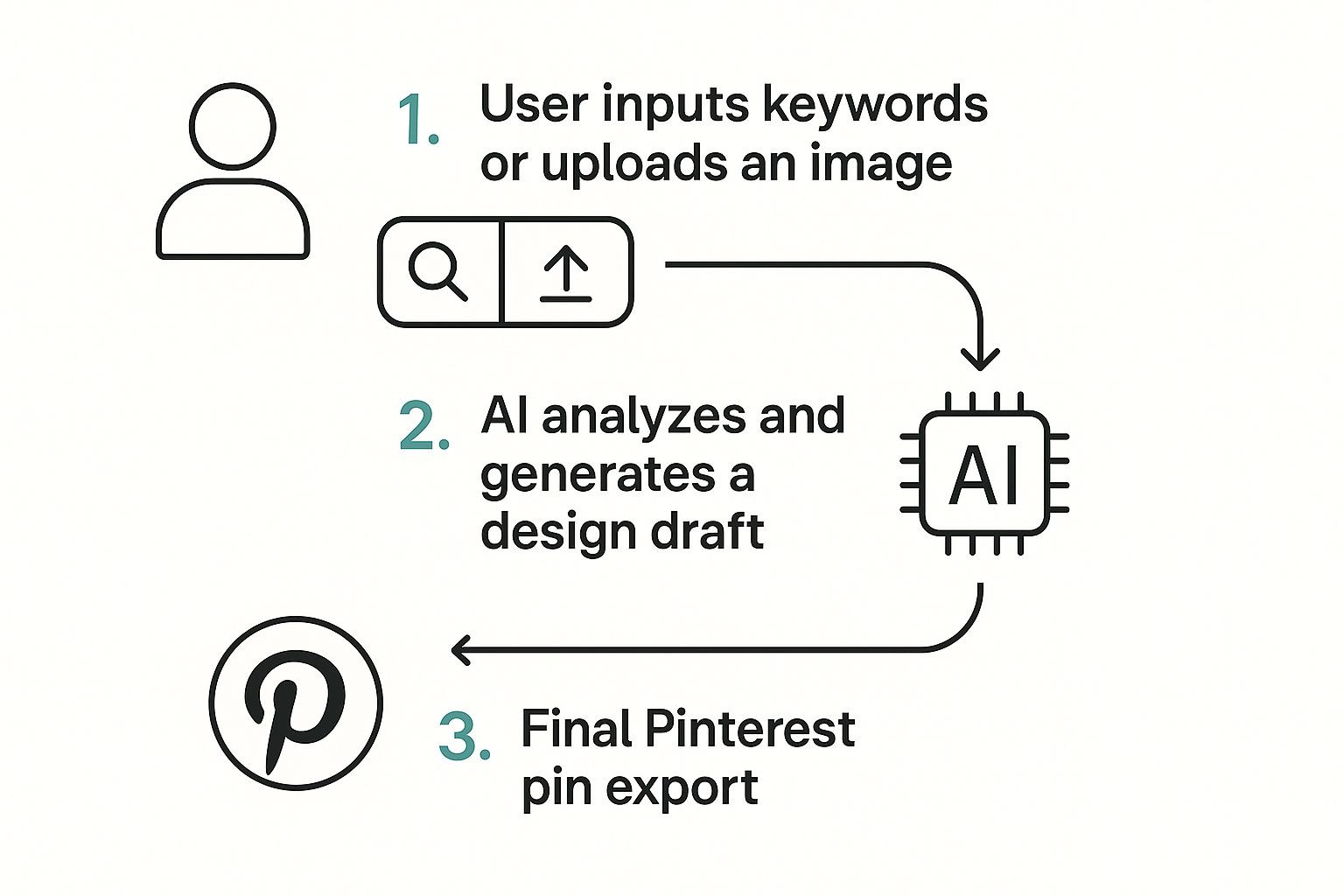
As you can see, your simple input is analyzed and transformed into a finished pin, completely cutting out the tedious manual design part.
Defining Your Brand's Visual Identity
To make sure every pin actually looks like your brand, the next step is to set up your brand kit. This is where you upload your logo, plug in your specific hex codes for your brand colors, and pick out your favorite fonts. A good AI Pinterest pin generator saves these settings and automatically slaps them onto every pin it creates from here on out.
This one-time setup is a massive time-saver. It guarantees brand consistency across hundreds of pins without you ever having to manually tweak a color or font again. It’s the secret to making AI-generated content look professional and cohesive.
With your brand identity locked and loaded, you can start looking at what the AI has cooked up. The tool will also generate SEO-friendly titles and descriptions for you. While they're usually pretty solid, you can always jump in and edit them to add your own flair or target specific keywords.
Reviewing and Finalizing Your Pins
The last step is a quick once-over. Just scroll through the generated pins and pick the ones you like best. You might want to swap out an image here or adjust the text placement there, but the heavy lifting is already done. In just a few minutes, you’ll have a full batch of high-quality, on-brand pins ready to be scheduled.
For a deeper dive into customizing your designs, our guide on using a pin design generator has some more advanced tips.
While we're talking about Pinterest here, this kind of automation is a game-changer across the board. If you’re looking to apply this thinking to other platforms, you might find this list of the top AI tools for content creation pretty useful.
By the end of this process, you’ve successfully turned a single URL into a batch of optimized pins, ready to drive traffic.
Customizing Pins to Reflect Your Brand
Automation is your starting line, not the finish. An ai pinterest pin generator is incredible for churning out a ton of designs fast, but it’s that last 10% of personalization that really makes your content stick. This is where you inject your unique brand voice and style into the AI’s work, turning a good pin into a great one.
The first batch of AI pins gives you a fantastic foundation. To really connect with your audience, though, you have to move beyond the default settings. It's all about striking that perfect balance between the speed of AI and the human touch of your creative vision. This is how you make sure every pin doesn't just look professional—it feels authentically yours.
Tweaking Text Overlays for Maximum Impact
Let's be real: the text on your pin is what stops the scroll. While AI can whip up some catchy titles, you can take them to the next level with a few small, strategic edits. For example, if the AI suggests "10 Healthy Dinner Ideas," you could easily tweak it to "10 Healthy Dinners Ready in 20 Minutes" to instantly highlight a huge benefit.
Think about making these quick adjustments to your text overlays:
- Font Hierarchy: Make the most important words bigger or bolder. This simple visual trick guides the viewer's eye right where you want it and makes your message crystal clear.
- Color Contrast: Make sure your text is easy to read. If the AI puts light text on a light background, change the font color or add a subtle drop shadow to make it pop.
- Word Choice: Swap out generic words for more powerful, action-oriented ones. Instead of "Good Tips," try "Essential Tips" or "Proven Strategies."
This kind of hands-on approach is vital. AI is great at the heavy lifting, but your expertise is the final ingredient. Marketers are already seeing that showing products in action with AI-enhanced creative can boost sales conversions by a whopping 67% compared to just using static images. As AI's role grows, Pinterest is even adding labels to AI-modified images for transparency. You can dig deeper into these kinds of trends in recent Pinterest statistics and insights.
Swapping Visuals and Saving Your Style
The AI is smart about pulling images from your content, but sometimes you have a specific shot that just tells the story better. Most pin generators make it super simple to swap out the AI-selected image for one of your own branded photos or graphics. This is a must for product-based businesses or any creator with a distinct visual style.
The real long-term win is teaching the AI your preferences. Once you've nailed a layout—with your go-to text placement, fonts, and image style—save it as a custom template.
By creating and saving your own templates, you’re basically training the AI on your brand’s specific look and feel. The next time you generate a batch of pins, the tool will lean on your custom designs first, which drastically cuts down on your manual editing time. It’s the perfect way to combine the raw speed of an ai pinterest pin generator with the personality of your unique brand, creating a workflow that’s both effective and sustainable.
Scheduling Content for Maximum Reach
Creating a fantastic pin is a huge win, but let's be real—it's only half the battle. For that pin to actually do its job and drive traffic, it has to be seen by the right people at the right time.
This is where strategic scheduling comes in. It's the secret sauce that turns your batches of AI-generated pins into a consistent, high-performing content machine.
Thankfully, the beauty of a modern AI Pinterest pin generator is that most come with a built-in scheduler. This completely changes the game, moving you from a tedious, one-by-one posting process to a streamlined "set it and forget it" workflow. You can literally plan your entire content calendar weeks or even months ahead.
Finding Your Posting Sweet Spot
One of the first questions I always get is, "How often should I actually be posting?" The answer isn't a magic number; it's about finding a rhythm that keeps your audience engaged without overwhelming them. You need to post often enough to stay on the Pinterest algorithm's good side, but not so much that you look spammy.
From what I've seen, a great starting point is pinning between 3 to 10 new pins per day. This frequency tells Pinterest you're an active and serious creator.
- Just starting out? Aim for 3-5 pins daily. It's a manageable goal that helps you build momentum without burning out.
- Ready to grow? If you have a solid backlog of content, ramping up to 8-10 pins a day can seriously accelerate your reach.
- A word of caution: Pinning more than 30 times a day can sometimes get flagged. It's better to focus on quality and consistency over just raw volume.
The key is consistency over intensity. It's way more effective to post five great pins every single day than to dump 30 pins on a Monday and then go silent for the rest of the week. An automated scheduler makes this completely effortless.
Leveraging Multiple Boards for Maximum Exposure
Here’s a pro tip: don't just pin your new content to one board and call it a day. If you really want to make the Pinterest algorithm work for you, you need to strategically share your pins across multiple relevant boards over time. This is one of the easiest ways to expand your reach.
Let's say you have a pin for a "healthy vegan breakfast recipe." You could schedule it to post to several of your boards:
- First, to your "Vegan Breakfast Ideas" board (super specific).
- A few days later, to your "Healthy Recipes for Busy Mornings" board (broader, solution-focused).
- A week later, to your "Plant-Based Eating Tips" board (more of a lifestyle angle).
By scheduling the same pin to these different boards with a decent interval in between, you expose it to new segments of your audience each time. A smart scheduler inside an AI Pinterest pin generator can automate this whole process, so you never have to worry about re-pinning too quickly.
This multi-board strategy creates an evergreen content pipeline that just keeps working for you. If you want to dive deeper, our guide on how to schedule Pinterest posts breaks down even more advanced tactics. By combining AI creation with smart scheduling, you're building a powerful, automated system for serious Pinterest growth.
Using Analytics to Improve Your AI Strategy
Getting your pins created and scheduled with an AI Pinterest pin generator is a fantastic start, but it's really only half the story. The real secret to sustainable growth on Pinterest is figuring out what's actually working so you can double down on it.
This is where your Pinterest Analytics becomes your secret weapon.
Think of analytics not as a boring spreadsheet, but as direct feedback from your audience. It’s a treasure trove of data telling you exactly which designs, headlines, and pin formats are making people stop scrolling and start clicking. Without it, you’re just guessing. With it, you can sharpen your entire AI-driven strategy.
Identifying Your Top-Performing Pins
Your first stop should be the Performance Over Time report inside Pinterest Analytics. This gives you a great high-level view of your account's health. Don't get lost in the weeds; just focus on a few key metrics that tell you what you really need to know about engagement and traffic.
Here’s what I always keep an eye on:
- Impressions: This is simply how many times your pins were shown to users. It’s your baseline for reach.
- Saves: How many people saved your pin to one of their boards. This is a huge signal to Pinterest that your content is valuable and worth showing to more people.
- Outbound Clicks: The number of times people clicked through to your website. For most of us, this is the ultimate goal.
Hunt for the pins that have a high number of both saves and outbound clicks. These are your golden pins—the ones that not only inspire your audience but also successfully get them to take action.
Translating Data Into Smarter AI Prompts
Once you've found your winners, it's time to put on your detective hat. What do these top-performing pins have in common?
Are they video pins? Do they all share a specific color palette? Is the call-to-action phrase particularly effective? This is where you connect the dots between your analytics data and your AI tool.
For instance, you might notice that your carousel pins are crushing it. That makes sense—data shows carousel pins can rack up 30% higher engagement than static ones. This is a powerful insight you can use immediately. (You can dig into more stats like this on Pinterest performance breakdowns).
By analyzing what resonates, you stop making vague requests and start giving your AI pin generator specific, data-backed instructions. This continuous feedback loop is what transforms your Pinterest strategy from a shot in the dark into a precision-guided marketing machine.
Instead of just telling the AI to "create pins for my new blog post," you can now feed it much more powerful prompts.
Here are a few examples of how you can level up your prompts based on what you find:
- "Generate five carousel pins with a bold, minimalist design for my post on [topic]."
- "Create video pins with a text overlay that asks a question, like 'Tired of [problem]?'"
- "Design static pins using a blue and gold color scheme and a clear 'Learn More' CTA button."
This approach ensures that every new batch of pins you generate is more strategic than the last. You’re no longer just making content; you’re making content you know your audience wants to see, click, and save.
Your Top Questions About AI Pin Generators, Answered
When you're thinking about adding a new tool to your workflow, it's natural to have questions. You want to know how an AI Pinterest pin generator really works and if it's the right fit for your brand. Let's dig into some of the things people ask me most often.
A big one I hear is whether using AI will get your account in trouble with Pinterest. The short answer? No. Pinterest's algorithm doesn't know or care how you made your pin. It only cares if the pin is high-quality, relevant to users, and part of a consistent pinning strategy.
In fact, the ability to show up consistently with fresh content is a huge green flag for Pinterest. It signals that you're an active creator, which can give your account's visibility a nice boost over time.
But How Do I Keep My AI Pins On-Brand?
This is a totally valid concern. You've worked hard to build a specific look and feel, and you don't want an AI tool to mess that up. The trick is picking a generator that gives you real control over customization. A good AI Pinterest pin generator will let you set up your brand essentials right from the start.
Typically, you can lock in your brand identity by:
- Uploading your logo so it appears on your pins automatically.
- Defining your color palette by plugging in your exact hex codes.
- Selecting your brand fonts to keep all your text consistent.
My best advice is to go one step further. Once you've set your brand kit, create and save a handful of custom templates that really capture your brand’s unique vibe. This basically trains the AI on your preferred style. And, of course, always give your pins a quick once-over before they go live to make sure they hit the mark.
Think of it this way: you're not handing over the keys to the kingdom. You're hiring an incredibly fast design assistant. You set the brand direction and give the final approval, while the AI does 90% of the tedious design work for you.
Are These Tools Actually Worth It for a Small Business?
One hundred percent, yes. If you're a small business owner, a solopreneur, or a creator, your time is your most precious asset. An AI Pinterest pin generator can realistically free up 10 or more hours every single week—time you'd otherwise lose fiddling with design software.
Imagine what you could do with that extra time. You could focus on developing new products, talking to customers, or mapping out your next big marketing move. When you look at the ROI in terms of more website traffic, more leads, and more sales, it quickly becomes one of the smartest, most affordable tools a small operation can have.
Ready to stop the manual grind and start growing your Pinterest presence? Pin Generator lets you create, schedule, and automate stunning pins in a fraction of the time. Get started today at PinGenerator.com.