
Create Stunning Pins with an AI Powered Pinterest Pin Maker
10 September 2025
An AI-powered Pinterest pin maker is a tool that completely automates the process of creating eye-catching, high-performing pins, saving you from endless hours of manual design work. Instead of staring at a blank canvas in a design tool, you just give it a URL or some basic text. In seconds, the AI spits out dozens of unique, on-brand pin variations, already complete with optimized titles and descriptions.
It sounds simple, but it's a massive shift in how you can approach the platform.
Why AI Pin Makers Are a Creative Game Changer
Are you struggling to feed the hungry Pinterest algorithm with a constant stream of fresh, eye-catching pins? You're definitely not alone. The demand for consistent, high-quality content is one of the biggest headaches for creators and marketers.
From design burnout to the sheer time it takes to produce content at scale, traditional design workflows just can't keep up.
This is exactly where an AI-powered Pinterest pin maker comes in, acting as way more than just a time-saver. It becomes a real strategic partner.
Overcoming Content Creation Hurdles
The reality of Pinterest marketing is that you need both volume and quality. You have to publish multiple unique pins every single day just to stay relevant, but creating each one by hand is a serious drain on your time and energy. This is especially true for small businesses and solo creators who don't have a design team on standby.
An AI tool completely removes this bottleneck. It takes over the repetitive tasks—resizing images, testing layouts, pairing fonts and colors—freeing you up to actually focus on the big-picture strategy.
Key Takeaway: The main advantage of an AI pin maker isn't just speed; it's the ability to consistently produce a high volume of diverse, on-brand content without torching your quality standards or burning yourself out.
To really see the difference, let's put the two methods side-by-side.
Manual Pin Design vs AI Pin Generation
| Feature | Manual Pin Creation | AI Pinterest Pin Maker |
|---|---|---|
| Speed | Slow; can take 15-30+ minutes per pin. | Fast; generates dozens of pins in under a minute. |
| Scale | Difficult to scale; creating 10+ pins a day is a full-time job. | Easy to scale; produces hundreds of pins with minimal effort. |
| Design Variety | Limited by your own creativity and templates. | Creates countless unique variations automatically. |
| Optimization | Requires manual keyword research for titles & descriptions. | Often includes AI-powered copy generation for optimized text. |
| Consistency | Can be challenging to maintain brand consistency across many pins. | Easily maintains brand guidelines (colors, fonts, logo). |
| Burnout Risk | High; repetitive design tasks lead to creative fatigue. | Low; automates the tedious work, letting you focus on strategy. |
As the table shows, it's not just about doing the same thing faster. It's about opening up a completely new level of strategic capability that was previously out of reach for most people.
Capitalizing on a High-Intent Audience
All this effort is absolutely worth it because the audience on Pinterest is primed to take action. The platform recently hit a massive 570 million monthly active users, and an incredible 85% of weekly Pinners have actually bought something based on pins they've seen.
An AI tool is essential for creating content at the scale you need to grab the attention of this huge and active user base. You can get more details on these stats over at Thunderbit's blog.
To get a feel for how AI is shaking up content everywhere, it's worth checking out the best AI content creation tools on the market. It shows how intelligent automation is becoming a standard part of digital marketing.
By automating design, writing compelling copy, and making sure every single pin is optimized for engagement, these tools help you keep pace with the algorithm and connect with people who are actively searching for inspiration and products. They’re no longer a "nice-to-have"—they're a core part of any winning Pinterest strategy.
Your First Pin Batch From a Single URL
Okay, this is where the magic really happens. Moving from theory to practice shows you just how powerful an AI powered pinterest pin maker can be. We're about to turn one single piece of content you've already created into dozens of on-brand pins in just a few minutes.
First things first, you need to teach the AI your brand’s unique style. Connect your Pinterest account and upload your brand kit—we're talking logos, your specific fonts, and your core brand colors. Getting this initial setup right is everything. It gives the AI the building blocks it needs to make sure every single pin looks and feels like it came straight from you.
From URL to Pin Collection
Once your branding is locked in, the process is ridiculously simple. Go grab the URL of a blog post, a product page, or any content you want to get more eyes on. Let’s say you just published a guide on "10 Budget Travel Tips for First-Time Backpackers." You just copy that link and paste it right into the tool.
The AI immediately gets to work, scanning your page to pull out the key images, headlines, and juicy text snippets. It's smart, too. It doesn't just grab random sentences; it actually identifies the most compelling points and visuals that are most likely to make someone stop scrolling on Pinterest. This is how you go from a blank canvas to a full collection of pins, ready to go, without touching a complex design tool.
The graphic below breaks down exactly how this rapid-fire generation works.
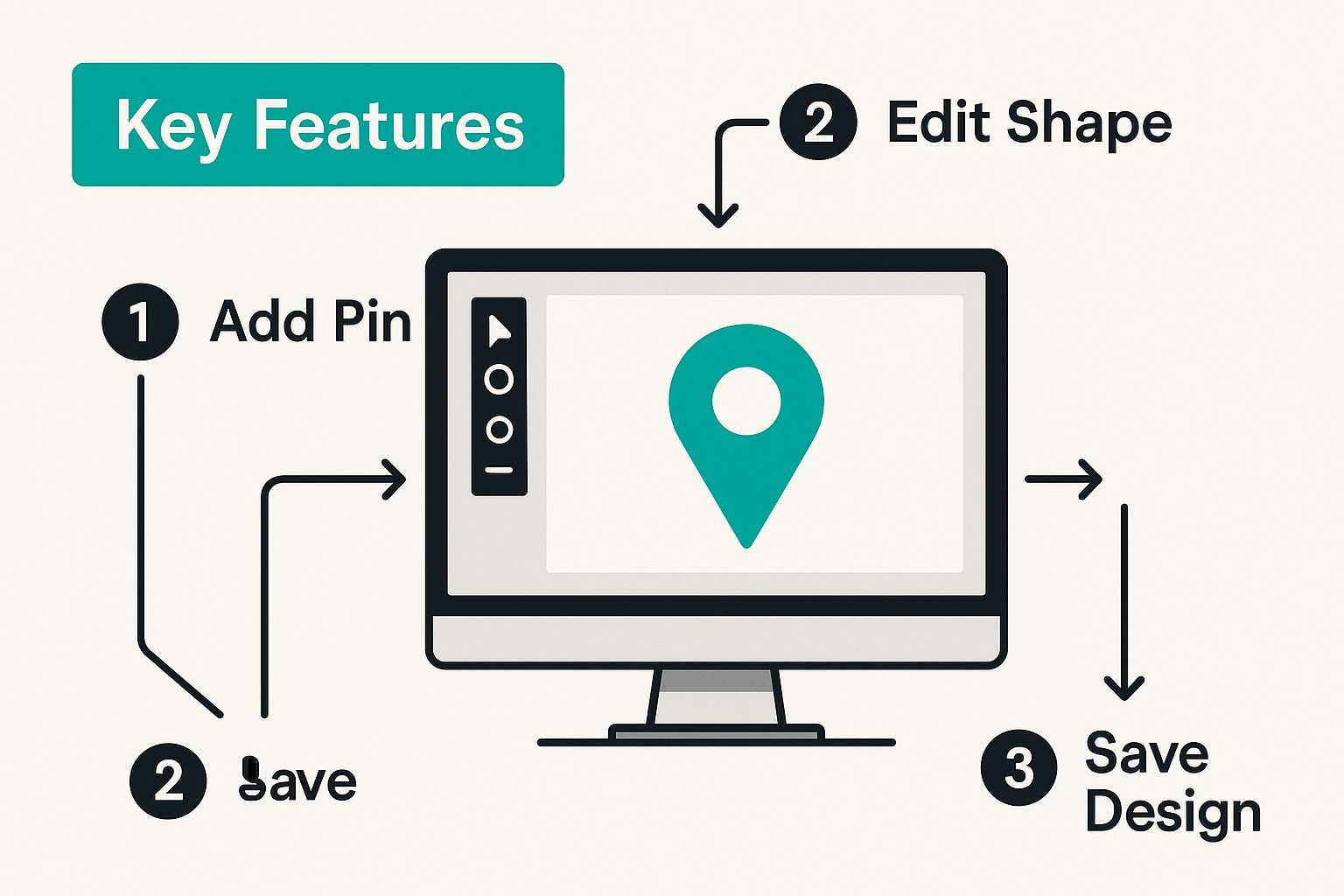
This whole process is built to turn a single blog post or product page into a whole suite of promotional graphics, each one designed specifically for the Pinterest platform.
Reviewing Your AI-Generated Designs
In just a few moments, you'll see a whole gallery of pin variations pop up. You’ll get different image crops, fresh text overlays, and unique color combos—all pulled from your brand kit and the URL you provided. Some pins might feature a specific tip from your post, while others might pull out a powerful statistic or ask a compelling question.
Pro Tip: Don't just grab the first pin you like and call it a day. The whole point is to have a bunch of different designs to test. What catches the eye of one person might not work for another. I always recommend picking a handful of your favorites and scheduling them out over the next few days.
This first batch is just your starting line. You have complete creative control to jump in and tweak anything you want. You can change the text, swap out an image, or adjust the call-to-action. Honestly, though, I've found the AI usually gets it 90% right on the first try, which saves a massive amount of time.
To see just how adaptable this can be, you can learn more about how an AI Pinterest pin creator can handle all sorts of different content types. The experience is designed to feel both effortless and incredibly powerful, completely taking the mystery out of making great pins.
Using AI Features for High-Impact Designs
Generating a batch of pins from a URL is a great start, but it's really just scratching the surface. The real magic of an AI-powered Pinterest pin maker is how it moves beyond basic templates to actually engineer pins that get clicks. These tools are packed with intelligent features that handle all those little details that make the difference between a pin that flops and one that goes viral.
Think of it like having a seasoned Pinterest expert looking over your shoulder. Instead of just guessing which headline will grab attention or what description will rank, the AI digs into massive amounts of data to give you suggestions that are proven to work. It’s a complete shift from a "spray and pray" approach to a data-backed strategy.
The AI isn't just making pretty pictures; it's building fully optimized assets designed to win over the Pinterest algorithm.
AI Copywriting for Titles and Descriptions
One of the most powerful time-savers is the AI title and description generator. This isn't just about filling in blank space. The AI has been trained on what actually performs well on Pinterest, so it gets the nuances of the platform’s search algorithm.
It whips up titles that are not only catchy but also loaded with the keywords people are genuinely searching for. It knows to keep titles in that sweet spot of 60-100 characters for mobile, making sure they're readable while still packing enough punch to spark curiosity. For descriptions, it aims for around 150-250 characters, giving just enough info to add value without overwhelming someone who's just scrolling by.
For instance, you might have a generic blog post title like "Travel Blog Post." The AI would come back with options like:
- 10 Budget Travel Hacks for First-Time Backpackers
- See Europe Without Breaking the Bank (Our Top Tips)
- Must-Know Backpacking Secrets for Your First Trip
Each one targets a slightly different angle, giving you multiple shots at getting discovered in search.
Smart Image Selection and Cropping
Let's be real: a pin's image is its first—and most important—hook. An AI pin maker scans the images from your URL and picks out the ones with the most potential. It's looking for clear subjects, vibrant colors, and compositions that just work in that classic vertical pin format.
But it doesn't stop there. The AI's smart cropping makes sure every single image is perfectly framed. This is a bigger deal than you might think. Pinterest’s own AI is the backbone of its entire platform, powering 100% of its search and recommendation engine. The platform itself has found that features like smart cropping help creators publish pins 42% faster. That's a huge clue that Pinterest really values well-formatted content. You can read more about how Pinterest uses AI to drive results to see just how deep it goes.
By automatically handling tedious tasks like choosing the best images and cropping them perfectly, the AI ensures your pins always look polished and professional in the feed, grabbing attention and earning that all-important click.
This whole process saves you from the mind-numbing task of manually resizing and testing different crops. Your visuals make a strong first impression, every time. Ultimately, these AI-driven features work together to create pins that aren’t just beautiful, but are strategically built from the ground up to succeed on Pinterest.
Automating Your Schedule for Consistent Growth
Let's be real: cranking out a bunch of awesome-looking pins is only half the battle. If you want to actually win on Pinterest, your strategy needs to be consistent. This is where an AI-powered Pinterest pin maker becomes your secret weapon, turning your Pinterest marketing from a daily grind into a hands-off growth machine.
Forget manually uploading and publishing every single pin. You can build a content queue that runs itself. The AI lets you schedule your whole batch of generated pins to your most relevant boards, pushing them live automatically when your audience is most likely to be scrolling. Set it up once and you're done—your content will be going live at all the right times.
Setting Up Your Content Queue
The whole process is built for speed. Once your pins are generated, you can assign each one to specific boards right inside the tool. Say you just created a dozen pins from a blog post about "healthy breakfast ideas." You could schedule a few to your "Quick Recipes" board and the rest to your "Healthy Eating" board in just a couple of clicks.
Next, you dial in the frequency and timing. A solid place to start is publishing 3-5 new pins a day. Your AI scheduler can space these out for you—one in the morning, one at lunchtime, and another in the evening—to catch different user habits and time zones.
Key Insight: Automation isn't just a time-saver. It's about maintaining a constant presence. A steady flow of new content tells the Pinterest algorithm that your account is active and valuable, which can seriously boost your visibility.
A/B Testing on Autopilot
Now for one of the coolest parts of automating your schedule: running A/B tests without even trying. When you have dozens of pin variations ready to go, you can finally figure out what your audience actually wants to see.
Here are a few simple tests you can run:
- Test Visuals: Schedule two pins with the same title but different images. Which visual style gets more clicks?
- Test Copy: Use the same image but try two different AI-generated titles. Does a straightforward "how-to" outperform a question?
- Test Calls-to-Action: Pit a pin with a "Shop Now" overlay against one with a "Learn More" overlay. See what actually drives traffic.
The tool tracks the performance data for every pin, so you can easily see which designs, copy, and CTAs are winning. This creates a powerful feedback loop where you’re refining your strategy based on real results, not just a hunch. For anyone wanting to dig deeper, exploring different Pinterest scheduling tools can unlock even more strategic options.
The Pinterest algorithm loves accounts that consistently post fresh, optimized content—sometimes rewarding those that publish 15 to 30 pins daily. Trying to keep up with that pace manually is a recipe for burnout. AI automation, on the other hand, can sustain that volume indefinitely, making it essential for any brand that's serious about growth.
Pro Tips for Optimizing Your AI Pins
Once you've got the hang of generating pins, it's time to level up. You want to move beyond just making pins to making pins that actually perform.
Think of an ai powered pinterest pin maker as a strategic partner, not just a production line. It's an asset that gets smarter the more you guide it. By feeding it better inputs and looking closely at what it creates, you can start getting expert-level results without the expert-level effort.
It's all about creating a feedback loop. You'll learn to guide the AI with specific keywords, test different visual styles, and use your own Pinterest data to make every new batch of pins better than the last.
Fuel Your AI with Real Keyword Research
This is crucial. Pinterest is a visual search engine, and keywords are the absolute lifeblood of getting your pins discovered. Before you even think about generating a new set of pins, spend a few minutes doing some quick-and-dirty keyword research right there on Pinterest.
Just start typing a broad topic like "home office" into the search bar. Pay close attention to the suggestions that pop up. Pinterest is literally telling you what people are searching for, like "home office ideas for small spaces" or "home office organization." These are gold.
Take those exact long-tail keywords and feed them directly into your pin maker when you generate titles and descriptions. This tells the AI precisely what search terms to target, giving your pins a massive head start in reaching the right people from the moment they go live.
Develop and Test a Few Core Templates
While the AI is fantastic at creating endless variations, you can steer its aesthetic by creating a few core template styles you know work for your brand. This helps maintain a consistent look while still giving you plenty of creative variety.
I recommend setting up a few distinct styles for different types of content:
- For Listicles: A template with a big, bold, numbered headline on a clean background is a classic winner. Think "5 Ways to…"
- For Tutorials: Try a multi-image template that shows a before-and-after or a few key steps. These are save-magnets.
- For Products: A minimalist style with a high-quality product shot, a clear price overlay, and a punchy call-to-action like "Shop the Look" works wonders.
Once you have these foundational styles, you can prompt the AI to generate pins "in the style of my listicle template." This streamlines everything and ensures you're creating content that already resonates with your audience.
Key Takeaway: Don’t let the AI do all the creative work in a vacuum. Look at your best-performing manual pins, figure out what design elements made them successful, and build templates around that. It's the perfect blend of smart automation and your own proven human insight.
Create Engaging AI Video Pins (The Easy Way)
Video Pins are one of the most powerful formats on Pinterest, and an AI pin maker makes them surprisingly easy to create. You don't need complicated video editing software, either.
A simple but effective trick is to create a short video pin that just cycles through several images from one of your blog posts, with text overlays appearing one after the other. This little bit of dynamic movement is often all it takes to stop the scroll.
It's a quick win that adds a high-impact format to your content strategy, and it takes a fraction of the time it would to produce a full video from scratch.
Answering Your Questions About AI Pin Makers
Jumping into a new tool always brings up a few questions. When it comes to an AI-powered Pinterest pin maker, I get it. You're probably wondering if a machine can really capture your unique brand voice or if it's just going to spit out generic, robotic-looking pins.
Let’s tackle those common concerns head-on.
"Will an AI Get My Branding Right?"
This is usually the first question people ask, and it's a big one. Can an AI really match your specific style? The short answer is a resounding yes, but it needs a little direction from you first. Modern AI tools like Pin Generator aren't just guessing; they're built for deep customization.
You kick things off by feeding it your brand kit—your logos, your exact color hex codes, and the specific fonts you use. This isn't just a gentle suggestion for the AI; it becomes the non-negotiable foundation for every single design it creates. From there, you can steer it further by choosing preferences like "minimalist" or "bold" to really dial in the aesthetic you're after.
"Will My Pins Look Repetitive?"
Nobody wants a Pinterest board that looks like a copy-and-paste job. It's a valid worry, but the good news is that quality tools are designed specifically to create variety and avoid that exact problem.
Just give the AI a single blog post URL, and it can generate dozens of genuinely distinct pin variations. It’s not just slapping your text on a background; it’s experimenting with different creative elements:
- Image Selection: It pulls various images from your content to use as fresh backgrounds.
- Text Snippets: It smartly extracts different headlines, subheadings, and key phrases to use for text overlays.
- Layouts and Colors: It tests tons of different combinations of your brand colors, arranging text and images in unique layouts every time.
The whole point isn't to create just one "perfect" pin. It's to give you a whole arsenal of options to choose from, test, and keep your feed looking dynamic and interesting.
And here's the cool part: the AI actually learns from your choices. When you consistently pick pins with a certain layout or edit text in a particular way, the tool starts to recognize your preferences. It gets better and better at matching your unique style with every new batch you generate.
"How Much Manual Work Is Actually Involved?"
This is my favorite part—the level of involvement is completely up to you. You can choose a workflow that fits your day, not the other way around.
Want to be completely hands-off? Just drop in a URL and let the AI handle everything from the initial design all the way to scheduling the pin. It’s a true set-it-and-forget-it approach.
Or, you can get your hands a little dirty. What I see most people do is find a perfect middle ground. They let the AI do about 90% of the heavy lifting. Then, they spend just a few minutes making those final little polishes—maybe tweaking a text overlay or swapping out an image. This hybrid method gives you that perfect blend of incredible efficiency and total creative control.
Ready to stop designing and start growing? Pin Generator automates your entire Pinterest workflow, turning your content into high-performing pins in seconds. Try it for yourself and see the difference at https://pingenerator.com.