
How to Make a Pinterest Collage: Easy Tips & Tricks
26 September 2025
At its core, a Pinterest collage is simply a single, eye-catching Pin made up of multiple images and products. You can whip these up using dedicated apps like Pinterest's own Shuffles or get more granular with graphic design tools to arrange photos, pop in some text, and tag your products before you upload.
Why Pinterest Collages Are Your Secret Weapon
It’s time to stop thinking of collages as just digital mood boards. On Pinterest, they are a serious strategic asset that can drive storytelling and, more importantly, sales. I've seen a single, well-designed collage outperform dozens of individual product shots, and the reason is simple: it provides context.
Instead of just showing a sweater, a collage can show that sweater as part of a complete, head-to-toe outfit. It tells a story. It shows how your products fit into a lifestyle someone actually wants. This visual narrative is what guides a user from "Oh, that's pretty" to a confident click and purchase.
From Inspiration to Action
The top brands on the platform get this. They create collages that stop the scroll on a platform where millions are actively hunting for their next buy.
This format is a perfect fit for a few key strategies:
- Showcasing Product Collections: Group your new arrivals, seasonal items, or products that just plain look good together into one compelling image. Think a "Summer Beach Day" collage featuring a swimsuit, sunscreen, a hat, and a beach towel.
- Creating Gift Guides: Curate products for holidays, birthdays, or any special occasion. You're basically doing the shopping for them, making it an easy "yes."
- Building Brand Aesthetics: This is huge. You can really reinforce your brand's whole vibe by mixing your product shots with inspirational imagery that screams you.
A Pinterest collage transforms your products from standalone items into pieces of a larger, more appealing story. It’s about selling a vision, not just an object.
The platform's massive growth just hammers home the power of visual commerce. In 2025, Pinterest hit a new peak of 578 million monthly active users worldwide, with quarterly revenues getting close to $1 billion. This surge was fueled in part by innovative ad formats like collages, which have become absolute powerhouses for advertisers. You can dive deeper into these numbers over at Exploding Topics.
Planning Your Collage for Maximum Impact
A scroll-stopping collage starts long before you ever open a design app. It begins with a clear plan, not just a random collection of pretty pictures. The first, most crucial question you have to ask yourself is: What do I want this collage to achieve?
The answer to that question will guide every single choice you make, from the images you pick to the call to action you write. For instance, a collage for a fashion brand announcing "New Autumn Arrivals" is built to drive sales. It's going to look and feel completely different from a home decor blogger's "Cozy Reading Nook Ideas" collage, which is all about building an aspirational vibe.
Defining Your Collage Goal
Think about the specific action you want a viewer to take. Are you chasing immediate clicks to a product page? Or are you playing the long game, aiming for saves to boost your account's visibility over time? The content you choose hinges on this goal.
This quick table breaks down how your goal should shape your content strategy.
| Collage Goal | Content Focus | Example Call to Action (CTA) |
|---|---|---|
| Drive Traffic/Sales | Product shots, "shop the look" styles, direct solutions | Shop the collection now! |
| Increase Saves | Inspirational scenes, DIY steps, checklists, mood boards | Save for your next project! |
| Build Brand Awareness | Behind-the-scenes, team photos, brand values quotes | Follow for more daily tips! |
| Generate Leads | Freebie mockups, webinar invites, checklist previews | Download your free guide! |
As you can see, a small shift in your goal completely changes the collage's focus and the action you're asking people to take.
Matching Content to Your Goal
-
Educational Collages: These are your "how-to" guides, infographics, or step-by-step visuals. They're magnets for saves but might not get as many immediate clicks. For a single educational blog post, you could create and schedule 5-10 different pin collages, but be sure to spread them out over several days or weeks to keep your feed fresh.
-
Inspirational Collages: Think "dream kitchen ideas" or "spring outfit inspiration." These are highly savable and can handle a much higher volume of pins. For an inspirational post, you could comfortably pin 20-30 different collage variations from that one URL, especially if you have an established account.
Ultimately, your goal is to tell a cohesive visual story. Every single image in your collage must work together to communicate one clear idea or feeling.
Once your purpose is crystal clear, it’s time for a little reconnaissance. Dive into Pinterest Trends and pay attention to the search bar's autocomplete suggestions. This is a goldmine for seeing what keywords and aesthetics your audience is actively searching for. Finding high-quality, cohesive images that align with these trends is the final piece of the planning puzzle. Get this right, and your collage will connect instantly.
Design Principles That Stop the Scroll
You don't need a fancy design degree to make a Pinterest collage that actually stops the scroll. The secret? The best designs lean on a few simple, powerful principles that tell the viewer's eye exactly where to look and create a feeling of harmony.
Get these right, and you'll instantly see your work go from chaotic to polished and professional.
It all starts with a clear focal point. This is the one thing—usually your largest or most vibrant image—that you want people to notice first. Think of a "shop the look" collage; that statement handbag should be the undeniable hero, with smaller accessories arranged around it.
Create Visual Harmony and Balance
With your focal point in place, it’s time to build a cohesive color palette. Pick two or three dominant colors and sprinkle them throughout your collage. This is a game-changer for creating a unified theme and keeping your Pin from feeling disorganized. A pro-tip is to pull colors directly from your main product image.
Balance is also a big deal. I'm not talking about perfect symmetry, but more about distributing the "visual weight" of your elements. If you've got a large, dark object on one side, you can balance it with a few smaller, lighter items on the other.
This creates a subtle sense of stability that's pleasing to the eye. Also, pay attention to the spacing between your items. Overlapping images can add some nice depth and richness, but too much just looks messy.
Give your elements some breathing room. Negative space—the empty area around your images—is just as important as the images themselves. It cleans up your design and makes your collage feel intentional, not rushed.
Add Texture and Flow
Okay, let's get into the details that add that extra professional polish. Mixing up textures can make your collage way more interesting. For instance, pairing a smooth silk blouse with a textured woven bag tells a more dynamic and engaging visual story.
Flow is all about guiding the viewer's eye across the collage. Try arranging your elements to create a natural path, often in a "Z" or "S" shape. This moves the viewer through your story, from the main focal point to the supporting details, making the whole thing feel connected.
Even though your collage might not be text-heavy, understanding how to create a visual hierarchy is key. Learning about mastering design in typography for stunning visuals can offer some surprisingly useful insights into making your images pop.
Finally, always, always think about where your collage will end up. To make sure your masterpiece looks its best, check out our complete guide to Pinterest Pin dimensions. This ensures your hard work is perfectly optimized for the feed.
Your Guide to Creating with Pinterest Shuffles
Alright, let's get our hands dirty with Pinterest's own creative app, Shuffles. This isn't just another collage maker; it’s designed specifically for the kind of layered, interactive collages that really pop on the platform. Think of it as your personal studio for transforming simple Pins into gorgeous, shoppable art.
First things first, you need to gather your assets. You can pull images straight from your own Pinterest boards (which is super convenient), snap a quick photo with your phone, or dive into Pinterest’s absolutely massive library. This is where that earlier planning really pays off. If you've already curated a board for your collage theme, finding cohesive elements is a total breeze.
Once your images are loaded up, the magic begins. Shuffles has this incredible "magic cutout" tool. With just one tap, it lifts an object right out of its background, giving you a clean, sticker-like element that's perfect for layering. I find this especially useful for making specific products stand out from the noise.
Arranging and Layering Your Design
Now that your elements are prepped, you can start building your layout. Drag, drop, resize, and rotate your cutouts until you find a composition that has a nice visual flow. Don't be afraid to overlap images! This is how you create depth and a sense of dynamic energy in your design.
This process flow shows the basic layering concept.
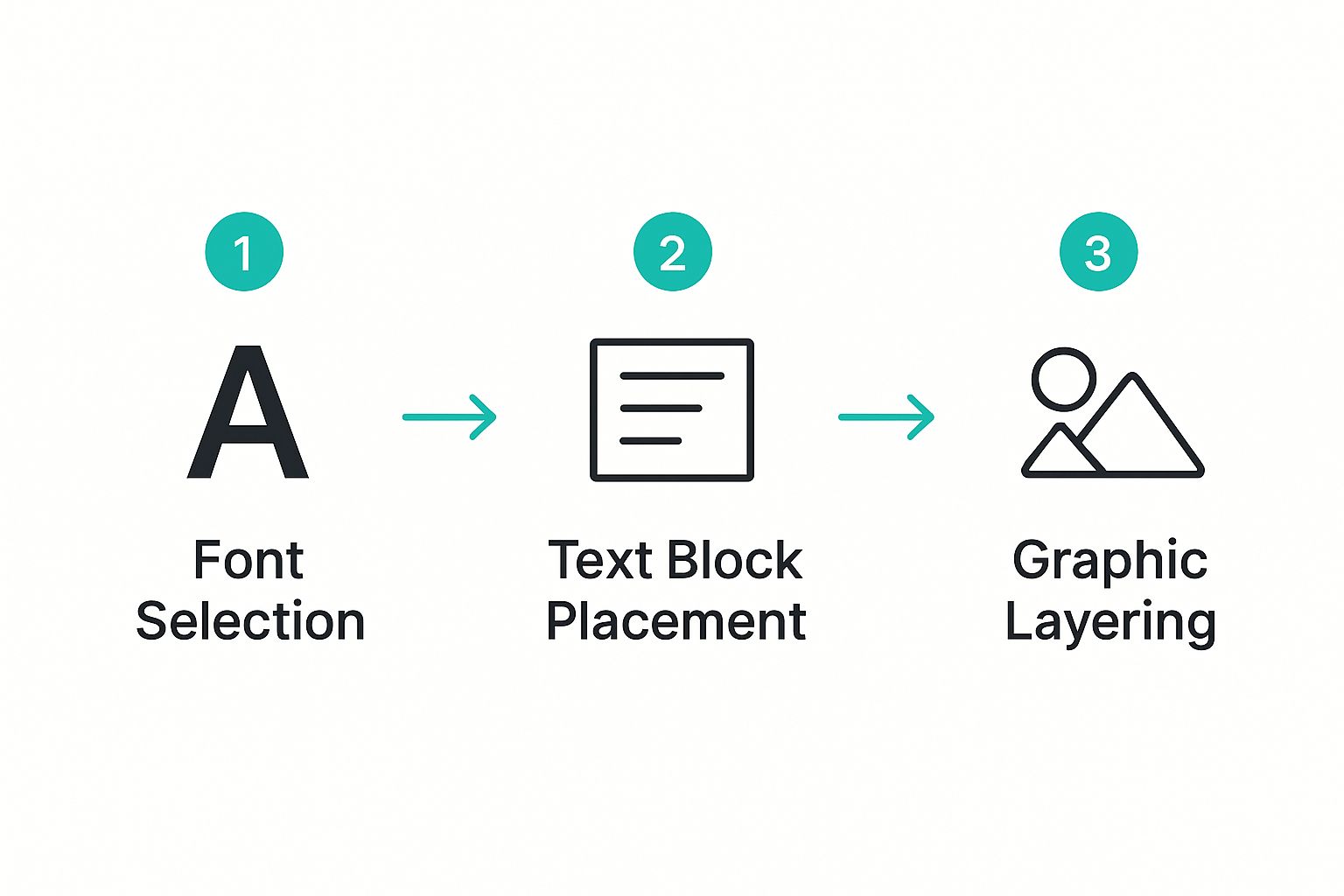
The image above breaks down how layering text and graphics builds a final product that's both visually interesting and well-organized.
But the real power of Shuffles is its direct integration with e-commerce. You can create these beautiful, thematic collections where every single item can be tagged with a product listing, linking directly to a sales page. It connects with seller product catalogs, turning your collage from simple inspiration into a powerful sales driver. If you want to dig deeper, Simple Pin Media has a great piece on using Pinterest collages as a sales tool.
By tagging products, you create a seamless path for your audience, moving them from discovery to checkout without ever leaving the ecosystem.
After arranging your items and tagging your products, you can even add animations or cool effects before you hit publish. Your finished Shuffle becomes a brand-new, interactive Pin that invites users to explore—and shop—every single element. Honestly, it’s one of the most effective ways to make a Pinterest collage right now.
Taking Your Content Creation to the Next Level with AI
Let's be real: creating collages one by one is fun, but it's not a growth strategy. Can you imagine trying to whip up hundreds of unique, shoppable collages from your product catalog in just a few minutes? That's not a fantasy—it's exactly the kind of power AI brings to your content game.
These days, AI tools can completely handle your visual content creation, and they can do it on a massive scale. These systems look at your product data, what your customers are into, and current trends to automatically group items into killer outfits or themed collections. This isn't just about working faster; it's about generating super-relevant content at a scale that was simply impossible before.
The Automation Advantage
This AI-first approach gives you a serious leg up in a visually crowded market. Instead of spending hours agonizing over which products go together, you can let an algorithm handle the heavy lifting. This frees you up to think about the bigger picture.
For instance, some AI tools can churn out thousands of unique Pins straight from your product feed. You can see exactly how this works in our guide on using an AI Pin image generator.
Even Pinterest itself is jumping on this bandwagon. Their own AI-powered auto-collages can transform an entire product catalog into thousands of shoppable collages almost instantly. The AI groups products based on outfit ideas and what users are engaging with. Early tests showed these AI-made collages are saved by users at twice the rate of a standard product Pin. Pretty impressive, right?
This isn't just about pumping out more content, faster. It's about creating smarter, more engaging content that clicks with individual user tastes—and doing it at scale.
Tapping into this technology is a huge part of growing a brand today. And if you're looking to really amplify your visual presence, it's worth exploring proven strategies for scaling content creation alongside these AI tools.
Got Questions About Pinterest Collages? We've Got Answers.
Even with the best game plan, a few questions always seem to pop up once you get down to the business of actually making a Pinterest collage. Let’s tackle some of the most common ones I hear, so you can clear up any confusion and start pinning with total confidence.
One of the first things people ask is if you can just make a collage right on the Pinterest website. While you can definitely arrange your Pins on a board to get a collage-like feel, you can't actually merge them into one single, shareable image. For that, you absolutely need a dedicated app. Pinterest's own Shuffles is built for this, but other graphic design tools work too. Shuffles, though, is specifically designed for that layered, interactive style that really pops on the platform.
Nailing the Technical Stuff
Another question that comes up all the time is about the right size and dimensions. This one's a biggie. Pinterest is all about vertical content, so you should always, always aim for a 2:3 aspect ratio.
Think 1000 x 1500 pixels. That’s the gold standard.
Sticking to these dimensions means your collage will take up the most possible screen space on a mobile feed. This is key for grabbing attention and making sure your beautiful work doesn't get awkwardly cropped.
Finally, how do you make a collage shoppable? The most seamless way is to use an app like Shuffles, which lets you tag products directly in your collage. When someone taps a tagged item, boom—they're sent right to the product page. If you’re creating your collage in a different tool, no worries. You can just upload the finished image as a regular Pin and add product tags later, or simply link the entire Pin to a specific product or a curated shop page on your website.
The big takeaway here? Pinterest is for organizing, but dedicated apps are for creating. Using the right tool for the job—and getting your dimensions perfect—is what turns a cool idea into a high-performing, shoppable Pin that actually works.
Tired of designing Pins one by one? What if you could scale your content creation instead? Pin Generator uses AI to create hundreds of unique, optimized Pins from your product catalog or blog posts in just a few minutes. Automate your Pinterest marketing today!