
Your Guide to Using a Pinterest Generator
5 October 2025
At its core, a Pinterest generator is a tool that completely automates the grunt work of creating Pinterest Pins. It takes your existing content—like blog posts or product pages—and spins it into dozens of unique, optimized pin designs in just a few seconds. Think of it as your own high-speed content creation assistant, using AI to handle everything from design and copywriting to scheduling.
Why a Pinterest Generator Is a Game Changer
Let's be clear: using a Pinterest generator isn't about saving a few minutes here and there. It's about completely overhauling your marketing workflow, shifting your strategy from a manual, time-sucking chore into a high-impact growth engine.
Forget the endless hours spent tweaking designs in Canva. Imagine having perfect brand consistency across hundreds of Pins, A/B testing different designs on the fly, and finally having the time to focus on big-picture strategy instead of just pumping out content.
This is about using automation to tap into Pinterest's power as a visual discovery platform at a scale you could never, ever achieve by hand. And with the platform's user base constantly growing, its influence is just getting stronger.
Just look at the steady climb in Pinterest's user base over the past few years.
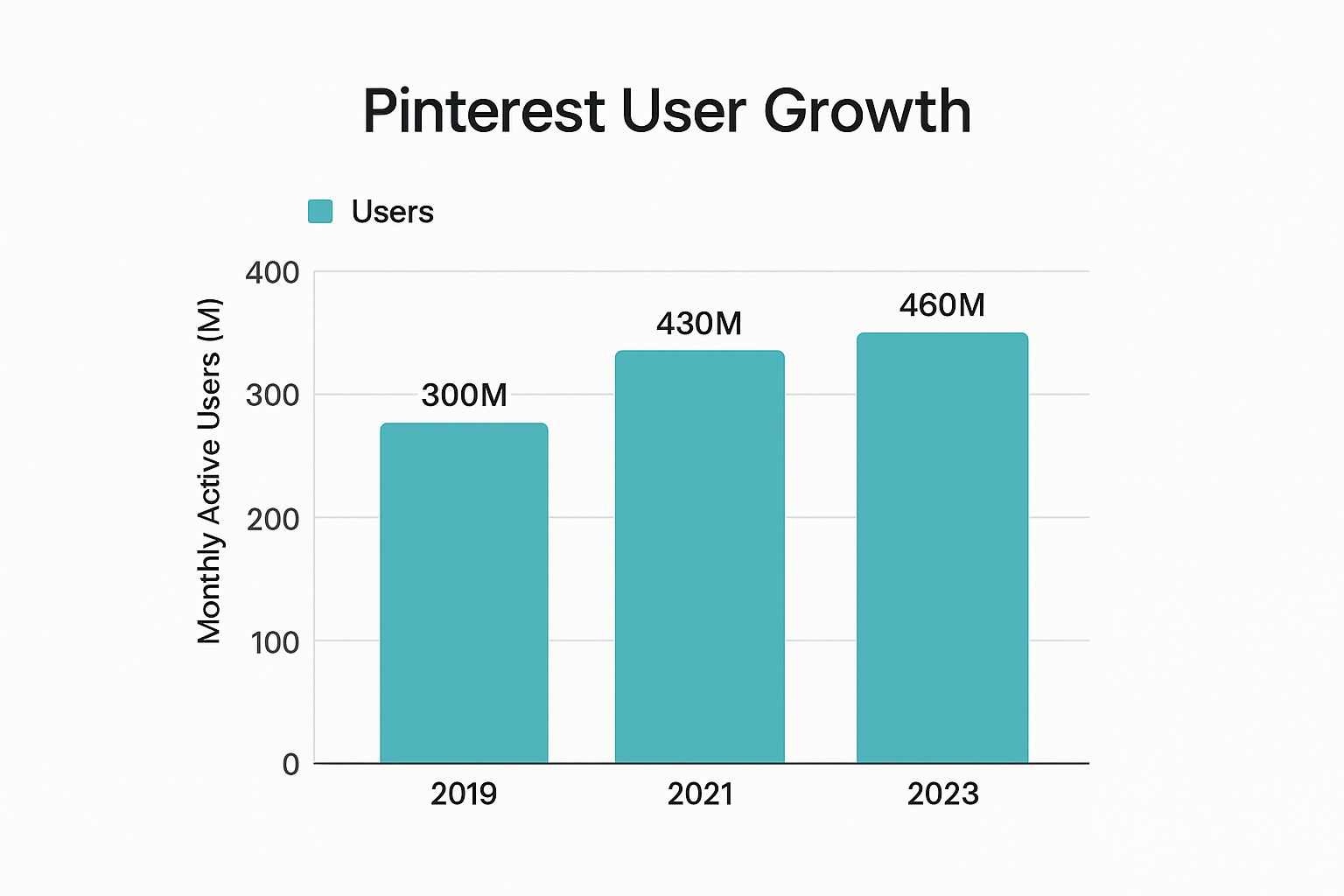
The data speaks for itself. Pinterest isn't just holding onto its audience; it's actively expanding, making it an even more critical channel for anyone serious about growth.
From Manual Labor to Strategic Automation
The old way of doing things—designing every single Pin, one by one—is a massive bottleneck. It kills your output and drains your creative energy. A Pinterest generator breaks that cycle by taking over the most repetitive, time-consuming parts of the process.
This frees you up to work on what actually moves the needle:
- Analyzing Performance: Which Pin designs are actually getting clicks? Which ones are falling flat?
- Keyword Research: What are your ideal customers really searching for on Pinterest?
- Community Engagement: How can you build a real connection with your audience?
By automating the production side, you transform from being a content creator into a content strategist. That shift is the real secret to unlocking sustainable growth on the platform.
Here’s a quick breakdown of the core differences in efficiency, scale, and strategic potential between traditional manual pinning and using an automated generator.
Manual Pinning vs Pinterest Generator
| Feature | Manual Pinning | Pinterest Generator |
|---|---|---|
| Speed | Slow; hours to create a few Pins | Fast; dozens of Pins in minutes |
| Scale | Limited; hard to produce consistently | High; easy to create hundreds of Pins |
| Consistency | Difficult to maintain brand style | Effortless; uses predefined templates |
| Optimization | Relies on manual keyword entry | AI-powered titles and descriptions |
| Focus | Task-oriented (designing, writing) | Strategy-oriented (analysis, research) |
| Time Cost | High; significant time investment daily | Low; set it up and let it run |
As you can see, the difference isn't just incremental—it's a fundamental change in how you approach the entire platform.
Tapping Into a Purchase-Ready Audience
Pinterest’s true value goes way beyond just pretty pictures. The numbers are staggering: research shows it drives 33% more referral traffic to e-commerce sites than Facebook, and Pinterest ads deliver a 32% higher return on ad spend.
Add to that nearly 1 billion video views daily and the fact that 96% of top searches are unbranded, and you have a discovery-first platform where people are actively looking for solutions before they've even picked a brand.
This high-intent audience is exactly what makes automation so powerful. By consistently creating fresh Pins at scale, you’re constantly putting your products and content in front of users who are primed to buy. To see how this fits into a bigger picture, it’s worth exploring a complete guide on an automated content creation strategy.
If you want to dive deeper into how this works specifically for Pinterest, you can learn more about our approach to AI-automated Pin generation at https://pingenerator.com/blog/ai-automated-pin-generation.
Choosing the Right Pinterest Generator for You
Let's be honest, not all Pinterest generator tools are created equal. The market is packed with options, but the perfect one for you comes down to your specific goals.
A blogger trying to drive consistent traffic to their articles has totally different needs than an e-commerce brand focused on product sales. Picking the right tool from the start means you’ll have something that slides right into your workflow and actually helps you grow, instead of just becoming another subscription you forget about.
So, the first thing to do is get crystal clear on your main objective. Are you trying to boost affiliate income? Sell physical products from your Shopify store? Or maybe establish yourself as the go-to expert in your niche? Your answer here will point you toward the features that really matter.
For example, an e-commerce seller should be looking for deep integration with platforms like Shopify or Etsy. You want a generator that can automatically pull product images, pricing, and descriptions. A content creator, on the other hand, should prioritize a rock-solid RSS feed integration to churn out Pins the second a new blog post goes live.
Core Features That Are Non-Negotiable
No matter your niche, a solid Pinterest generator needs a core set of features built for one thing: getting maximum results with minimum effort. These are the functions that separate a basic scheduler from a true content powerhouse.
Make sure any tool you consider has:
- Bulk Pin Creation: The ability to generate dozens of unique Pin variations from a single URL is everything. This is the single biggest time-saver, turning one blog post into an entire week's worth of content.
- AI-Powered Design Suggestions: A good generator does more than just slap your content onto static templates. It should offer AI-driven design and text variations, helping you A/B test different visuals and copy to see what your audience actually clicks on.
- Smart Scheduling Capabilities: Basic scheduling is table stakes. Look for intelligent features that post your content at the best times based on when your audience is most active. This is how your Pins get seen.
An intuitive, clean user interface is just as crucial as the features themselves. A cluttered or confusing dashboard will slow you down, defeating the whole point of automation. Your chosen tool should feel easy to use from day one.
Evaluating Integrations and Workflow Fit
A Pinterest generator can't be an island; it needs to connect with the other tools you're already using. Seamless integrations are what build a truly hands-off content machine.
Think about how a potential tool would slot into your current process. If you still love designing in Canva, does the generator offer a way to easily import those designs? If your content strategy is all about your blog, does it have a reliable WordPress or RSS feed connection that can truly run on autopilot?
Ultimately, the best Pinterest generator is one that feels like a natural extension of your brand. It should remove friction from your day, not add new steps to your to-do list.
Before you commit, take full advantage of any free trials. This is your chance to run a real-world test. Connect your accounts, generate a batch of Pins from one of your own URLs, and see how the whole process feels. That hands-on experience is the only way to find a tool that will genuinely help you scale your efforts and crush your Pinterest marketing goals.
Kicking Off Your First Automated Pin Campaign
Alright, let's get down to business. This is where we move from theory to action and start seeing just how fast you can go from an idea to a full queue of scheduled, high-quality Pins. Forget spending hours on this stuff; we're talking minutes.
First things first, you'll need to connect your Pinterest account. It's a simple, secure authorization that gives the tool permission to post on your behalf. Once that's linked up, you're ready to set up your visual identity.
Build Your Brand Kit for Total Consistency
Before you even think about generating a single Pin, you absolutely have to set up your brand kit. Seriously, don't skip this. This is where you'll upload your logo, plug in your specific brand colors using their hex codes, and choose your go-to fonts.
Think of it as programming your brand's DNA directly into the system.
Doing this upfront is a game-changer. It means every single Pin the generator spits out—whether it's 10 or 1,000—will look like you. No more manually tweaking colors or fonts on every design. This is how you get that professional, cohesive look across your entire profile, the kind that makes people instantly recognize your content in a busy feed.
A solid brand kit is your secret weapon for scaling content without making it look cheap or generic. It’s the difference between automated Pins that look polished and professional versus ones that just scream "robot-made."
Generate Pins Straight from a URL or Product
With your brand kit locked and loaded, you're ready to make some magic. The easiest way to start is with a single URL. Just grab the link to a blog post, a product page, or even a category page from your site and paste it into the generator.
The tool’s AI gets to work immediately, scanning the page and pulling out all the key images and text to use as a starting point.
Let's say you're a food blogger and you pop in the URL for your "Vegan Chocolate Chip Cookies" recipe. Here’s what happens next:
- It grabs the images: The tool finds all those delicious cookie photos you have in your post.
- It pulls the text: It yanks the blog post title and snippets from your intro to create a bunch of initial Pin titles and descriptions.
- It applies your brand: Finally, it smashes all that content together with your brand kit and a variety of templates, instantly creating a whole batch of unique Pin designs.
Just like that, one blog post becomes a dozen different promotional assets, each with its own vibe.
Nail Your Titles and Descriptions
A great design stops the scroll, but it's the title and description that earn the click. Most Pin generators have AI writing assistants built right in, so you don't have to guess what works.
Instead of just reusing your blog post title over and over, you can generate a handful of keyword-rich variations in seconds. The AI can help you write descriptions that tap directly into what users are searching for, answering their unspoken question: "What's in it for me?"
And of course, double-check that your destination URL is correct for every Pin.
To really make your automated Pins shine, the quality of your original images is everything. Learning how to take professional product photos is a skill that will pay dividends, making every Pin you generate that much more effective.
Customize Templates and Schedule It All Out
Once you've got a batch of generated Pins, the fun part begins. You can quickly scan through the options and pick the designs that best fit what you're trying to achieve. Don't love an image? Swap it out. Want to tweak the text? Go for it. You can even apply different templates to the same content to see which one pops the most.
The last piece of the puzzle is scheduling. Please, don't just dump all your shiny new Pins onto Pinterest at once. A good pinterest generator has a smart scheduler that lets you spread your content out over days or even weeks.
Just select the Pins you love, assign them to the right boards, and set your posting frequency. The tool takes over from there, drip-feeding your content at the best times to keep your account active and the algorithm happy. You've just launched an entire campaign without breaking a sweat.
Advanced Strategies to Maximize Your Growth
Alright, so you've got the hang of the basics with your Pinterest generator. Now it’s time to really open up the throttle and go beyond just simple scheduling. This is where we move from just creating Pins to strategically taking over your niche.
The real magic of automation isn't just about clawing back a few hours. It’s about being able to execute strategies at a scale that's flat-out impossible for a human to manage. We're talking about pumping out dynamic content, diversifying your descriptions, and setting up smart rules that put your best content on a 24/7 work schedule.
Scale Your Content with Video Pins
If you're still sleeping on Video Pins, you are leaving a ton of engagement on the table. They consistently blow static images out of the water and are the absolute best way to stop the scroll in a busy feed. A good Pinterest generator lets you create and schedule dozens of these at once.
Picture this: you take one of your blog posts and slice it into five different short-form videos. Each one hits a different key point or tip. This isn't just about recycling your content; it's about giving your audience multiple doors to walk through to find you. You can bulk-create these videos and then schedule them out across all your relevant boards, getting your message seen without the manual grind.
Master Spintax for Unique Descriptions
Look, posting the exact same description on hundreds of Pins is a huge red flag for the Pinterest algorithm. It also makes your content look boring and repetitive to actual users. This is where Spintax becomes your secret weapon.
Spintax is a simple little formatting trick that lets you create hundreds of unique text variations from a single template. It works by giving the software alternative words or phrases inside curly braces {}, separated by pipes |.
For instance, a simple Spintax line could look like this:{Check out|Discover|Explore} this {awesome|amazing|fantastic} guide to {Pinterest marketing|growing on Pinterest}.
When your generator spits out a Pin, it randomly grabs one option from each set of braces, creating unique descriptions every single time:
- "Check out this awesome guide to Pinterest marketing."
- "Discover this fantastic guide to growing on Pinterest."
Honestly, using Spintax is one of the smartest things you can do to keep your content looking fresh and stay off any spam filter radars. It’s a total pro move that seriously helps your Pinterest SEO by mixing up your keyword usage in a natural way.
Implement Smart Scheduling Rules
Next-level scheduling is so much more than just picking a time and date. It's about building intelligent rules that put your content strategy on autopilot. This is how you really set your growth to cruise control.
Try setting up rules like these:
- Evergreen Content Recycling: Set a rule to automatically reschedule your top-performing evergreen Pins every 60-90 days to new, relevant boards. This keeps your best stuff constantly circulating and driving traffic.
- Drip-Feeding to Group Boards: Instead of carpet-bombing a group board with all your new Pins at once, create a rule to drip-feed just one or two per day. You maintain a steady presence without getting on the board moderator's bad side.
- Seasonal Campaigns: Get all your holiday or seasonal content lined up months in advance. Then, schedule it to start pinning at the perfect time to catch all that high-intent seasonal traffic.
These tactics are key to tapping into what makes Pinterest so powerful right now. With CEO Bill Ready positioning the platform at the intersection of social media and e-commerce, users are there with a clear intent to buy. According to research from sources like Exploding Topics, this "social commerce" trend is booming. Using these advanced automation techniques makes sure your brand is always front and center for this highly motivated audience.
Weaving Your Generator Into Your Content Workflow
A Pinterest generator shouldn't be some tool you dust off once in a while. To really squeeze the most value out of it, you need to plug it directly into your content marketing machine. It becomes the final, crucial step in your process—a powerful distribution engine.
The whole point is to build a seamless pipeline. Every single piece of content you create—blog posts, videos, podcasts—should automatically get amplified on Pinterest. This is how you transform the generator from a simple creation tool into the last link in your content chain, making sure nothing you create slips through the cracks.
Set Up Automatic Pin Creation with RSS Feeds
One of the slickest ways to build this pipeline is by integrating an RSS feed. Most blogging platforms, like WordPress, spit out an RSS feed of your latest posts automatically. You can hook this feed right into your Pinterest generator.
This is a true "set it and forget it" system.
The second you hit "publish" on a new blog post, the generator sniffs it out, grabs the content, and whips up a batch of fresh, on-brand Pins. You can even set up rules to schedule these new Pins across your most relevant boards over the next few days or weeks. If you're on WordPress, it's worth checking out a dedicated AI Pin generator for WordPress to make this integration even tighter.
Repurpose Absolutely Everything
Don't just stop at blog posts. Look at every piece of content you produce as a goldmine for a dozen new Pins. The trick is to view your existing assets through a creative lens and find clever ways to slice and dice them for Pinterest.
- YouTube Videos: Got a great video? Pull out the key stats, memorable quotes, or a quick checklist and turn them into a series of quote graphics or list-style Pins.
- Case Studies: Transform powerful client testimonials or impressive data points into eye-catching Pins that scream social proof and build your authority.
- Podcasts: Create audiogram-style Video Pins using a juicy snippet from your latest episode. It's a fantastic way to drive listeners directly to your show.
This repurposing mindset is non-negotiable if you want to get the maximum value from your content. You've already done the heavy lifting by creating the core asset; the generator's job is to multiply its reach.
This kind of automated distribution is what consistently gets your content in front of an audience that's ready to buy. It's not just about views; it's about action. In fact, a whopping 85% of weekly Pinterest users say they've made a purchase based on Pins from brands.
That high-conversion mindset means every piece of content you amplify has a direct line to driving real business results. You can dig into more stats like this over on The Frank Agency's blog.
Still Have Some Questions About Pinterest Generators?
It's totally normal to have a few lingering questions before jumping into a new tool. I get it. Based on the hundreds of conversations I've had with creators just like you, a few key concerns pop up time and time again.
Let's clear the air and tackle those head-on so you can feel confident about what a generator can really do for your Pinterest strategy.
Is It Actually Safe to Use a Pinterest Generator?
Yes, it's 100% safe, but with one massive caveat: you absolutely must use an official Pinterest Marketing Partner.
Tools like Pin Generator are built using Pinterest's official API. Think of it as a sanctioned, direct line to their platform. This means we're required to play by their rules—respecting limits on how many Pins you can post and how often. Your account is never at risk of looking spammy.
The real danger lies with shady, unofficial bots or scrapers that violate Pinterest's terms. As long as you stick with a verified partner, your account is in safe hands.
Won't All My Pins End Up Looking the Same?
This is probably the biggest myth out there! A good generator is specifically designed to create variety, not a feed full of cookie-cutter Pins.
Here’s how you keep things fresh and on-brand:
- Build a Template Library: Don't just rely on one design. Create a whole collection of different templates that the tool can cycle through automatically.
- Embrace Randomization: Smart generators can shuffle elements like colors, font styles, and image layouts within your brand's guidelines. This creates subtle variations that make each Pin feel unique.
- Use Spintax for Text: As we talked about earlier, Spintax is a game-changer. It lets you create hundreds of unique titles and descriptions from a single template, so your copy never feels robotic.
The goal is to look consistently branded, not identical.
So, How Many Pins Should I Be Making and Scheduling?
On Pinterest, consistency will always beat volume. You don't need to flood the platform to see results.
A fantastic—and totally manageable—starting point is to schedule between 5 and 15 high-quality, relevant Pins per day. A generator makes hitting this number feel effortless.
Honestly, it’s far better to schedule 5 amazing Pins that perfectly match your boards than it is to blast out 50 generic ones that don't connect with your audience. Start there, watch your Pinterest Analytics like a hawk, and adjust based on what resonates.
Ready to stop spending hours in Canva and put your Pinterest growth on autopilot? With Pin Generator, you can create and schedule hundreds of on-brand Pins in minutes, not days.
Start your free trial today and see the difference for yourself!